WooCommerce vs Shopify: Which Ecommerce Platform Wins in 2026?
WooCommerce vs Shopify compared on real 2026 pricing, transaction fees, customization, and scaling, so you pick the right ecommerce platform.

Long Nguyen
Fullstack Developer · AI Engineer · Researcher
WooCommerce vs Shopify: the short answer
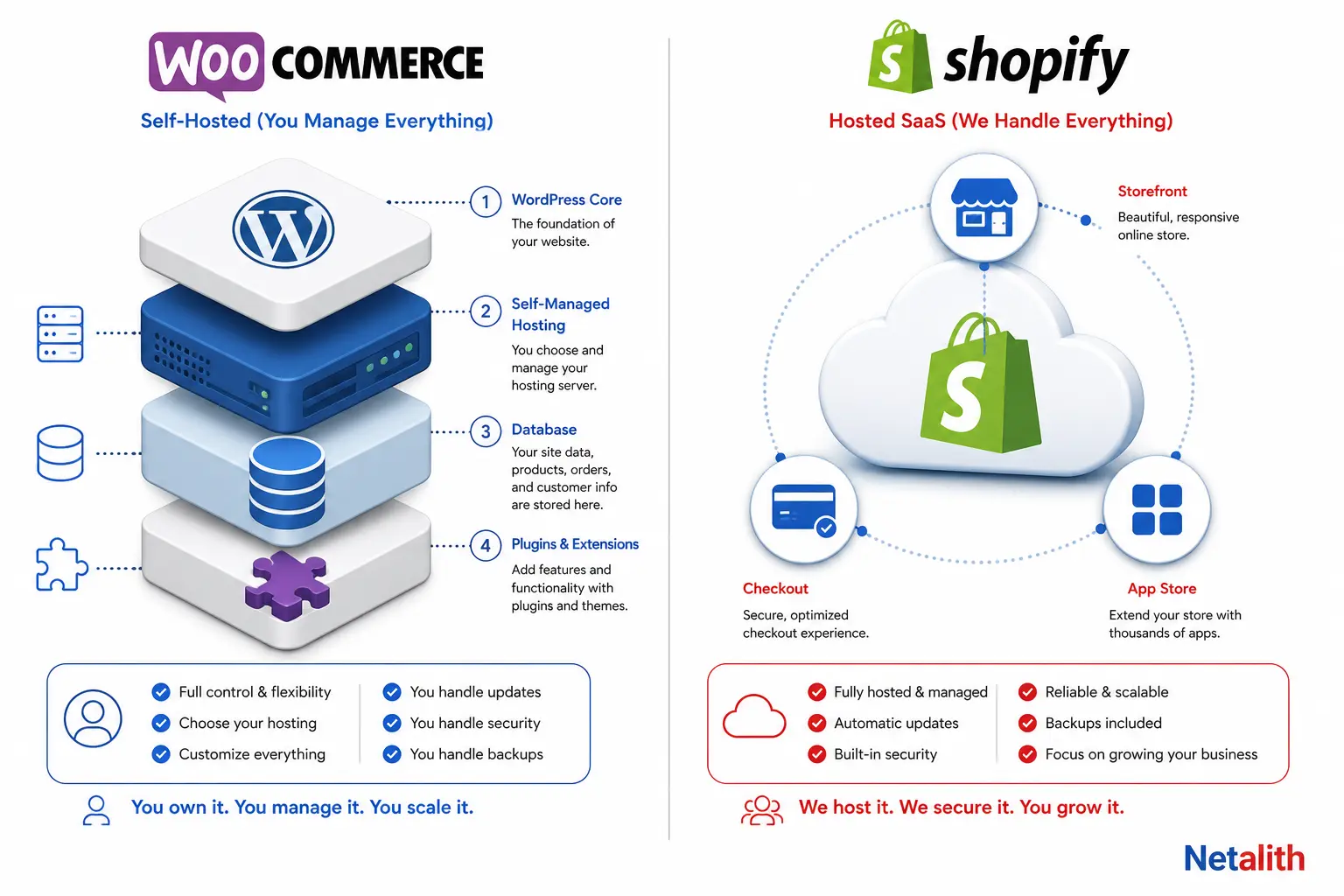
WooCommerce is a free, open-source plugin that turns a self-hosted WordPress site into a store — you choose the host, own the database, and pay only for what you add. Shopify is a closed, hosted platform — you pay a monthly subscription, Shopify runs the servers, and you build inside its templating system and app store.
Neither is objectively better; they solve different problems. The practical question is who you want holding the infrastructure risk: you (WooCommerce, lower fixed cost, more responsibility) or Shopify (higher fixed cost, almost no infrastructure responsibility).
| Pick this if... | Platform |
|---|---|
| You want the lowest possible fixed monthly cost and don't mind managing hosting/security | WooCommerce |
| You already run WordPress for content/SEO and want the store in the same CMS | WooCommerce |
| You want to launch fast with zero server management | Shopify |
| You're selling across multiple channels (social, marketplaces, POS) and want one dashboard | Shopify |
| You need predictable uptime/PCI compliance handled for you | Shopify |
Core architecture: self-hosted plugin vs hosted SaaS
This is the difference everything else in this comparison flows from.
WooCommerce is PHP running on top of WordPress, stored in a MySQL database you control. You choose the hosting provider, you're responsible for applying WordPress core, theme, and plugin updates, and you (or your host) own uptime, backups, and server-level security. In exchange, you have unrestricted access to the codebase, the database, and every template file.
Shopify is the opposite: a closed platform where merchants build stores using Liquid templates and Shopify's Admin/Storefront APIs, but never touch a server or a database directly. Shopify handles hosting, CDN, uptime, and security patching, and the platform is certified Level 1 PCI DSS compliant, meaning stores built on it are PCI compliant by default — a real advantage if you don't have anyone on the team who wants to own compliance.
| Factor | WooCommerce | Shopify |
|---|---|---|
| Hosting | You choose (shared, managed WP, VPS) | Included, fully managed |
| Codebase access | Full — PHP/MySQL, edit anything | None — Liquid templates + APIs only |
| Updates/patching | Your responsibility | Handled by Shopify |
| PCI compliance | Depends on host/gateway setup | Built in (Level 1 PCI DSS) |
| Data ownership | Full database export anytime | Export via admin/API, platform-controlled |
WooCommerce vs Shopify: real cost comparison
"WooCommerce is free" is technically true and practically misleading — the plugin costs nothing, but hosting, premium extensions, a theme, and processing fees add up. Shopify's cost is more predictable because it's mostly one line item.
| Shopify plan | Monthly (annual billing) | Monthly (pay-monthly) | Best for |
|---|---|---|---|
| Starter | $5 | $5 | Social/link-in-bio selling only, no full storefront |
| Basic | $29 | $39 | Solo founders, new stores |
| Grow | $79 | $105 | Small teams that need reporting |
| Advanced | $299 | $399 | Scaling stores, lower processing rates |
| Plus | from $2,300 (3-year term) | — | High-volume, custom checkout |
That table is Shopify's own current pricing page — worth checking directly since promotional offers (like the recurring "$1/month for 3 months" deal) shift the effective first-year cost.
WooCommerce doesn't have a plan tier to quote — instead you're assembling a stack:
| Cost item | Typical range |
|---|---|
| Core plugin | $0 |
| Hosting (shared → managed WooCommerce) | $15–$300/mo depending on traffic and tier |
| Premium theme | $0–$200 one-time |
| Premium extensions | Individually $29–$329/year each on the official WooCommerce Marketplace |
| Security/backup/maintenance | $0–$300/mo if you outsource it |
The practical range most small stores land in is roughly $500–$3,000/year all-in — which can undercut Shopify's Basic/Grow plans, or overshoot them, depending entirely on how many premium extensions and how much managed hosting you end up needing. The honest expert take: WooCommerce's cost is a function of your patience for assembling a stack yourself; Shopify's cost is a function of which plan tier your feature needs push you into.
Transaction and payment processing fees
This is the cost most first-time merchants get wrong on both platforms.
On Shopify, using Shopify Payments (Shopify's own gateway) means you only pay the card processing rate — no extra platform cut. But if you use a third-party payment gateway instead, Shopify layers an additional transaction fee on top, ranging from 2% on Basic down to 0.6% on Advanced. Merchants who bring their own payment provider for regional reasons — a common case outside the US — often don't realize this stacking fee exists until their first payout is smaller than expected.
| Shopify plan | Online card rate (Shopify Payments) | 3rd-party gateway fee |
|---|---|---|
| Basic | 2.9% + 30¢ | 2.0% |
| Grow | 2.7% + 30¢ | 1.0% |
| Advanced | 2.5% + 30¢ | 0.6% |
| Plus | from 2.25% + 30¢ | 0.2% |
WooCommerce has no equivalent platform-level cut at all — because there's no platform, only a plugin. You pay whatever your chosen gateway charges (WooPayments, the native option, runs roughly 2.5–2.9% + 30¢ per transaction) and nothing else. If you already have a merchant account with better negotiated rates from volume, WooCommerce lets you use it without a stacking penalty.
Setup speed and ongoing maintenance burden
Shopify is built to get a store live without touching infrastructure: pick a theme, add products, connect Shopify Payments, and you can be selling the same day. There's no server to provision, no PHP version to manage, no plugin-conflict debugging.
WooCommerce's setup has more steps before the first sale: install WordPress, pick and configure hosting, install WooCommerce plus whichever extensions you need (shipping, tax, SEO), and choose a compatible theme. None of it is hard individually, but it's real setup time that Shopify skips entirely.
The trade-off continues after launch. Shopify pushes updates centrally — you never patch anything. WooCommerce stores need someone watching for WordPress core updates, plugin compatibility after those updates, and security hardening, because a self-hosted WordPress site is a more attractive attack surface than a platform Shopify secures for every tenant at once. This is the single biggest reason "WooCommerce is free" undersells the real cost — the maintenance labor either becomes your time or a line item you pay someone else for.
Customization, code access, and SEO/content control
WooCommerce's real advantage isn't the store — it's that the store lives inside WordPress, the same CMS running the content marketing engine most SEO strategies depend on. Custom post types, full taxonomy control, unrestricted URL structures, and native blog tooling all sit in the same database as the product catalog, so content and commerce aren't two separate systems fighting for the same keywords.
Shopify's blog and content tools are functional but secondary to the commerce engine, and checkout customization is explicitly limited below the Plus tier — Shopify's own plan comparison lists checkout customization as "Limited" on Basic, Grow, and Advanced, with "Full" customization reserved for Plus. If your growth plan depends on a non-standard checkout flow, that's a real constraint to know about before you build on a lower tier and hit it later.
Where Shopify wins on control is consistency: because every store runs the same underlying platform, themes and apps are more predictable to combine — you're far less likely to hit the plugin-conflict problems that come with stacking a dozen WordPress plugins from different vendors on WooCommerce.
Scaling and infrastructure responsibility
Shopify scales by design — CDN, autoscaling, and uptime are Shopify's problem, not yours, at every plan tier. The trade-offs show up in plan-gated limits instead: Shopify's own comparison caps headless storefronts at 1 per store on Basic through Advanced (25 on Plus) and gives Advanced and Plus higher API rate limits than Basic and Grow, so a high-traffic, API-heavy integration can genuinely need a plan upgrade.
WooCommerce scaling is a hosting decision you make yourself. A store outgrowing shared hosting typically moves to managed WooCommerce hosting, then to a VPS or dedicated setup as traffic climbs into the thousands of daily visitors — each step is a real migration, not a plan toggle. The upside is there's no platform-imposed ceiling on catalogs, locations, or API calls; the ceiling is whatever infrastructure you're willing to pay for.
Apps and extensions ecosystem
Both platforms rely on third-party add-ons for anything beyond the core feature set — subscriptions, advanced shipping rules, loyalty programs, bundles.
| WooCommerce | Shopify | |
|---|---|---|
| Marketplace | WooCommerce Marketplace + broader WordPress plugin repo | Shopify App Store |
| Typical extension cost | $29–$329/year each, individually licensed | Often subscription-based, per-app monthly fees stack |
| Compatibility risk | Higher — plugins from different vendors can conflict | Lower — apps built against one stable platform API |
| Free tier availability | Many free plugins, quality varies widely | Free tiers common, upsell to paid tiers common too |
The pattern to watch on both platforms is the same: a handful of $79–$199/year purchases feels trivial one at a time, and six months later it's a real recurring cost most merchants didn't budget for at launch.
Which one should you actually choose?
Skip the "which is better" framing — it's the wrong question. Ask instead who you want managing the parts you don't want to think about:
- Choose WooCommerce if you already run WordPress for content, you have (or can hire) someone comfortable with hosting and maintenance, and minimizing fixed monthly cost matters more than minimizing setup effort.
- Choose Shopify if you want to sell across multiple channels from one dashboard, you'd rather pay a predictable subscription than manage infrastructure, and you're launching without dedicated technical staff.
- Choose neither, and go custom if your business logic genuinely doesn't fit either platform's data model — high-volume B2B pricing rules, complex multi-warehouse logistics, or deep ERP integration are cases where a purpose-built store outperforms both.
Migrating between the two — or from either one into a custom build — is where most of the real risk lives: product data, order history, SEO redirects, and payment gateway continuity all have to survive the move. That's the kind of work worth scoping properly rather than improvising, and it's exactly what Netalith's eCommerce support service is built around — marketplace API integrations, store migrations, and platform troubleshooting across WooCommerce, Shopify, and 20+ other channels.
If you're still weighing WooCommerce against Shopify for your specific catalog and traffic, a short free consultation is a low-commitment way to get a second opinion before you commit months of setup work to the wrong platform.
FAQ
Frequently asked questions
Is WooCommerce cheaper than Shopify?
It can be, but it isn't automatically. The WooCommerce plugin is free, but hosting, premium extensions, and maintenance typically add up to $500-$3,000/year for a small store, which can land above or below Shopify's $29-$299/month plans depending on how many paid extensions and how much managed hosting you end up needing.
Does WooCommerce charge transaction fees like Shopify?
No. WooCommerce has no platform-level transaction fee since there's no platform, only a plugin. You pay whatever your payment gateway charges. Shopify adds an extra fee (0.6-2% depending on plan) only if you use a third-party gateway instead of Shopify Payments.
Can I migrate from WooCommerce to Shopify, or the other way around?
Yes, both directions are common migrations. The risk isn't technical feasibility, it's making sure product data, order history, SEO redirects, and payment gateway setup all survive the move intact, which is why migrations are usually worth scoping as a project rather than done ad hoc.
Which platform is better for SEO?
Both can rank well. WooCommerce's advantage is that the store lives inside WordPress alongside your content, so blog and product SEO share one CMS. Shopify's content tools are more secondary to the commerce engine, though its stores are technically solid and consistent across themes.
Do I need to know how to code to run a WooCommerce store?
Not to launch a basic store, but you'll get far more value from WooCommerce if you or someone on your team is comfortable with WordPress hosting, plugin management, and basic troubleshooting, since none of that is handled for you the way Shopify handles it.