Zapier Alternative for eCommerce: Shopify Flow, Make, n8n or Custom?
Zapier alternative for ecommerce: compare Shopify Flow, Make, n8n and custom integrations by billing unit, speed and reliability, with the task math per order.

Long Nguyen
Fullstack Developer · AI Engineer · Researcher
Which Zapier alternative fits your store?
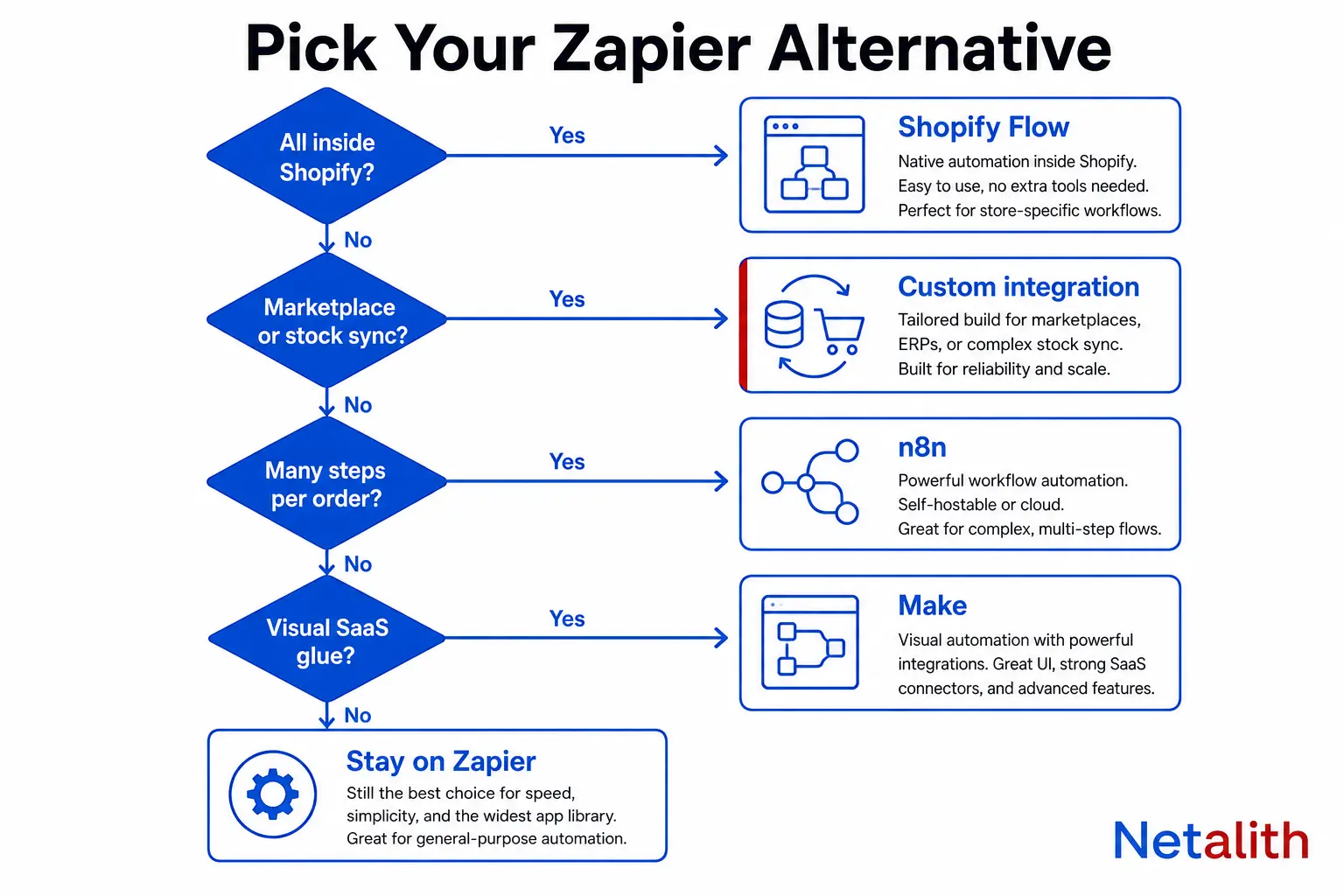
The right Zapier alternative for ecommerce depends on where your orders and stock levels have to travel, not on which editor looks nicest. Zapier bills per action, and a store's action count grows with every order and every SKU. The four realistic replacements each change that billing unit in a different way.
| Your situation | Use | Why |
|---|---|---|
| The whole workflow starts and ends inside Shopify (tagging, order holds, low-stock alerts) | Shopify Flow | Free app on Basic, Grow, Advanced and Plus, with no per-run fee |
| Many steps per order, and someone on the team is comfortable with JSON | n8n | Billed per workflow run, not per step |
| Visual builder, SaaS-to-SaaS glue, moderate volume | Make | More work per dollar at the entry tiers, but still billed per step |
| Orders, inventory or listings moving between a store and marketplaces | Custom integration | Needs queues, retries and reconciliation that a no-code tool does not own |
| Under 100 actions a month and nothing money-critical | Stay on Zapier | The free plan already covers it |
The rest of this article shows the math behind each row, so you can check it against your own order volume before you move anything.
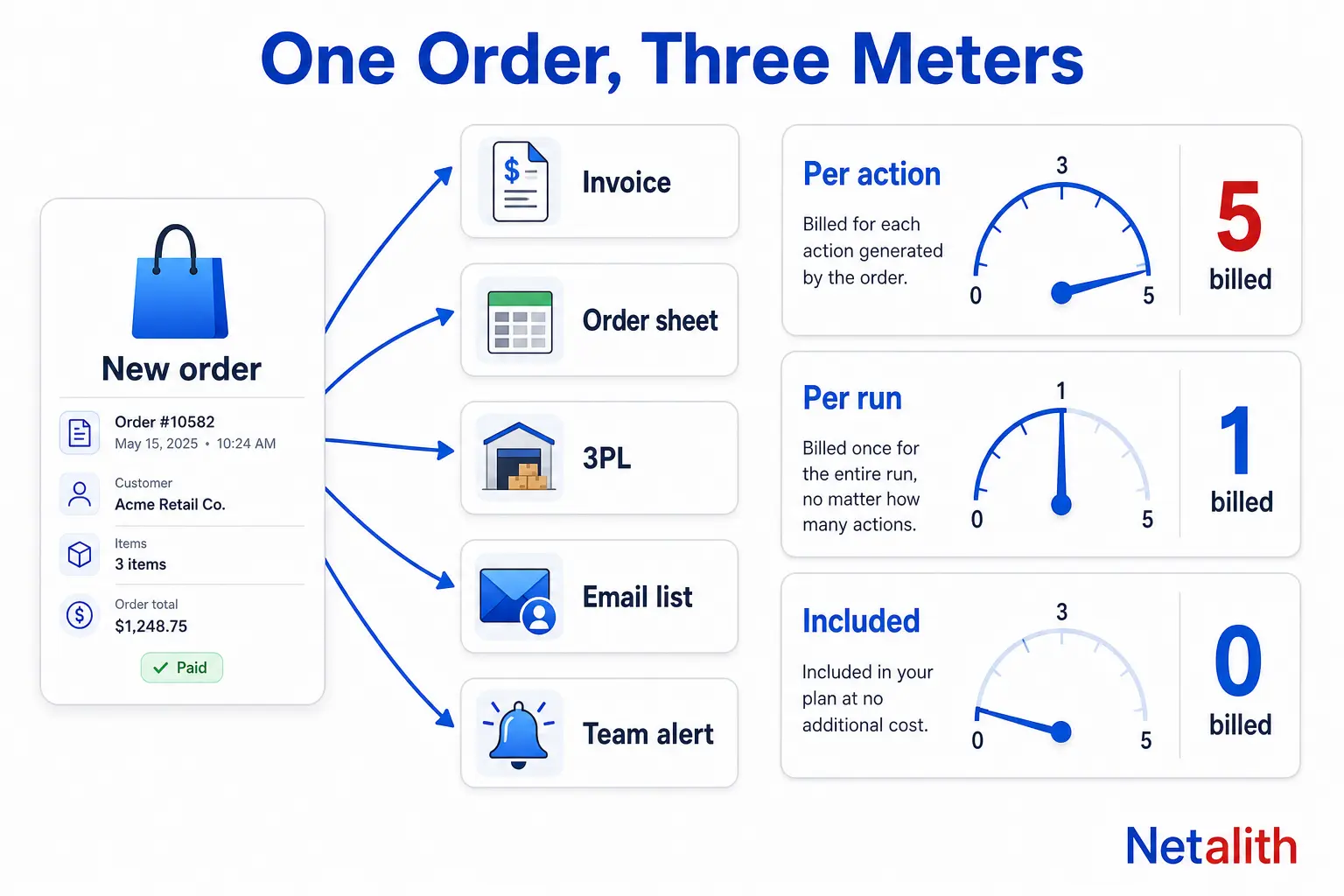
Why Zapier gets expensive for ecommerce: the task math per order
Zapier charges in tasks, and Zapier's task usage documentation defines a task as any successful action. Triggers are free. So are Filter, Paths, Formatter, Delay and Looping steps. That is a fair model for a contact form that fires twenty times a month. It is a hard model for a store, because the work is repeated for every order.
Take a common order workflow and count only the steps that bill:
| Step after a new order | Tasks |
|---|---|
| Create the invoice in accounting | 1 |
| Add a row to the order sheet or ERP | 1 |
| Send the order to the 3PL or fulfillment app | 1 |
| Add the buyer to the email list | 1 |
| Post an alert to the team chat | 1 |
| Total per order | 5 |
Now multiply by volume:
| Orders per month | Tasks at 5 actions per order |
|---|---|
| 300 | 1,500 |
| 1,000 | 5,000 |
| 3,000 | 15,000 |
Three things push the real number higher than this table.
- Line items. The Looping step itself is free, but every action it repeats is a successful action. Writing one row per line item turns a three-item order into three tasks for that step, not one.
- Inventory. Stock sync is billed per update, not per order. Pushing one stock level a day for 500 SKUs is 500 × 30 = 15,000 tasks a month before a single order is processed.
- Peaks. Once you pass your plan's task limit, extra tasks are billed separately at a higher per-task rate, up to three times the plan limit. Past that point, tasks are held until the billing cycle ends. If pay-per-task is switched off, new Zap runs are held as soon as you reach the limit. For a store, a held task in the last week of November is an order that has not reached the warehouse.
Speed is the second cost. On Zapier's pricing page as of , polling triggers check every 15 minutes on Free, every 2 minutes on Professional (listed from $19.99 a month) and every minute on Team (listed from $69 a month). The Free plan is also limited to 100 tasks, two-step Zaps and no webhooks. A 15-minute gap on a stock update is a 15-minute window in which you can sell an item you no longer have. Whether a given trigger is instant or polled depends on the app, so check the trigger label in the editor instead of assuming.
Zapier alternatives for ecommerce compared
The useful comparison is not the feature list. It is the unit each tool bills, because that decides how the cost behaves when order volume doubles. The fourth column prices the same job in each tool's own unit: 1,000 orders a month with five actions per order.
| Option | You pay per | Entry point (October 2026) | 1,000 orders × 5 actions is billed as | Where it breaks down |
|---|---|---|---|---|
| Zapier (baseline) | Successful action (task) | Free: 100 tasks. Paid plans listed from $19.99/month | 5,000 tasks | Order spikes, line-item loops, inventory sync |
| Shopify Flow | Nothing per run | Free app on Basic, Grow, Advanced and Plus | No usage fee | The workflow has to leave Shopify |
| Make | Module run (credit) | Free: 1,000 credits. Paid plans listed from $12/month for 10,000 credits | 5,000 or more credits | Long scenarios and per-item iteration burn credits the same way tasks do |
| n8n Cloud | Workflow execution | €20/month for 2,500 executions, €50/month for 10,000 (billed annually) | 1,000 executions | Nobody on the team can debug expressions and JSON |
| Custom integration | Build and hosting | Priced to scope | No usage fee | Low volume, where maintenance costs more than it saves |
Prices were read from each vendor's own pricing page in October 2026. They change often, so confirm the current tier before you commit to a plan.
Shopify Flow: the free alternative when the work stays inside Shopify
Shopify Flow is Shopify's own automation app. It watches the store for an event (a trigger), checks conditions, then runs actions. It is free on the Basic, Grow, Advanced and Plus plans, and it has no task meter.
It replaces Zapier well for store-internal jobs:
- Tag orders above a value threshold or from a specific sales channel
- Hold high-risk orders for review before fulfillment
- Notify the team when a variant drops below a stock level
- Tag customers by lifetime spend so segments stay current
- Unpublish products when inventory reaches zero
The limit is the exit door. The Send HTTP request action, which is how Flow talks to a system that has no connector, is available on Grow, Advanced and Plus only. On Basic, Flow is internal automation plus whatever apps ship their own Flow connectors.
Our advice: move every Zap whose trigger and actions are all Shopify to Flow first. It costs nothing and removes tasks from your bill immediately. Do not expect Flow to become your integration layer. It has no concept of a second store, a marketplace account or an external warehouse unless that system built a connector.
Make: lower cost per step, same billing shape
Make bills in credits, and one module action in a scenario costs one credit. Routers and error handlers are free. As of October 2026 the Free plan includes 1,000 credits a month with a 15-minute minimum schedule, and paid plans are listed from $12 a month for 10,000 credits with scheduling down to one minute.
That is noticeably more work per dollar than Zapier's entry tiers, and the visual canvas handles branching better than a linear Zap. But the cost curve has the same shape. A scenario with a trigger and five actions spends five or more credits per order, and iterating over line items multiplies that. Make's own pricing page says a single run can use anything from two credits to thousands.
Two checks before you move an order workflow to Make:
- Schedule. Before you set a scenario to run every minute, confirm how its scheduled trigger consumes credits. Where the app offers an instant (webhook) trigger, use that.
- Code steps. Custom code is billed by runtime, at two credits per second, so heavy data reshaping inside a scenario is not free.
Make is a good fit for visual, branching logic between SaaS apps at moderate volume. It postpones the per-step problem. It does not remove it.
n8n: per-execution billing and the self-hosting option
n8n counts executions. One execution is one run of the entire workflow, however many steps it contains and however much data it handles. A 12-step order workflow at 1,000 orders a month is 1,000 executions. n8n Cloud lists Starter at €20 a month for 2,500 executions and Pro at €50 a month for 10,000, both billed annually.
This changes how you should design workflows. On Zapier and Make you keep workflows short to save money. On n8n a long workflow costs the same as a short one, and batching is rewarded: one scheduled run that reads 500 stock levels and pushes them to a second channel is a single execution. That reverses the inventory math from earlier.
The self-hosted Community Edition removes execution charges entirely. Two criteria decide whether it suits you:
- License. n8n is fair-code, released under its Sustainable Use License. It is not an OSI-approved open-source license. Running it for your own store's internal automation is the intended use. Offering it to other people as a hosted product is restricted, which matters if you are an agency planning to resell it.
- Operations. You own uptime, upgrades, backups and the security of every stored API credential. An order pipeline on an unpatched server is a worse problem than a large Zapier bill.
Choose n8n when someone on the team can read a JSON payload and debug an expression. Without that person, the savings turn into stalled workflows nobody can fix.
Custom integration: when order and inventory sync outgrow no-code
Three signals tell you a workflow no longer belongs in any no-code tool:
- An oversell costs real money. Marketplace penalties, cancelled orders and refunds are more expensive than the automation bill.
- Marketplaces are involved. Seller APIs such as Amazon SP-API work with per-operation rate limits, batch feeds and approval steps. No-code app catalogs are deepest for SaaS tools and thinnest for marketplace seller APIs, so check the exact trigger and action list for your marketplace before you assume coverage.
- You need to replay and audit. When an order is missing, someone has to answer where it stopped and resend it.
The reliability argument comes from Shopify itself. Shopify's webhook documentation states that ordering is not guaranteed within a topic or across topics for the same resource, that duplicate deliveries happen and should be ignored using the X-Shopify-Webhook-Id header, and that delivery is not always guaranteed, so apps should run reconciliation jobs that periodically fetch data. A Zap that fires on a new-order event and does nothing else is the pattern that guidance warns against: it trusts every event to arrive once, in order.
A proper integration does five things a no-code workflow does not own:
- Verifies the webhook signature before trusting the payload
- Ignores duplicates by storing the webhook ID
- Acknowledges fast and pushes the work to a queue
- Retries with backoff inside each API's rate limit
- Reconciles on a schedule, fetching recently updated orders and filling any gaps
The first three steps fit in a short handler. This Django example verifies the signature, uses a unique constraint on the webhook ID so a redelivery is acknowledged but not processed twice, and hands the work to a background queue:
import base64, hashlib, hmac
from django.http import HttpResponse

def shopify_order_webhook(request):
    # SHOPIFY_SECRET is the app's client secret as bytes
    digest = hmac.new(SHOPIFY_SECRET, request.body, hashlib.sha256).digest()
    expected = base64.b64encode(digest).decode()
    received = request.headers.get('X-Shopify-Hmac-Sha256', '')
    if not hmac.compare_digest(expected, received):
        return HttpResponse(status=401)

    webhook_id = request.headers.get('X-Shopify-Webhook-Id', '')
    # webhook_id has a unique constraint: a redelivery finds the existing row
    _, created = WebhookReceipt.objects.get_or_create(webhook_id=webhook_id)
    if created:
        process_order.delay(request.body.decode())  # queue it, answer fast

    return HttpResponse(status=200)
The reconciliation job is the part people skip, and it is the part that finds the order a webhook never delivered. Marketplace sync adds listings, stock and tracking on top of this, which is the scope of our marketplace integration service for Amazon SP-API, eBay, Walmart, Etsy and Temu.
Be honest about the trade. Custom code moves the cost from a monthly meter to a build plus ongoing maintenance, because platform APIs are versioned and retired on a schedule. At a few hundred orders a month with no marketplace, that trade usually loses.
When Zapier is still the right choice
Leaving Zapier is not always the right move. Keep it when:
- Your usage sits comfortably inside the plan you already pay for and is not growing with order volume
- The workflow is convenience, not revenue: a chat alert, a review request, a row in a marketing sheet
- You need a connector for a niche app that the other tools do not cover
- Nobody on the team wants to own a server or a codebase
A mixed setup is normal and often the cheapest result: Flow for store-internal rules, code or n8n for orders and stock, and a small Zapier plan for the long tail of low-volume glue.
How to move off Zapier without losing orders
Migrate by risk, not by which Zap annoys you most.
- Rank Zaps by tasks used. Open your task history and sort by consumption. A few Zaps normally account for most of the bill.
- Split them into two groups. Money path (orders, inventory, refunds, fulfillment) and convenience (alerts, tags, marketing lists).
- Move Shopify-internal Zaps to Flow first. Lowest risk, immediate saving.
- Run money-path replacements in parallel. Point the new workflow at a test destination or a log, leave the Zap live, and compare the two outputs for at least a full week, including a weekend.
- Cut over one workflow at a time. Turn the Zap off instead of deleting it, and keep it for one billing cycle as a rollback.
- Add a daily count check. Compare the number of orders in the store with the number that reached the destination. This catches silent failures on any platform.
If you are not sure which group a workflow belongs in, or whether your volume justifies custom code at all, describe your current Zaps and order volume in a free Netalith quote request and we will tell you which parts are worth moving and which are fine where they are.
FAQ
Frequently asked questions
What is the best Zapier alternative for ecommerce?
It depends on where the workflow runs. Use Shopify Flow when the trigger and actions are all inside Shopify, n8n when you have many steps per order and a technical person to maintain it, Make for visual SaaS-to-SaaS workflows at moderate volume, and a custom integration for order, inventory or listing sync with marketplaces.
How many Zapier tasks does one ecommerce order use?
One task per successful action. Triggers, Filter, Paths, Formatter, Delay and Looping steps are not counted. An order workflow with five actions uses five tasks per order, so 1,000 orders a month is 5,000 tasks, and actions repeated for each line item add more.
Can Shopify Flow replace Zapier?
For store-internal automation, yes. Flow is a free app on the Basic, Grow, Advanced and Plus plans and has no per-run fee. It cannot fully replace Zapier for external systems: the Send HTTP request action is only available on Grow, Advanced and Plus, and other apps need their own Flow connector.
Is Make cheaper than Zapier for an online store?
Usually at the entry tiers. As of October 2026 Make lists paid plans from $12 a month for 10,000 credits, with one credit per module action. The billing shape is the same as Zapier, though: cost still grows with steps per order, so long scenarios and line-item loops remain expensive at high volume.
Is n8n free to use for ecommerce automation?
The self-hosted Community Edition has no execution charges, but you pay for hosting and you own updates, backups and credential security. It is fair-code under the Sustainable Use License, not OSI open source: internal business use is fine, reselling it as a hosted product is restricted. n8n Cloud starts at 20 euros a month for 2,500 executions, billed annually.
When should I replace Zapier with a custom integration?
When an oversell or a missed order costs more than the automation bill, when marketplace seller APIs are involved, or when you need to audit and replay failed events. Custom code adds signature checks, duplicate handling, queued retries and scheduled reconciliation, at the price of a build cost and ongoing maintenance.