Odoo WooCommerce Integration: Connector, Custom API, or Migrate?
Odoo WooCommerce integration explained: no native connector, which Odoo plans allow it, connector vs custom API sync, data mapping, and what breaks.

Long Nguyen
Lập trình viên Fullstack · Kỹ sư AI · Nhà nghiên cứu
Does Odoo have a native WooCommerce connector?
No. An Odoo WooCommerce integration is always built on something Odoo does not ship itself: a third-party module, a custom module, or an external sync service. Odoo's own Sales documentation for version 19 covers built-in connectors for Amazon, Shopee, Lazada and TikTok Shop. WooCommerce is not on that list.
Odoo's own answer to online selling is its eCommerce app, which shares one database with inventory and accounting. That option is covered at the end of this guide, because for some stores it is the better move.
If you are keeping WooCommerce, three questions decide the project, in this order:
- Is your Odoo plan and hosting allowed to be integrated at all?
- Which build route fits: a ready-made connector, a custom sync, or a no-code tool?
- Which system owns which data?
Which Odoo plans and hosting can integrate with WooCommerce?
This is the step most guides skip, and it rules out options before you compare any connector. Two limits apply: where custom code can run, and who may call the Odoo API from outside.
| Your Odoo setup | Third-party or custom modules | External API | What you can realistically do |
|---|---|---|---|
| Odoo Online, One App Free or Standard plan | No | No | Manual CSV import and export only. Automation needs a plan or hosting change first. |
| Odoo Online, Custom plan | No | Yes | An external sync service that calls both APIs. |
| Odoo.sh or on-premise, Custom plan | Yes | Yes | Connector module, custom module, or external sync service. |
| Odoo Community, self-hosted | Yes | Yes | Same as above. Check that the module supports Community. |
Two details behind that table:
- API access is a plan feature. The Odoo External JSON-2 API documentation states that data access through the external API is available only on Custom pricing plans, not on One App Free or Standard.
- Odoo Online does not host custom modules. Odoo's pricing page describes Odoo Online as hosting for databases without custom modules. A connector module therefore needs Odoo.sh or your own server, whatever plan you pay for.
The XML-RPC deadline to ask every vendor about
Odoo 19 introduced the JSON-2 API and deprecated the older XML-RPC and JSON-RPC endpoints. The documentation schedules their removal for Odoo 22 (fall 2028), and for Odoo Online from version 21.1 (winter 2027).
What that means in practice: any integration that calls Odoo from outside over XML-RPC, for example a plugin installed on the WordPress side, has a fixed shelf life. Modules that run inside Odoo use its ORM directly and are not affected. Ask which one you are buying.
Three ways to connect WooCommerce to Odoo
| Apps Store connector module | Custom module or sync service | No-code automation platform | |
|---|---|---|---|
| Where it runs | Inside Odoo | Inside Odoo, or as a separate service calling both APIs | A third-party cloud |
| Works with Odoo Online | No | Sync service only, Custom plan | Custom plan only, since it uses the external API |
| Fits when | Standard catalog and a standard order flow | Custom fields, B2B pricing, several warehouses, unusual order flows | Low order volume and one or two flows, such as new order to draft sales order |
| Main risk | Code quality varies, and each Odoo upgrade depends on the vendor | Higher upfront cost, and you own the maintenance | Weak at stock reconciliation, retries and duplicate prevention as volume grows |
| Upfront cost | Lowest | Highest | Low |
The Odoo Apps Store lists many third-party modules for this job, most of them named plainly WooCommerce Connector. Start there if your processes are standard. A connector that covers 90% of your flow and gets a small customization is usually cheaper than a build from zero.
Go custom when the connector would need rewriting anyway: pricing rules per customer group, stock split across warehouses, bundles, or an approval step before orders are confirmed. Netalith does both sides of this work, reviewing or extending an existing connector and building custom sync, as part of its Odoo development and integration service.
How to evaluate an Odoo WooCommerce connector before you buy
Dozens of listings share the same name, so compare on criteria, not on the feature bullets. These are the ones that predict trouble:
- Version and edition. Modules are published per Odoo major version. Confirm a release for your exact version, and for Community if that is what you run.
- License. Paid modules are commonly sold under the Odoo Proprietary License. Read whether you may modify the code and how many databases one purchase covers.
- Supply-chain risk. The module runs inside your ERP with database access and stores read and write keys for your store. Have a developer read the code, and install it on a staging copy first.
- Sync mechanism. Webhooks plus a scheduled reconciliation is the robust design. Scheduled jobs alone mean delay; webhooks alone mean silent gaps.
- Data coverage. Check variable products, refunds, tax mapping, shipping lines, coupons and multiple stores against what you actually use.
- Server dependencies. Some connectors need extra Python packages installed on the Odoo server. That confirms they cannot run on Odoo Online.
- Upgrade policy. Ask whether the next Odoo version is included in the price and how long after release it usually arrives.
- Logs and retries. You need a per-record error log and a way to re-run one failed order without re-importing everything.
What data to sync between Odoo and WooCommerce, and in which direction
The rule that prevents most sync bugs: every field has exactly one owner. Two-way sync of the same field creates loops and overwrites. Two-way sync of different fields is fine.
| Data | Usual owner | Direction | Trigger |
|---|---|---|---|
| Stock levels | Odoo | Odoo to WooCommerce | On stock movement, plus a scheduled full push |
| Orders | WooCommerce | WooCommerce to Odoo | Webhook on order creation, plus reconciliation polling |
| Customers | WooCommerce | WooCommerce to Odoo | Created with the order, matched on email |
| Fulfilment status and tracking | Odoo | Odoo to WooCommerce | When the delivery is validated |
| Product content, images, categories | Choose one | One-way from the owner | On change |
| Prices | Choose one | One-way from the owner | On change |
| Refunds | WooCommerce | WooCommerce to Odoo, as a credit note | On refund |
Product content is the real decision. Make Odoo the owner if you also sell through a point of sale or marketplaces. Keep WooCommerce as the owner if your marketing team writes product pages in WordPress. Tracking numbers need one extra choice, because WooCommerce core has no tracking field on orders: write them to an order note, to order metadata, or to a shipment-tracking plugin.
Order status mapping
The WooCommerce REST API uses seven order statuses. Decide the Odoo action for each before any code is written.
| WooCommerce status | Suggested Odoo action |
|---|---|
| pending | Do not import. Payment has not arrived. |
| on-hold | Import as a quotation, or wait. Typical for bank transfer. |
| processing | Import and confirm the sales order. This is the main entry point. |
| completed | Set by Odoo after delivery, not imported as new. |
| cancelled | Cancel the sales order if it is not yet shipped. |
| refunded | Create a credit note, and a return if goods come back. |
| failed | Ignore. |
How an Odoo WooCommerce API sync works
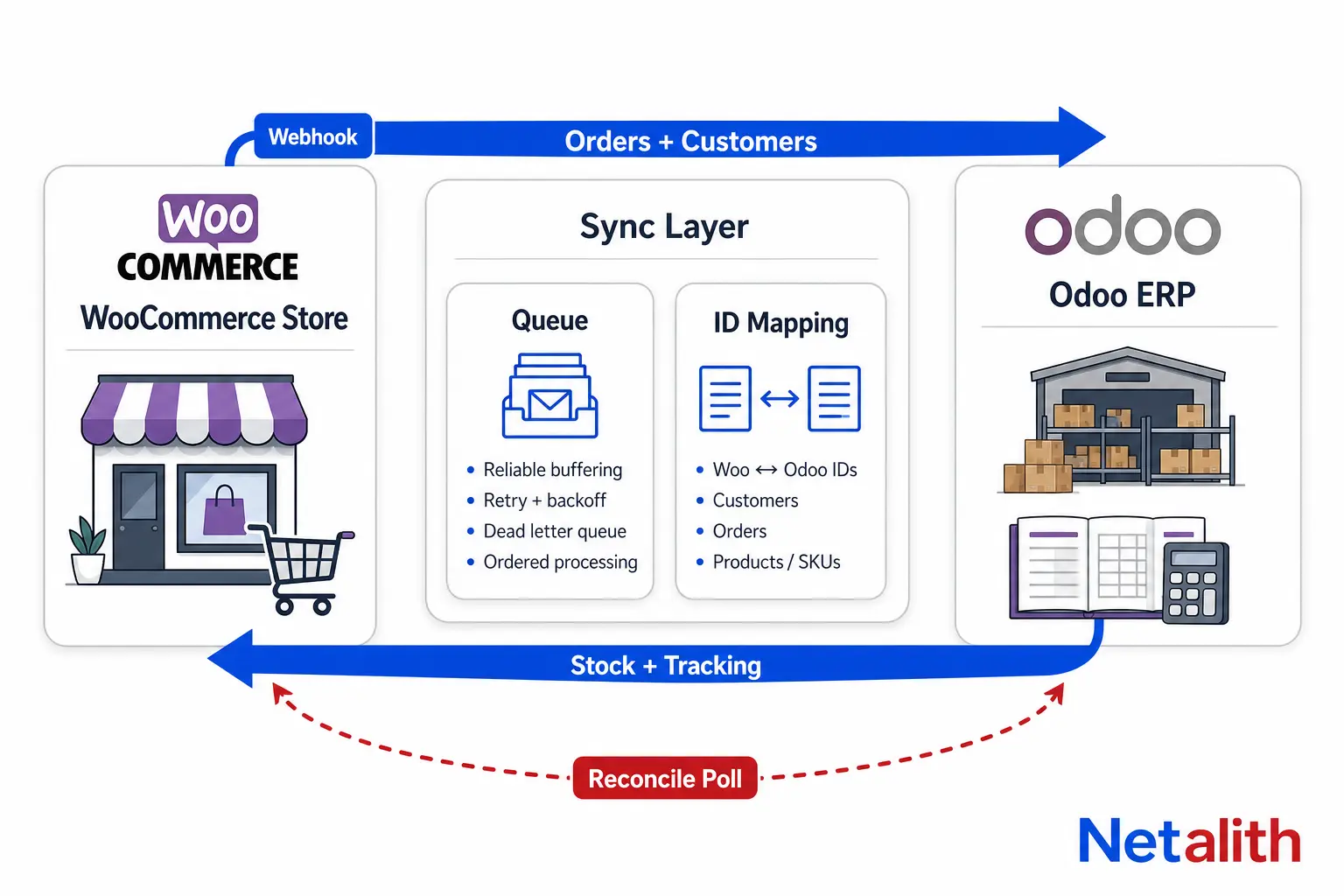
The WooCommerce side
WooCommerce exposes its data under /wp-json/wc/v3/. The details that shape an integration, all from the WooCommerce REST API documentation:
- Keys. A consumer key and secret, created under WooCommerce > Settings > Advanced > REST API, with read, write, or read/write permission. Over HTTPS they are sent as HTTP Basic Auth.
- Pagination. Lists return 10 items by default and at most 100 per page. Totals arrive in the
X-WP-TotalandX-WP-TotalPagesheaders. - Incremental pulls. Order and product lists accept
modified_after, so a poll only fetches what changed. - Batch writes. Batch endpoints accept up to 100 objects per request by default, which is how stock for a large catalog should be pushed.
- Webhooks. Topics such as
order.createdandorder.updatedpost JSON to your URL, signed in theX-WC-Webhook-Signatureheader with a base64-encoded HMAC-SHA256 of the payload.
The Odoo side
From Odoo 19, an outside service calls POST /json/2/<model>/<method> with an API key as a bearer token. One behaviour matters more than the syntax: every JSON-2 call runs in its own database transaction, and calls cannot be chained inside one. Create an order header in one call and its lines in a second, and a failure in between leaves a half-built order in your ERP.
The fix is to send the order and its lines in a single create call, or to expose one custom method that does everything. The sketch below shows the pattern. Partner and product lookups are left out.
import base64, hashlib, hmac, requests

def woo_signature_ok(raw_body, header_sig, secret):
    digest = hmac.new(secret.encode(), raw_body, hashlib.sha256).digest()
    expected = base64.b64encode(digest).decode()
    return hmac.compare_digest(expected, header_sig)

def odoo(model, method, **params):
    r = requests.post(
        f'{ODOO_URL}/json/2/{model}/{method}',
        headers={'Authorization': f'bearer {ODOO_API_KEY}',
                 'X-Odoo-Database': ODOO_DB},
        json=params, timeout=30)
    r.raise_for_status()
    return r.json()

def import_order(woo):               # woo = parsed order.created payload
    ref = 'WC-' + str(woo['id'])
    domain = [['client_order_ref', '=', ref]]
    if odoo('sale.order', 'search_count', domain=domain):
        return                       # already imported, deliveries can repeat
    odoo('sale.order', 'create', vals_list=[{
        'partner_id': find_or_create_partner(woo['billing']),
        'client_order_ref': ref,
        'order_line': [[0, 0, {
            'product_id': product_id_for_sku(line['sku']),
            'product_uom_qty': line['quantity'],
            'price_unit': float(line['price']),
        }] for line in woo['line_items']],
    }])
Around that core, a production sync adds four things: verify the signature before doing any work, acknowledge the webhook fast and process from a queue, keep a mapping of WooCommerce IDs to Odoo IDs, and run a scheduled poll with modified_after to catch whatever the webhooks missed.
What breaks in production, and the fix
| Symptom | Cause | Fix |
|---|---|---|
| Duplicate or unmatched products | SKU is optional in WooCommerce, and Odoo does not force its Internal Reference to be unique. | Clean and enforce SKUs on both sides before the first sync, then match on stored IDs, not on SKU alone. |
| Variants do not line up | A WooCommerce variable product is a parent with separately stored variations. Odoo generates variants from attribute lines and can create combinations the store never had. | Map each variation to one Odoo variant by SKU and control which combinations Odoo creates. |
| Order totals differ by cents | WooCommerce sends its own tax results as two-decimal strings. Odoo recalculates tax from its own tax records. | Map every WooCommerce tax rate to an Odoo tax, match the tax-included setting, and define a rounding-difference rule. |
| Overselling | The sync pushes on-hand quantity, which still includes stock reserved for other orders. | Push the free quantity for the warehouses that ship web orders. Add a safety buffer on fast sellers. |
| Orders silently stop arriving | WooCommerce disables a webhook after five consecutive failed deliveries, for example during an Odoo upgrade. | Monitor webhook status, keep the reconciliation poll, and alert when no order has arrived for an unusual stretch. |
| Duplicate sales orders | The same order arrives twice, by repeated delivery or by webhook and poll together. | Use the WooCommerce order ID as an idempotency key with a uniqueness check in Odoo. |
| Integration dies after a staff change | A WooCommerce API key belongs to a WordPress user and stops working when that user is deleted. | Create a dedicated integration user on both systems with only the access the sync needs. |
| Orders missing around midnight | WooCommerce dates follow the site timezone unless you use the GMT fields. Odoo stores UTC. | Read the _gmt date fields and set dates_are_gmt on filtered requests. |
None of these show up in a demo with ten products. They show up in week three, which is why a staging run with a copy of your real catalog and a month of real orders is worth more than any feature list.
What an Odoo WooCommerce integration costs
The connector license is usually the smallest line. Budget for all five:
| Cost line | Connector module | Custom build |
|---|---|---|
| Software | One module purchase per Odoo version | Development time |
| Odoo plan | Custom plan if you are on Odoo Enterprise, since Standard allows neither custom modules nor the external API | |
| Hosting | Odoo.sh or your own server for anything that runs inside Odoo | |
| Setup | SKU cleanup, tax mapping, status mapping, test run on real data. Needed on every route. | |
| Maintenance | Vendor updates for each Odoo version, plus fixes when WooCommerce or a plugin changes behaviour | Your developer does both |
Setup is where estimates go wrong. A catalog with clean, unique SKUs and one tax rate connects quickly. A catalog with missing SKUs, variable products and several tax classes needs data work before any tool can help, and no connector does that part for you.
Integrate WooCommerce with Odoo, or move the store to Odoo eCommerce?
Odoo eCommerce runs on the same database as inventory, sales and accounting, so there is nothing to sync. That removes the whole class of problems above. It also means rebuilding the storefront.
| Keep WooCommerce and integrate when | Move to Odoo eCommerce when |
|---|---|
| Organic traffic depends on your WordPress content and URLs | The storefront is a plain catalog with a checkout |
| You rely on WooCommerce extensions such as subscriptions or bookings | Pricing, stock and product rules already live in Odoo |
| Your team works in WordPress every day | You would rather maintain one system than a sync layer |
A migration has its own costs: redirects for every indexed URL, a rebuilt theme, and a check that your payment provider is supported. Compare that one-time cost against paying for and maintaining an integration for years.
If you are unsure which side of that table you are on, send Netalith your Odoo version, hosting type and a rough product and order count through the free quote form. You get a scoped recommendation, connector, custom sync or migration, priced to scope.
CÂU HỎI THƯỜNG GẶP
Câu hỏi thường gặp
Does Odoo have a built-in WooCommerce connector?
No. Odoo 19 documents built-in connectors for Amazon, Shopee, Lazada and TikTok Shop, but not for WooCommerce. An Odoo WooCommerce integration uses a third-party module from the Odoo Apps Store, a custom module, or an external sync service.
Can I connect WooCommerce to Odoo Online?
Only on the Custom plan, and only through an external sync service that calls the Odoo API. Odoo Online does not host third-party or custom modules, and Odoo's documentation limits external API access to Custom pricing plans. On One App Free or Standard, automated integration is not available.
Does Odoo Community work with WooCommerce?
Yes. A self-hosted Odoo Community server can run connector modules and custom modules, and its API is part of Odoo itself. Check that the connector you choose is published for Community and for your exact Odoo version.
Is Odoo WooCommerce sync real-time?
It can be close to real-time for orders when WooCommerce webhooks are used, because each new order is posted to the sync as it happens. Connectors that rely only on scheduled jobs sync at the job interval. A reliable setup uses webhooks plus a scheduled reconciliation, since WooCommerce disables a webhook after five consecutive failed deliveries.
Which system should be the source of truth for inventory?
Odoo. It records receipts, reservations, deliveries and returns, so it knows the quantity that is actually free to sell. WooCommerce should receive stock from Odoo and send orders back, not keep its own separate stock count.
Will connectors that use XML-RPC keep working?
For now. Odoo deprecated the XML-RPC and JSON-RPC endpoints in version 19 in favour of the JSON-2 API, and its documentation schedules their removal for Odoo 22 (fall 2028) and Odoo Online 21.1 (winter 2027). Integrations that call Odoo from outside need to move to JSON-2 before then. Modules running inside Odoo are not affected.