PrestaShop to Shopify migration: the 6 things that actually break
PrestaShop to Shopify migration, focused on what breaks: the 3-option variant limit, friendly-URL redirects, tax-excluded prices and order history.

Long Nguyen
Lập trình viên Fullstack · Kỹ sư AI · Nhà nghiên cứu
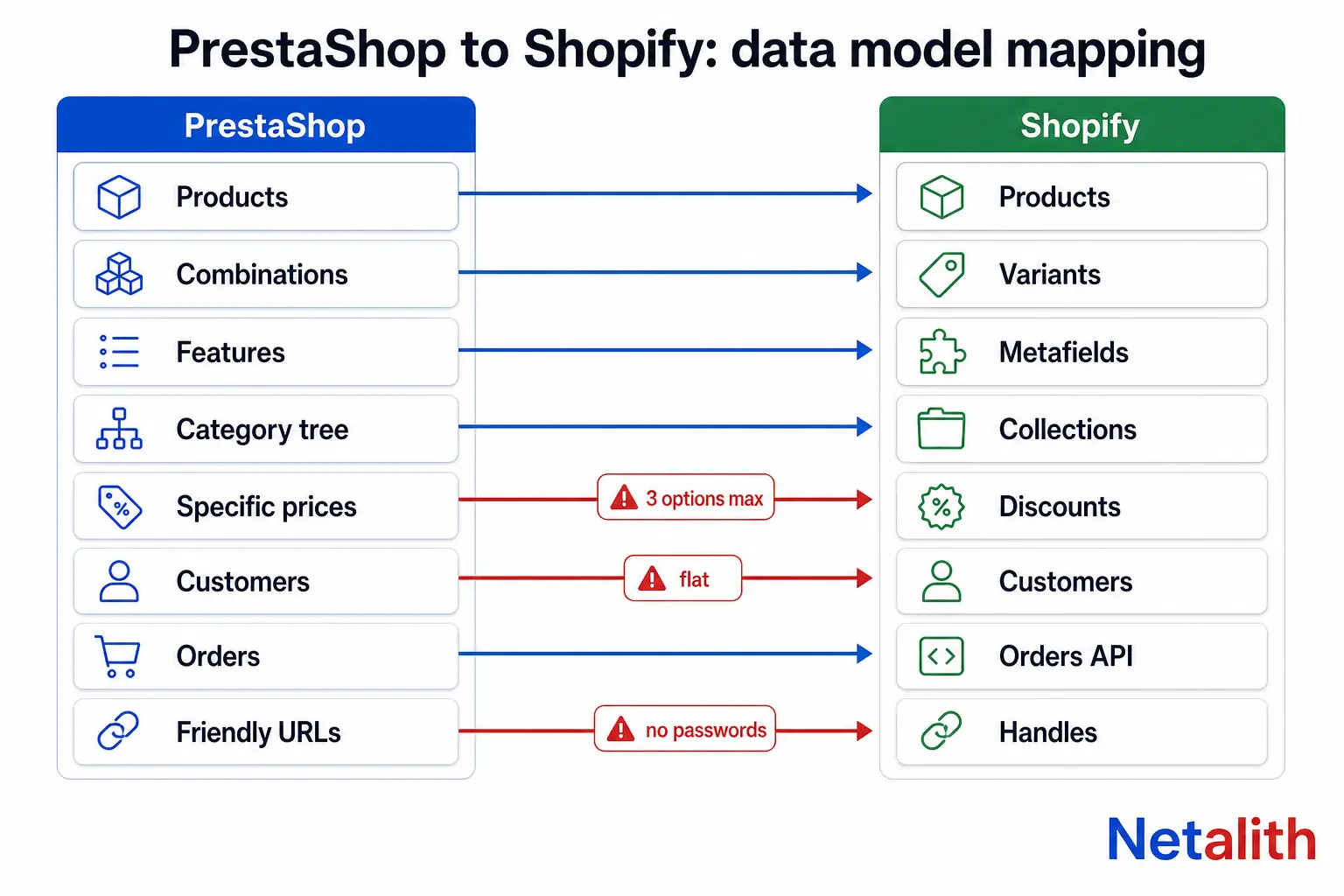
What actually transfers from PrestaShop to Shopify
Migration tools move rows. What breaks in a PrestaShop to Shopify migration is everything that has no matching row on the other side: a fourth attribute group, a nested category tree, a tax-excluded price, a payment record that was never processed by Shopify.
Before you pick a tool, know which half of your store is a copy job and which half is a rebuild.
| PrestaShop | Shopify equivalent | Transfers cleanly? |
|---|---|---|
Products (ps_product + ps_product_lang) |
Products | Yes |
Combinations (ps_product_attribute) |
Variants | Only with 3 or fewer attribute groups |
Features (ps_feature) |
Metafields or tags | Manual mapping |
| Nested category tree | Collections (flat) | No — hierarchy is lost |
| Several images per combination | One media item per variant | Partial |
| CMS pages | Pages | Yes |
| Customers and addresses | Customers | Yes, without passwords |
| Orders and invoices | Orders | API only, no payment records |
| Specific prices, cart rules | Discounts | Mostly manual |
| Carriers and shipping rules | Shipping profiles | Rebuild |
| Modules | Apps | Rebuild |
| Friendly URLs | Handles | Needs a redirect map |
The rows marked rebuild are where the budget goes. The rows marked partial are where the silent data loss happens, because the import reports success either way.
PrestaShop combinations vs Shopify variants: the 3-option wall
This is the single constraint that decides whether your migration is a weekend or a month. PrestaShop lets a product carry any number of attribute groups — size, colour, material, finish, length, engraving. Shopify does not.
Per Shopify's own documentation on adding product variants, a product can have up to 2,048 variants but only three options, and up to 250 media items with one media item assignable per variant. Stores holding 500,000 or more variants hit a 10,000-new-variants-per-day import cap unless they are on Plus.
So the variant count is rarely the problem. The number of axes is. Count yours before you quote the job:
SELECT p.id_product,
       COUNT(DISTINCT ag.id_attribute_group) AS option_axes,
       COUNT(DISTINCT pa.id_product_attribute) AS combinations
FROM ps_product p
JOIN ps_product_attribute pa
  ON pa.id_product = p.id_product
JOIN ps_product_attribute_combination pac
  ON pac.id_product_attribute = pa.id_product_attribute
JOIN ps_attribute a
  ON a.id_attribute = pac.id_attribute
JOIN ps_attribute_group ag
  ON ag.id_attribute_group = a.id_attribute_group
GROUP BY p.id_product
HAVING option_axes > 3
ORDER BY option_axes DESC;
If that query returns nothing, any migration app will do. If it returns a few hundred rows, you have four ways out, in order of how much they cost you later:
- Merge two axes into one option.
MaterialandFinishbecomeOak / Matte. Cheapest, and it keeps one product page and one set of reviews. It makes filtering uglier. - Demote the weakest axis to a metafield. Works when the axis does not change price or stock — it is a spec, not a variant. Most PrestaShop stores have at least one of these mislabelled as an attribute.
- Split into sibling products and link them. On Plus, combined listings put them back under one storefront listing; off Plus, you carry the SEO cost of splitting one ranking page into five.
- Move the axis to a line-item property (engraving text, cut-to-length). Correct for made-to-order inputs, but the value is no longer stock-tracked.
Decide this per product family, not globally, and decide it before the import runs. Reversing it afterwards means re-doing the redirect map in the next section.
Mapping PrestaShop friendly URLs to Shopify without losing rankings
Shopify's URL structure is fixed: /products/{handle}, /collections/{handle}, /pages/{handle}, /blogs/{blog}/{handle}. Every PrestaShop URL you have ever had indexed is going to 404 on day one unless you map it.
| PrestaShop route | Default pattern | Shopify target |
|---|---|---|
| Product | {category:/}{id}-{rewrite}.html |
/products/{handle} |
| Category | {id}-{rewrite} |
/collections/{handle} |
| CMS page | content/{id}-{rewrite} |
/pages/{handle} |
| Manufacturer | {id}_{rewrite} |
/collections/{vendor} |
| Non-friendly | index.php?id_product=5&controller=product |
Not redirectable in Shopify |
Do not assume the defaults. Read the live rules out of the database first — the PS_ROUTE_product_rule and PS_ROUTE_category_rule keys in ps_configuration tell you whether the store prefixes product URLs with the category path, and that one detail changes every source path in your file. Then generate the map:
SELECT CONCAT('/', p.id_product, '-', pl.link_rewrite, '.html') AS `Redirect from`,
       CONCAT('/products/', pl.link_rewrite)                     AS `Redirect to`
FROM ps_product p
JOIN ps_product_lang pl
  ON pl.id_product = p.id_product
 AND pl.id_lang = 1
 AND pl.id_shop = 1
WHERE p.active = 1;
Four things in Shopify's URL redirects documentation decide whether this works:
- A redirect only fires on a 404. If the source path still resolves, the redirect is inert. On a fresh Shopify store every old PrestaShop path 404s, so you can import the whole file before the DNS switch and it goes live the moment traffic lands.
- Query strings are unreliable. If the store never enabled friendly URLs, your indexed URL set is
index.php?id_product=...and Shopify's redirect engine will not save you. Handle those at the edge — a Cloudflare rule in front of the domain — or accept the loss. - Reserved paths cannot be redirected, including
/products,/collections,/collections/all,/cart,/ordersand/apps. PrestaShop stores with a/cart-shaped CMS slug lose it. - Volume has a ceiling: 100,000 redirects on standard plans, 20,000,000 on Plus. A 60,000-SKU catalogue with three language prefixes exceeds that ceiling, so consolidate at the pattern level instead of the URL level.
Build the source list from three places, not one: the PrestaShop database, the old sitemap.xml, and the Search Console export of pages that actually received impressions. The database knows what exists; only Search Console knows what earns money. If that inventory is bigger than you expected, this is the part of a store data migration worth handing to someone who has done it before — the catalogue import is recoverable, a botched redirect map is not.
Why EU PrestaShop stores lose margin on import day
PrestaShop stores ps_product.price excluding tax and computes the displayed price from the customer's tax rules group at render time. Shopify stores one price per variant and a store-level setting decides whether that number already includes tax.
Export one and import into the other without converting, and a 21% VAT store publishes its entire catalogue 21% under cost. The import reports zero errors. Checks that catch it:
- Convert before import: multiply by the tax rate of the product's tax rules group, not by a single store-wide rate. PrestaShop stores regularly carry reduced rates for books, food or shipping.
- Add
ps_product.ecotaxback in where it applies. It is stored separately and is part of the displayed price in France. - Round at the end. PrestaShop keeps six decimal places; Shopify keeps two. Round the final tax-inclusive price, never the ex-VAT figure, or you drift a cent per line and your invoices stop reconciling.
- Reprice, do not re-export, anything in
ps_specific_price. Group prices, country prices, quantity breaks and dated campaign prices have no native Shopify equivalent beyond compare-at price and automatic discounts. Quantity breaks need an app, or B2B on Plus.
Then spot-check twenty products by hand across tax rates and currencies. Twenty manual checks catch a conversion error that a 12,000-row import will not.
Customers, passwords and order history: what Shopify will not accept
Passwords never migrate. PrestaShop hashes with its own scheme and Shopify does not accept hashes from anywhere. This is less painful than it sounds: Shopify's customer accounts sign people in with a one-time email code, so there is no password to re-create. Switch to those before launch and the question disappears. If you stay on legacy accounts, you are sending activation invites to your whole list on launch day — plan the send, or your deliverability takes the hit.
Marketing consent is a legal field, not a data field. Map ps_customer.newsletter and optin honestly. Importing a list as subscribed because it is easier is the kind of shortcut that turns a replatform into a GDPR complaint.
Orders are not a CSV import. Shopify admin has no native order import; historical orders go in through the Admin API or an app that uses it. Three consequences people discover after launch:
- Imported orders carry no real transactions, so they cannot be refunded or captured in Shopify. Refunds on pre-migration orders stay with your old payment provider.
- Imported orders distort analytics if you backdate them into the current period. Decide whether reporting continuity or clean reporting matters more, and do it deliberately.
- Invoices stay a legal obligation in most of the EU. Keep PrestaShop running read-only on a subdomain rather than importing invoice PDFs you cannot reproduce.
A common and defensible decision: migrate customers in full, migrate the last 12–24 months of orders for support lookups, and archive the rest.
App, CSV or custom script: choosing a migration method
There are three real options. Pick on constraints, not on marketing pages.
| Criterion | Migration app | CSV by hand | Custom API script |
|---|---|---|---|
| Best for | Standard catalogue, 3 or fewer option axes | Under ~500 SKUs | Non-standard data model, multi-language, re-runnable |
| Orders | Usually included, paid tier | Not supported | Full control |
| Re-run / delta sync | Sometimes | No | Yes |
| Transformation logic | Fixed by the vendor | Spreadsheet-level | Arbitrary |
| Credential exposure | DB, FTP or admin access handed to a third party | None | Stays in-house |
| Cost shape | Per-entity, scales with catalogue | Your time | Fixed build cost |
Two selection criteria that get skipped and should not be:
- Credential scope. Most migration apps want database or FTP credentials to your live store plus a Shopify Admin token. That is production access to your customer table handed to a vendor. Check their data retention policy, create a scoped Shopify custom app token rather than reusing an existing one, and rotate everything the day the migration finishes.
- Re-runnability. A migration is never one pass. You will import, find a mapping error, and need to do it again. A method you cannot repeat cheaply turns every mistake into manual repair work.
Run a trial migration of 50 products covering your worst cases — the product with the most combinations, one with a reduced tax rate, one in every language — before you pay for the full run. The free tiers exist for exactly this.
The cutover sequence that avoids downtime
Order matters more than tooling here. This sequence keeps the old store earning until the moment the new one is correct.
- Freeze catalogue edits in PrestaShop. Orders keep flowing; product data stops moving.
- Build the Shopify store password-protected and import the catalogue. Never let a half-built store get indexed.
- Crawl the old site and merge the URL inventory with the sitemap and the Search Console export.
- Import the redirect CSV into Shopify before cutover. It stays inert until those paths 404.
- Delta-sync customers and orders created during the freeze.
- Lower the DNS TTL to 300 seconds a day ahead, then switch.
- Move PrestaShop to a subdomain, read-only, for invoices and support history. Do not delete it.
- Resubmit the sitemap, keep the old Search Console property, and watch 404s daily for two weeks.
Keep the PrestaShop hosting paid for at least six months. The cost of one more hosting invoice is nothing against the cost of discovering, in month four, that a field you never mapped was the one accounting needed.
What to check in the first 14 days
- Search Console → Pages. Watch Not found (404) climb, then fall as redirects resolve. A flat high 404 count means your map missed a route pattern, not individual pages.
- Redirect chains. PrestaShop stores often already redirected old slugs internally. Point the new redirect at the final destination, not at the old intermediate.
- Top 50 revenue URLs by hand. Not a sample — the specific pages that make the money.
- Product feeds. This is the one that surprises people. Google Merchant Center and Meta catalogue item IDs were tied to PrestaShop product IDs; after migration they are Shopify variant IDs. Every item is treated as new, and the performance history attached to the old IDs is gone. Map item IDs deliberately in the new feed or accept the reset — but know which one you chose.
- Structured data. Your PrestaShop theme emitted product schema; your Shopify theme emits different schema. Validate it rather than assuming.
- Language and market subfolders. Redirects apply across market subfolders, but source paths with a language prefix need their own entries.
Expect a dip. A clean PrestaShop to Shopify migration still costs you a few weeks of ranking volatility while Google re-crawls and re-associates the new URLs. What a clean one avoids is the permanent loss — pages that never got a redirect and simply drop out of the index.
If you are not sure whether your current URL inventory, feeds and structured data are in a state worth migrating, a $20 Audit + Roadmap returns a prioritised list of what to fix before the move, within 24–48 hours. Cheaper than finding out after the DNS switch.
CÂU HỎI THƯỜNG GẶP
Câu hỏi thường gặp
Will a PrestaShop to Shopify migration hurt my SEO?
Expect two to six weeks of ranking volatility while Google re-crawls and re-associates the new URLs. That part is unavoidable. Permanent loss is avoidable, and it comes from one thing: indexed PrestaShop URLs that never received a 301 redirect. Build the source URL list from the database, the old sitemap and a Search Console impressions export, and import the redirect CSV into Shopify before the DNS switch.
Can I migrate my PrestaShop order history to Shopify?
Yes, but not through a CSV. Shopify admin has no native order import, so historical orders go in through the Admin API or an app that uses it. Imported orders carry no real transactions, which means they cannot be refunded or captured inside Shopify. Most stores import the last 12 to 24 months for support lookups and keep PrestaShop running read-only on a subdomain for older invoices.
What happens to my customers' passwords?
They do not transfer. Shopify does not accept password hashes from any platform. The clean fix is to launch on Shopify's customer accounts, which sign customers in with a one-time email code, so no password is needed. On legacy accounts you have to send activation invites to your entire customer list on launch day, which is worth scheduling rather than triggering accidentally.
My products have more than three attribute groups. What are my options?
Shopify allows a maximum of three options per product, though up to 2,048 variants. You can merge two axes into one option value such as 'Oak / Matte', demote an axis that does not affect price or stock to a metafield, split the product into siblings, or move a made-to-order input like engraving text to a line item property. Decide per product family before the import, because changing it afterwards invalidates your redirect map.
How long does a PrestaShop to Shopify migration take?
A standard catalogue with three or fewer option axes, no order history and clean friendly URLs can be done in a few days with a migration app. Add multi-language, more than three attribute groups, tax-inclusive pricing conversion, order history and a large redirect map, and it is a multi-week project. The variable that predicts the timeline best is not SKU count, it is how far your data model sits from Shopify's.
Do I need to keep my PrestaShop store running after the migration?
Keep it running read-only on a subdomain for at least six months. Invoice retention is a legal obligation in most of the EU and imported Shopify orders do not reproduce PrestaShop invoice documents. It is also your only recovery path if you discover a field that was never mapped.