Magento to Shopify Migration: What Transfers, What Breaks, and the Cutover Order
Magento to Shopify migration guide: what data actually transfers, how configurable products map to variants, and the redirect map that protects your rankings.

Long Nguyen
Lập trình viên Fullstack · Kỹ sư AI · Nhà nghiên cứu
Why Magento stores are moving right now: the support clock
Most replatforming decisions in 2026 are not driven by a feature wish-list. They are driven by a date.
Adobe runs two support tiers, and the gap between them is the whole story. Adobe Commerce customers can get a no-cost one-year extension on some lines. The Magento Open Source code base is explicitly excluded from that extension — so Open Source merchants lose patches at the earlier date, with nothing to buy their way out of.
| Release line | End of regular support | Extension available? | Where that leaves you today |
|---|---|---|---|
| 2.4.5 | 9 Aug 2025 | Commerce only, ran to | Unsupported on both editions |
| 2.4.6 | No extension for Open Source | Open Source stores are already unpatched | |
| 2.4.7 | No extension for Open Source | Roughly six months of runway | |
| 2.4.9 | Into 2029 (GA May 2026) | Current long-term line | The upgrade target if you stay |
Dates are from Adobe's Commerce software lifecycle policy, which is the only version of this table worth trusting — third-party EOL trackers routinely show the Commerce extended date next to an Open Source store and make the runway look longer than it is.
There is a second clock that catches people out: PHP. Magento 2.4.6 runs on PHP 8.1 and 8.2, and PHP 8.2 reaches its own end of life on . Adobe's extended support does not extend support for third-party dependencies. An Adobe Commerce merchant with patches into 2027 can still fail a PCI assessment at the end of 2026 because the language runtime underneath is dead. Check both clocks before you decide you have time.
Confirm which edition you are actually on before anything else — composer.json requiring magento/product-community-edition means Open Source and the earlier dates; magento/product-enterprise-edition means Commerce.
Should you upgrade Magento or move to Shopify?
A Magento 2.4.6 to 2.4.9 upgrade is not free. On a store with a dozen third-party extensions it is a two-to-three month project with its own regression risk, and it buys you about three years before the same conversation happens again. Replatforming is usually comparable in effort and resets the maintenance burden to near zero. So the question is not which is cheaper this quarter — it is where your differentiation actually lives.
| Signal in your store | Points to | Why |
|---|---|---|
| Checkout logic is custom and load-bearing (split shipments, freight quoting, credit terms) | Stay on Magento | Shopify's checkout is only extensible through Functions and Checkout UI extensions, and only on upper plans. Rebuilding genuinely custom checkout logic is the single most expensive part of a migration. |
| B2B with company accounts, negotiated catalogs, purchase orders | Stay, or Shopify Plus | Shopify's B2B features are real but live on Plus. Below that you are gluing it together with apps. |
| You employ a Magento developer already | Stay | The upgrade is cheap when the knowledge is in-house. Migration is expensive when it is not. |
| Hosting, patching and an agency retainer cost more than a Shopify plan plus apps | Move | Most mid-market Open Source stores find this is true once they add it up honestly, including the emergency patch weekends. |
| Your advantage is product, brand and marketing — not platform behaviour | Move | You are paying infrastructure tax for flexibility you never use. |
| Catalog is large but structurally plain (many SKUs, few attribute axes) | Move | Volume is not the hard part of a Shopify migration. Structural complexity is. |
The honest version: if you cannot name three platform behaviours Shopify would take away from you, the platform is not where your moat is.
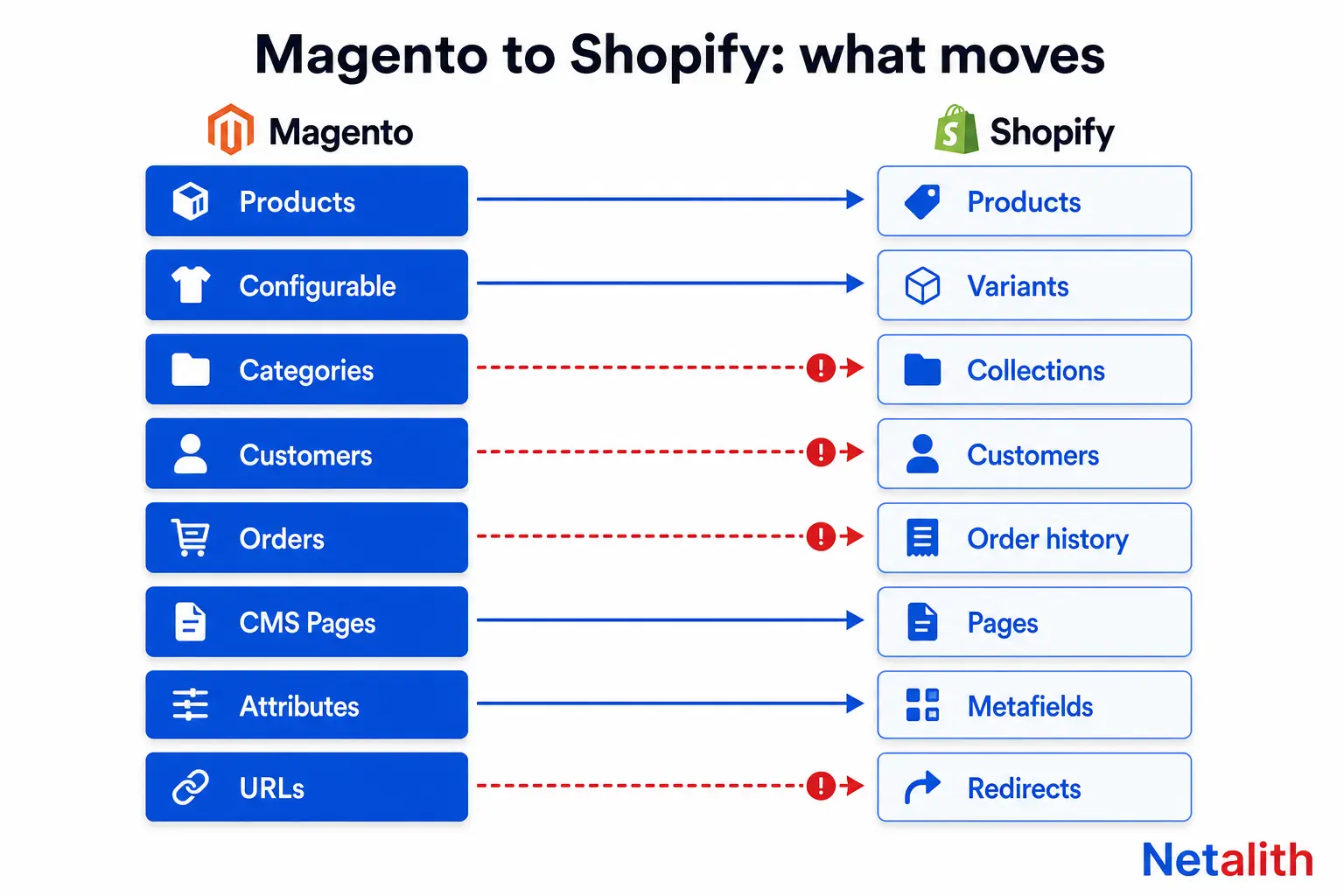
What actually transfers from Magento to Shopify — and what doesn't
Every migration tool markets on the first column of this table. The projects that go wrong go wrong in the second one.
| Magento data | Transfers? | What to plan for |
|---|---|---|
| Simple products, SKUs, prices, inventory | Yes | Clean work. Reconcile counts, don't assume them. |
| Product images | Yes | Re-hosted on Shopify's CDN; filenames and paths change, so any hardcoded image URL in your content breaks. |
| Categories | Partly | Become collections. Shopify collections are a flat list, not a tree — deep category hierarchies get flattened and rebuilt in navigation. |
| Customer accounts | Partly | Records move; password hashes do not. Every customer resets on first login. Plan the comms — this is the number one post-launch support spike. |
| Order history | Partly | Imports as historical records. You generally cannot refund, re-fulfil or re-capture against an imported order. Keep Magento readable for finance. |
| CMS pages and blog posts | Yes | Layout widgets and CMS blocks inside them do not. Expect manual rework on anything built with Page Builder. |
| Product reviews | App-dependent | Shopify has no core review store. Pick the review app first, then migrate into its schema — not after. |
| Customer groups and tier pricing | No, not 1:1 | Shopify has B2B catalogs on Plus, or tags plus an app below it. Model this before you import customers. |
| Store views and multi-site | No | Becomes Shopify Markets, or separate stores. Multi-language Magento store views in particular do not map cleanly. |
| Cart price rules and coupons | Partly | Codes can be recreated; stacked and conditional rules often need Shopify Functions. |
| URL structure | No | Covered below. This is where migrations lose traffic. |
Mapping Magento configurable products to Shopify variants
Magento has six product types. Shopify has one, with options hanging off it. That mismatch is the real data-modelling work.
| Magento type | Shopify equivalent | The catch |
|---|---|---|
| Simple | Product with one variant | None. |
| Configurable | Product with options and variants | Magento lets you build a configurable on as many attribute axes as you like. Shopify's option model is far narrower, so four-axis products get collapsed (two axes merged into one compound option) or split into several products. |
| Grouped | Collection, or a combined listing on Plus | No native concept of buying several children from one page. |
| Bundle | App or Shopify Functions | Dynamic pricing on bundles is not native. |
| Virtual | Product with shipping disabled | Clean. |
| Downloadable | Digital delivery app | Core Shopify does not deliver files. |
On limits: Shopify's GraphQL Admin API handles up to 2,048 variants on a single product, and returns a maximum of 250 items per page on everything else, per Shopify's products and collections documentation. The practical consequence for a migration script: variants on one product come back in a single request, but your product loop has to be cursor-paginated, and a 40,000-SKU catalog should go through bulk operations rather than per-product mutations unless you enjoy rate-limit backoff.
The piece most teams skip: Magento attribute sets do not have a Shopify home by default. Material, warranty, voltage, compatibility — anything that was a filterable attribute in layered navigation — has to be re-created as metafields, and metafields must exist before the import runs or those values are silently dropped. Define the metafield definitions first, map attribute codes to metafield keys in a spreadsheet, and treat that spreadsheet as a deliverable. If filtering on those attributes matters for navigation, connect them to Search and Discovery at the same time, not as a phase two that never happens.
The redirect map: how to keep your rankings
Shopify will not reproduce your Magento URLs. Products live at /products/{handle}, collections at /collections/{handle}, pages at /pages/{handle}, articles at /blogs/{blog}/{handle}. Magento's category-path URLs with a .html suffix have no equivalent. Every indexed URL on the store changes, which means a 301 map is not an optimisation — it is the migration.
Build the source list from the database, not only from a crawler. Magento keeps every live and historical URL in url_rewrite, including rewrites a crawl of your current navigation will never surface:
SELECT request_path, target_path, entity_type, entity_id
FROM url_rewrite
WHERE store_id = 1
  AND redirect_type = 0;
Then union that with three more sources: the Search Console performance export (everything that actually earns impressions), the top landing pages in analytics for the last 12 months, and your backlink export. A URL with external links pointing at it is worth more than a URL in your sitemap.
Shopify takes the finished map as a CSV in the admin, with exactly two columns:
Redirect from,Redirect to
/mens/shoes/trail-runner-x.html,/products/trail-runner-x
/mens/shoes.html,/collections/mens-shoes
/catalog/product/view/id/4471,/products/trail-runner-x
Rules that save you a traffic drop:
- Never chain. Map every old URL to its final destination. A redirect that lands on another redirect bleeds crawl budget and sometimes bleeds the ranking signal with it.
- Collapse layered navigation parameters. Magento filter URLs like
/mens/shoes.html?color=black&size=42can run into the thousands. Point the whole family at the base collection; do not generate a redirect per combination. - Handle the suffix and case variants. Both the
.htmland non-.htmlforms, and any uppercase legacy paths, need entries. They are separate URLs to a crawler. - Check Shopify's own duplicate paths. Shopify also serves a product inside a collection at
/collections/x/products/y. Confirm your theme canonicalises to the bare/products/{handle}before launch. - Keep the old Search Console property. Do not delete it. It is how you prove the redirects were picked up.
Mapping a catalog of a few hundred products is an afternoon in a spreadsheet. Mapping 20,000 URLs with historical rewrites, discontinued SKUs and parameter families is a scripted job with a verification pass — which is the shape of most of the ecommerce data migration and replatforming work we take on.
The cutover order that avoids downtime
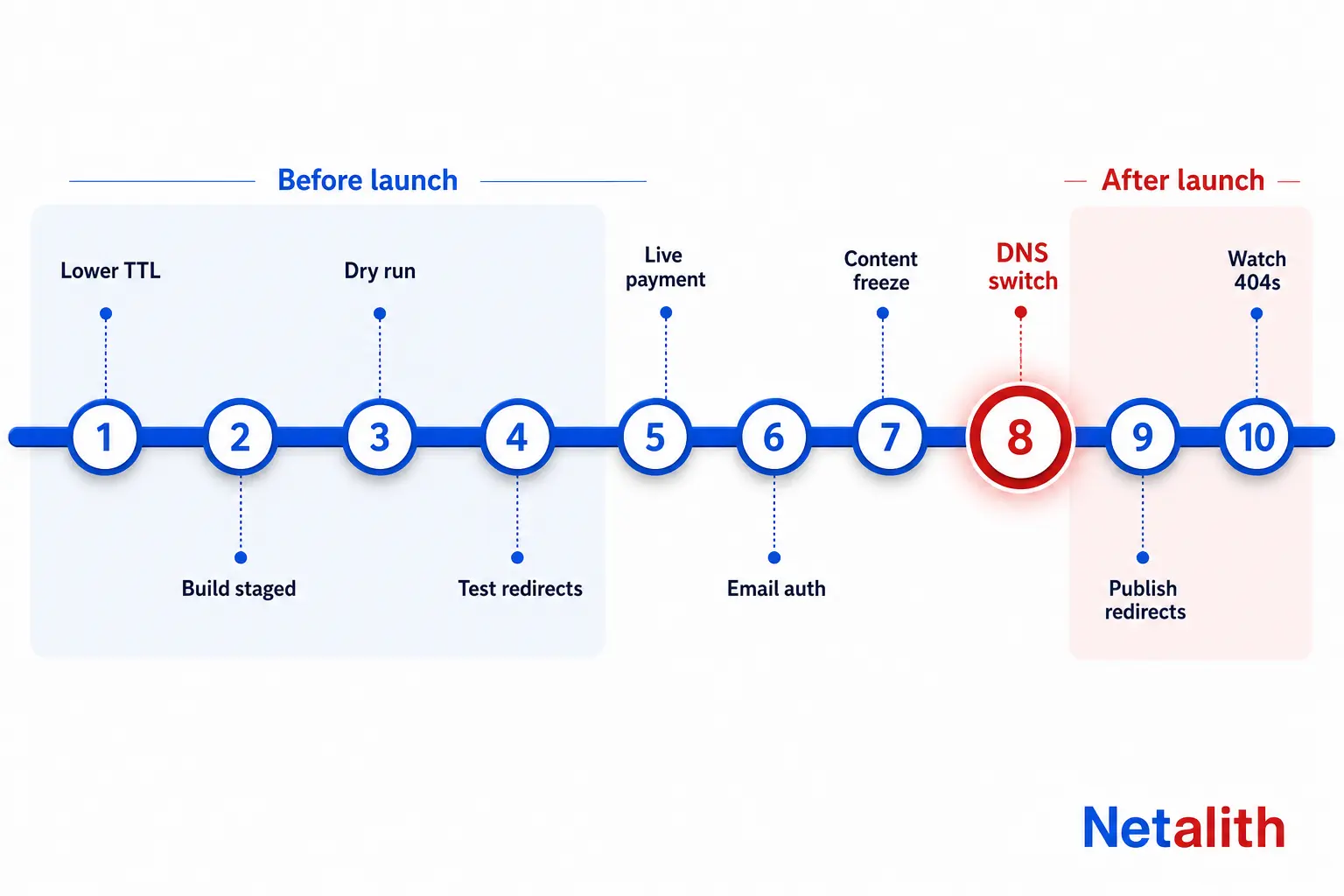
The sequence matters more than any individual step. This is the order we run it in:
- Drop DNS TTL to 300 seconds, at least 48 hours before launch day. Do this first because it is the one step you cannot accelerate later.
- Build on the myshopify.com domain with password protection on. Shopify blocks indexing of password-protected stores, so you cannot accidentally index the staging build.
- Run a full dry-run import of the real catalog — not a sample. Then diff it: product count, variant count, sum of prices, count of products with zero images, count of SKUs present in Magento and missing in Shopify. Automate the diff; eyeballing a catalog does not scale.
- Load the redirect map into the staging store and test it as a list, not by clicking. A script that requests every old path and asserts a 301 to the expected target takes an hour to write and catches the mistakes that cost rankings.
- Configure payments, taxes and shipping, then run one real low-value transaction end to end and refund it. Test mode does not prove your live gateway credentials work.
- Set up email authentication before launch. SPF, DKIM and your sending domain on Shopify have to be in place, or the first wave of order confirmations lands in spam — on the day you have the least slack to notice.
- Freeze catalog and content edits, then run the final delta import of products, customers and orders. Announce the freeze window to whoever edits the store; it is usually broken by someone who never saw the email.
- Switch DNS. Keep Magento alive on a subdomain such as
legacy.yourdomain.com, read-only, for finance and support history. Do not let it keep answering on the primary domain. - Publish redirects on the live domain immediately, then submit the new sitemap in Search Console and leave the old property in place.
- Watch 404s daily for 14 days and add redirects as real traffic finds the gaps your map missed. It always misses some.
Two things to keep off launch day: a theme redesign, and a catalog restructure. Both are legitimate projects. Running either at the same time as a replatform means that when traffic drops you have no idea which change caused it.
What to watch in the first 30 days after migration
A migration looks successful for about a week. The signals that matter are lagging ones.
| Watch | Where | What normal looks like |
|---|---|---|
| 404 hits on old paths | Shopify admin, analytics | A spike in week one, trending to near zero by week three. Flat and high means your map has a systematic gap. |
| Indexed page count | Search Console, old and new property | Old property falls as new one rises, with overlap. Both falling is the alarm. |
| Organic clicks by landing page | Search Console | A 10–20% dip for two to four weeks is typical while URLs are re-crawled. No recovery by week six means a redirect or canonical problem, not a ranking problem. |
| Password reset volume | Support inbox | Front-loaded and large, because hashes did not migrate. If it is small, your customers may not be finding login at all. |
| Conversion rate on top 20 landing pages | Analytics | Compare against the same pages pre-migration, not against a site average. |
| Email deliverability | Gateway or ESP reports | Order confirmations opening at normal rates. A silent drop here reads as a sales problem for weeks. |
What a Magento to Shopify migration costs and how long it takes
Catalog size is the number everyone quotes and the weakest predictor of effort. These are the drivers that actually move a quote:
- Attribute axes per configurable product. Two axes is automation. Four is data modelling with human decisions on every family.
- Number of indexed URLs, not number of products. A 2,000-product store with ten years of layered navigation indexed can have a larger redirect job than a 20,000-product store launched last year.
- Custom checkout and pricing logic. The most expensive thing in any Magento migration, every time.
- Integrations. ERP, 3PL, marketplace feeds and accounting all need rebuilding against Shopify's APIs, and each one has its own test cycle.
- Content built in Page Builder. It does not export. Budget per page, manually.
Rough shape for a mid-market Open Source store with a conventional catalog and a handful of integrations: four to eight weeks from kickoff to cutover, with the redirect map and integration rebuilds consuming more of that than the product import does. Anything promising a two-day migration is quoting the data copy and leaving you the rest.
If you are on 2.4.6 or earlier, the decision has already been made for you by the calendar — what is left is choosing whether to spend the budget on another Magento upgrade cycle or on the last platform migration you do for a while. If you want that scoped against your actual catalog and URL footprint rather than against a generic checklist, tell us what you are running and we will come back with a plan.
CÂU HỎI THƯỜNG GẶP
Câu hỏi thường gặp
How long does a Magento to Shopify migration take?
For a mid-market store with a conventional catalog and a few integrations, four to eight weeks from kickoff to cutover is realistic. The product import is rarely the long pole — the redirect map, the attribute-to-metafield modelling and rebuilding ERP, 3PL or marketplace integrations against Shopify's APIs take most of the schedule. Quotes promising a two-day migration are pricing the data copy only.
Will I lose my SEO rankings when I move from Magento to Shopify?
You will lose them if you skip the 301 redirect map, because Shopify forces its own URL structure and every indexed URL changes. With a complete map built from Magento's url_rewrite table plus Search Console and backlink exports, expect a 10–20% organic dip for two to four weeks while URLs are re-crawled, then recovery. No recovery by week six usually means a redirect chain or canonical problem rather than a ranking loss.
Do customer passwords transfer from Magento to Shopify?
No. Customer records, addresses and order history can be imported, but password hashes cannot be migrated between the platforms. Every customer has to set a new password on first login, so plan an announcement email before cutover and expect a support spike in week one.
Can Shopify handle Magento configurable products?
Yes, as products with options and variants, and Shopify's GraphQL Admin API supports up to 2,048 variants on a single product. The constraint is the number of option axes, not the variant count: Magento configurables built on four or more attributes have to be collapsed into compound options or split across several Shopify products.
Is Magento Open Source still supported in 2026?
Only on the newer lines. Regular support for the 2.4.6 line ended on 11 August 2026, and Adobe's no-cost support extension applies to Adobe Commerce customers only — the Open Source code base is explicitly excluded. A Magento Open Source 2.4.6 store is running unpatched software today, with no extension available to buy.
Should I upgrade to Magento 2.4.9 instead of migrating to Shopify?
Upgrade if your checkout logic is genuinely custom, you run B2B with negotiated catalogs and purchase orders, or you already employ a Magento developer. Migrate if your hosting, patching and retainer costs exceed a Shopify plan plus apps, and you cannot name three platform behaviours Shopify would take away from you.