OpenCart to WooCommerce Migration: The Order That Saves Your URLs
OpenCart to WooCommerce migration in the right order: what really transfers, how options become variations, and the 301 map that protects your traffic.

Long Nguyen
Développeur fullstack · Ingénieur IA · Chercheur
Most OpenCart to WooCommerce migration guides are written by the companies selling the migration tool, so they all end at the same place: products moved, job done. The products are the easy part. The parts that actually cost money are the option-to-variation mapping, the order history decision, and the 301 map you can only build while the old store is still running.
This is the sequence I use, the data model mismatches to plan for, and the checks that tell you the move worked.
Is moving off OpenCart actually worth it?
Start by killing the bad reason. OpenCart is not abandoned. Both branches shipped releases on — 4.1.0.4 on the current branch and 3.0.5.1 on the long-running 3.0.x branch, which also picked up PHP 8.5 compatibility work (OpenCart release history on GitHub). If a developer tells you to replatform because OpenCart is dead, they are selling you something.
The reasons that hold up:
- Hiring and extensions. WordPress developers are easier and cheaper to find than OpenCart developers in most markets, and the extension catalogue is deeper for payments, subscriptions and marketplace feeds.
- Content and commerce in one system. If your acquisition plan depends on publishing, OpenCart makes you bolt a CMS onto a cart. WooCommerce is the opposite.
- You are facing an OpenCart 3 to 4 jump anyway. Extensions and themes rarely carry across that boundary. Once you are rebuilding the front end and re-buying modules, the real comparison is OpenCart 4 against WooCommerce, not against staying put.
The honest counter-case: a store under a few hundred SKUs that converts fine and has no content strategy will not earn back the migration. Replatforming is a cost you recover through something — cheaper maintenance, faster shipping of features, organic traffic. If you cannot name which one, postpone.
What actually transfers from OpenCart to WooCommerce
The two systems do not share a data model, so nothing transfers one-to-one. This is the mapping I work from, and the thing that bites on each row.
| OpenCart | WooCommerce destination | What bites |
|---|---|---|
Products (oc_product + oc_product_description) |
Simple or variable products | model is usually the real SKU; the sku column is often empty |
Categories (oc_category_path) |
product_cat terms |
Hierarchy must be rebuilt before products import, not after |
| Manufacturers | Brand taxonomy | Brand pages get new URLs, so they need redirects too |
| Options and option values | Attributes plus variations | Not equivalent concepts — see the section below |
| Customers | WordPress users, customer role | Password hashes do not transfer in any form |
| Orders | WooCommerce orders (HPOS tables) | Status vocabulary differs; totals must be carried, never recomputed |
| Reviews | WordPress comments with a rating meta value | Approval state and author email are easy to lose |
SEO keywords (oc_seo_url) |
Permalinks plus a 301 map | Only extractable while the old database is reachable |
| Information pages | WordPress pages | Internal links inside the HTML still point at old paths |
| Coupons and vouchers | WooCommerce coupons | OpenCart vouchers are stored value, not discounts — they are a different feature |
Anything not on that list — abandoned carts, loyalty points, affiliate balances, custom fields added by modules — lives in extension tables and migrates only if you write for it specifically. Inventory that before quoting the job, not after.
The migration order that avoids downtime
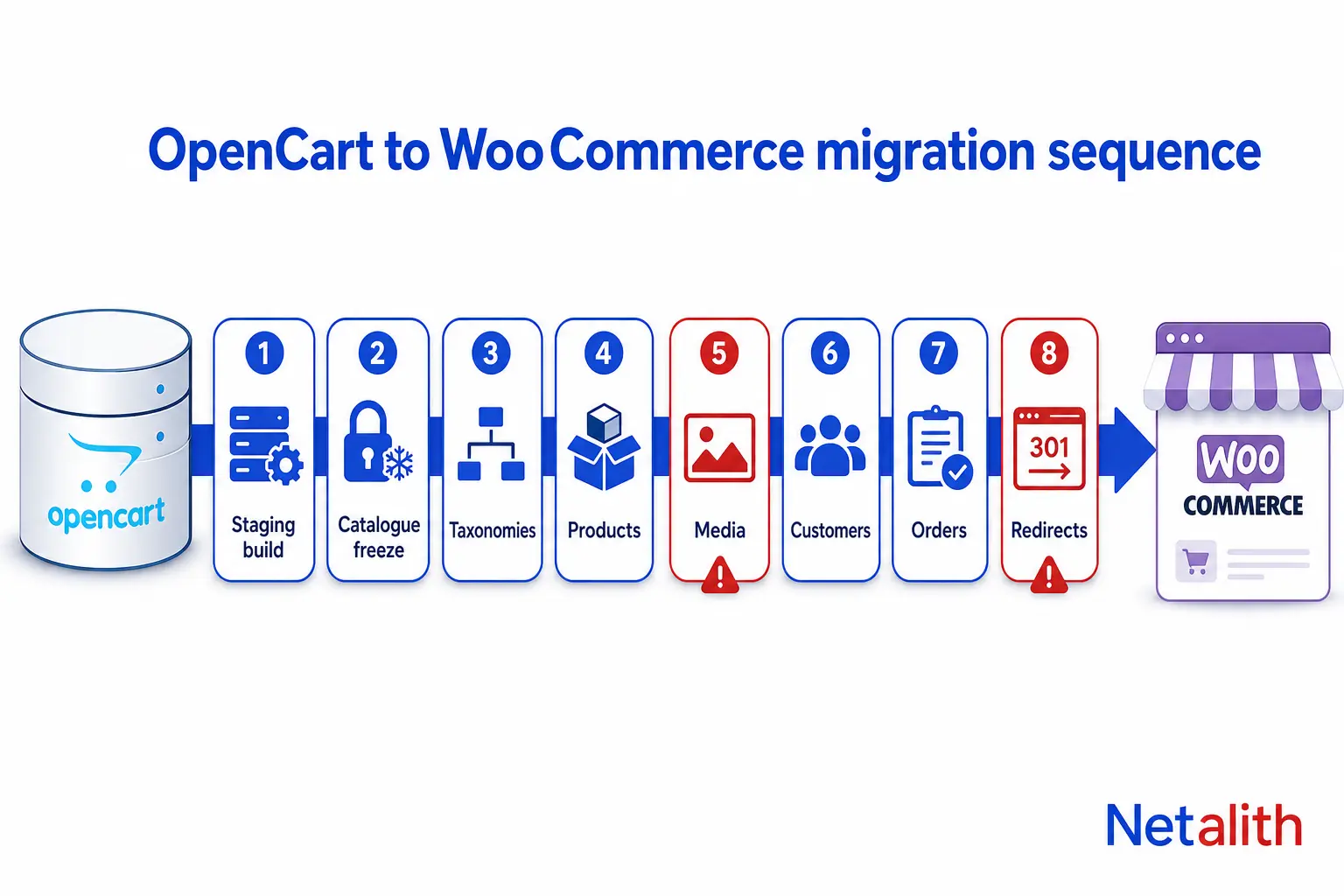
Order matters more than tooling. Run it in this sequence and most of the classic failures never happen.
- Build the target on staging first, on the same PHP and MySQL versions production will run. Settle the permalink structure here, before a single product exists.
- Freeze catalogue edits, not orders. The store keeps selling. You stop editing products, prices and categories, so your extract stays valid.
- Taxonomies before products. Categories, global attributes and brands go in first. Import products before the attributes exist and you get hundreds of per-product local attributes that can never drive variations.
- Products in three passes: simple products, then variable parents, then variation rows.
- Images while the old store is still live. WooCommerce pulls images by URL into the Media Library, so the OpenCart domain must still be serving
/image/cache/...at that moment. Do this before any DNS change, never after. - Customers, then orders. Orders reference both customers and products, so they go last.
- Extract the redirect map from the live OpenCart database before anything is switched off. This is the step people skip, and it is unrecoverable once the old stack is gone.
- Cut over, then keep the OpenCart stack online and read-only for 30 days. You will need it to answer a support question or recover a field you did not map.
The actual downtime window is short — a final delta of orders placed during the freeze, then DNS. Everything expensive happens before it.
How to get product data out of OpenCart cleanly
OpenCart has no dependable built-in product export, so the source of truth is the database. A query shaped to WooCommerce column names is faster than any intermediate format, because the output is already an importable file.
SELECT
  COALESCE(NULLIF(p.sku, ''), p.model)  AS 'SKU',
  pd.name                               AS 'Name',
  pd.description                        AS 'Description',
  pd.meta_description                   AS 'meta:_yoast_wpseo_metadesc',
  p.price                               AS 'Regular price',
  p.quantity                            AS 'Stock',
  CASE WHEN p.status = 1 THEN 1 ELSE -1 END AS 'Published',
  p.weight                              AS 'Weight (kg)',
  GROUP_CONCAT(DISTINCT pi.image ORDER BY pi.sort_order SEPARATOR ', ') AS 'Images'
FROM oc_product p
JOIN oc_product_description pd
  ON pd.product_id = p.product_id
 AND pd.language_id = 1
LEFT JOIN oc_product_image pi
  ON pi.product_id = p.product_id
GROUP BY p.product_id;
Three things that are not obvious from the schema:
COALESCE(NULLIF(p.sku, ''), p.model)exists because most OpenCart stores never populatedskuand have been usingmodelas the identifier for years. Pick one and keep it stable — every later re-import matches on it.- The
Imagescolumn has to contain absolute URLs on the still-live domain, with the mainp.imagevalue first so it becomes the featured image. - Category paths come from
oc_category_path, notoc_product_to_category. WooCommerce expects the full hierarchy in one cell, with levels separated by a greater-than sign, which means walking the path table and joining the level names in order.
Run the extract twice, a day apart, and diff the output. If the two files differ, your catalogue freeze is not actually in force.
Turning OpenCart options into WooCommerce variations
This is the hardest mapping in the whole migration and the one that automated tools handle worst, because the two models mean different things.
An OpenCart option is an add-on attached to a product: pick a value, optionally adjust the price by a prefix and amount. A WooCommerce variation is a real child product with its own SKU, price, stock level and image. One is a modifier; the other is an entity.
The rule I use to decide:
- Does the choice have its own stock? Then it is a variation. Size and colour on apparel, capacity on a part — these become attributes plus variation rows.
- Does it only change the price? Gift wrapping, extended warranty, engraving. These are product add-ons, not variations. Forcing them into a variation matrix multiplies your product count for nothing.
- Is it free text, a file upload or a date? WooCommerce has no native equivalent. Plan an add-on plugin or custom cart meta.
Prices need converting too. OpenCart stores an option price as a modifier (+15.00) against the base product; WooCommerce variations store the absolute price. Compute it during the extract, not by hand afterwards.
Once mapped, the CSV shape is strict: the parent row carries Type = variable with every attribute value listed, each child row carries Type = variation, a unique SKU, a blank ID, and a Parent value holding the parent SKU or an ID written as id:123. Attribute names and values must match the parent exactly, including capitalisation.
One current detail worth knowing, because it changes how many passes you run: from WooCommerce 11.1, an update import can create new variations for an existing variable product in a single file, provided the parent row appears before its variation rows and each variation has a unique mapped SKU with a blank ID. On earlier versions, or when you cannot guarantee row order, you need the old two-import workflow — parent first, then a variation-only file (WooCommerce product CSV importer documentation). Check the version on the target install before you plan the passes.
Whatever route you take, the importer works in one request, so split large catalogues into batches of a few hundred rows. A single oversized file that dies halfway leaves you reconciling a partial import, which is slower than the batching would have been. If the catalogue, options and order history together look like more than a weekend, this is the point where handing the extract and load to someone who has done it before is cheaper than learning it on your own store — it is the bulk of what our ecommerce data migration work consists of.
Keeping your rankings: mapping OpenCart URLs to WooCommerce
Traffic loss after a replatform is almost never a ranking penalty. It is a few thousand URLs quietly returning 404.
OpenCart 3 keeps its SEO keywords in oc_seo_url, each row tying a query such as product_id=42 to a keyword. That table is your redirect map. Extract it, join it to the new WooCommerce slug for the same product, and you have old path to new path in one file. OpenCart 4 restructured the same table, so confirm the column layout on your own install rather than copying a query from a tutorial.
The parts that catch people:
- Decide the permalink structure first. WooCommerce defaults to
/product/slug/and/product-category/slug/, while OpenCart often serves a nested category path. Changing your mind after import invalidates the whole map. - Stores without SEO URLs need query-string redirects. A rule matching only the path will never fire on
index.php?route=product/product&product_id=42— the condition has to test the query string itself, which is a different directive in both Apache and nginx. - Carry the metadata.
meta_titleandmeta_descriptionalready exist per product and per language in OpenCart. Map them into your SEO plugin meta keys during import; rewriting them later is a project of its own. - Do not blanket-redirect to the homepage. Discontinued products should 301 to the closest surviving category or return 410. A mass redirect to the root is treated as a soft 404 and loses whatever the page had.
- Keep internal links honest. Descriptions and CMS pages are full of hard-coded old paths. Rewrite them in the database rather than relying on the redirect layer to catch every one.
After cutover, submit the new sitemap and watch coverage for a month. A short dip while the index refreshes is normal; a sustained drop means your map has holes.
Customers, orders and the password problem
Customer records move easily. Passwords do not: OpenCart and WordPress hash them differently, and neither can read the other, so no tool can migrate a usable password. Two honest options:
- Force a reset. Import the accounts, send a password-reset campaign at launch. Fine for stores where repeat purchase is rare, and it costs you nothing.
- Verify the legacy hash once. Store the old hash as user meta and hook WordPress authentication so the first successful login validates against it, rehashes with WordPress, then deletes the meta. Customers never notice. Worth the hour of work for any store with real repeat buyers, because a reset email at cutover is a conversion event you will lose part of.
Order history is a budget decision, not a technical one. Ask what the orders are for. Customer self-service and reorder flows need them inside WooCommerce. Accounting and warranty lookups usually do not — a read-only archive of the old store, or an exported dataset, serves that at a fraction of the cost. Importing years of orders is routinely the single largest line in a migration quote.
If you do import them, two rules. Carry the recorded totals and tax exactly as they were; never let the new store recompute historical orders against current tax rules. And map order statuses deliberately rather than by name — the two systems use overlapping words for different states, and a wrong mapping can re-trigger emails or reopen fulfilment.
Finally, write orders through WooCommerce CRUD classes or the REST API, not raw SQL inserts. WooCommerce maintains lookup tables, term counts and High-Performance Order Storage alongside the main records; direct inserts skip all of it and leave a store that reports wrong numbers in ways that are hard to trace back to the migration.
Migration plugins versus doing it yourself
There are three routes: the free CSV importer built into WooCommerce, a paid migration service, or a scripted migration. Rather than naming a winner, here are the criteria I actually judge them on — the answers change by store.
| Criterion | Why it decides the choice |
|---|---|
| Where does the data travel? | Hosted migration services move your customer records through their own infrastructure. For an EU store that is a data-processor question your DPA has to cover, before it is a technical one. |
| Does it install a connector on both stores? | A bridge script with write access to a live production cart is a real attack surface. Removing it after the migration must be on the checklist. |
| Does it produce the 301 map? | Many do not, or charge for it separately. The redirects are the part that protects revenue, so a tool that moves products but not URLs has solved the cheap half. |
| Can you re-run it safely? | You will run the product pass several times. Matching on SKU means a re-run updates; no matching means a re-run duplicates your catalogue. |
| How are options handled? | Test this on ten real products before you buy anything. It is where automated migrations are weakest, and the demo catalogue will never show it. |
| What is the rollback? | A database snapshot taken immediately before each pass. If a tool cannot be undone with a restore, it cannot be used on production. |
As a rough guide: a few hundred simple products with clean SKUs is a CSV job, and the built-in importer plus a hand-built redirect map will beat any paid tool on both cost and control. Heavy option structures, multi-language catalogues or order history point to a scripted migration, because you need per-row logic that no generic mapper exposes.
The first two weeks after cutover
Launch day is not the end of the migration. Work this list:
- Crawl the whole new site and the full old URL list; every old URL must return a single 301, not a chain.
- Place a real test order through every payment and shipping method, including a guest checkout and a refund.
- Check transactional email actually sends and renders — new host, new sending domain, new deliverability.
- Compare product counts, category counts and total stock value against the old database. A mismatch here is a silent partial import.
- Spot-check twenty variable products on the storefront: can a customer select every option and reach checkout?
- Watch Search Console coverage and the top landing pages from the previous quarter, weekly, for at least a month.
- Confirm the old store is read-only and any migration bridge plugin has been removed from it.
Two weeks of boring checks is the difference between a migration that nobody notices and one you are still explaining in six months. If you would rather hand the whole sequence to someone who has run it before, tell us about your store and catalogue size and we will scope it.
FAQ
Questions fréquentes
Can I migrate from OpenCart to WooCommerce without losing SEO rankings?
Yes, if you build a complete 301 map before the old store goes offline. OpenCart 3 keeps its SEO keywords in the oc_seo_url table, which is effectively your redirect source; join it to the new WooCommerce slugs and redirect every old URL to a single new one. Also carry over the existing meta titles and descriptions, and avoid blanket-redirecting discontinued products to the homepage, which search engines treat as a soft 404.
How long does an OpenCart to WooCommerce migration take?
A few hundred simple products with clean SKUs and no order history is a matter of days, most of it spent on redirects and testing rather than the import itself. Complex option structures, multiple languages, or years of order history push it into weeks, because each needs per-row logic rather than a generic mapper. The product import is rarely the long pole.
Will my customers have to reset their passwords?
Not necessarily. OpenCart and WordPress use different password hashing, so no tool can transfer a working password. You can either send a reset campaign at launch, or store the legacy hash as user meta and hook WordPress authentication so the first successful login verifies against it, rehashes the password, and deletes the old value. The second option is invisible to customers and worth the effort for stores with repeat buyers.
Can the built-in WooCommerce CSV importer handle OpenCart product options?
Only after you have translated them. OpenCart options are price and choice modifiers attached to a product, while WooCommerce variations are child products with their own SKU, price and stock. Choices that carry stock become attributes plus variation rows; choices that only change the price belong in an add-ons plugin instead. Once mapped, the importer handles the parent and variation rows, though the number of passes depends on your WooCommerce version.
Should I import my old order history into WooCommerce?
Only if something in the new store needs it. Customer self-service, reorder flows and loyalty calculations need orders inside WooCommerce; accounting, warranty lookups and tax records usually do not, and a read-only archive of the old store serves those far more cheaply. Historical order import is routinely the largest single cost in a migration quote.
Does it matter whether I am on OpenCart 3 or OpenCart 4?
The sequence is the same, but the extraction queries differ. OpenCart 4 restructured several tables, including the SEO URL table, and its newer variant handling maps more directly onto WooCommerce variable products than OpenCart 3 options do. Confirm the schema on your own install before reusing any query, including the ones in this article.