Gemini Down? How to Check, What the Errors Mean, and What to Do
Gemini down? Check the right status page, decode errors like 1076 and “Something went wrong”, see the 2026 outage record, and keep your app running.

Long Nguyen
Développeur fullstack · Ingénieur IA · Chercheur
Is Gemini down right now? Check the right status page, not just one
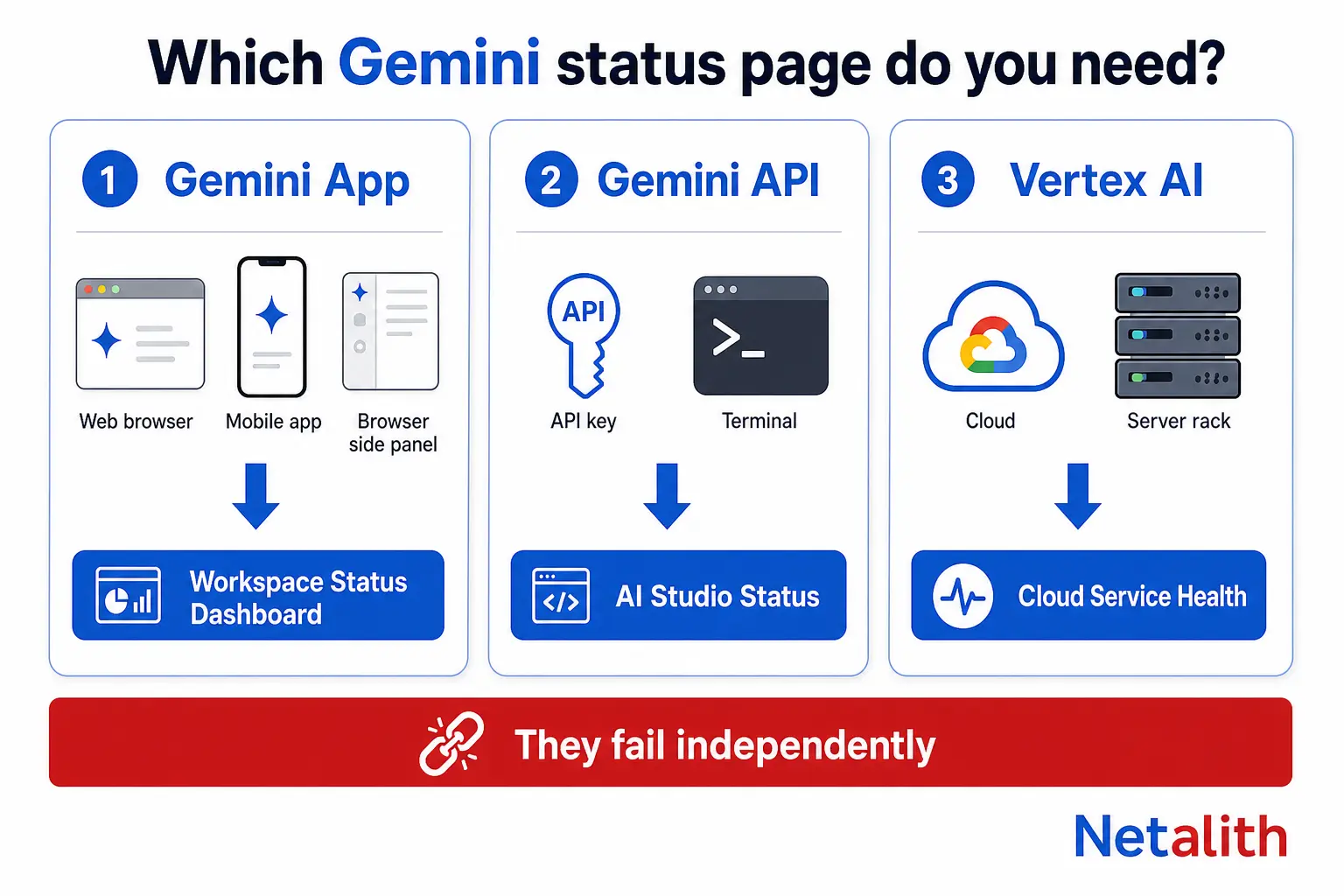
"Gemini" is not one service. It is at least three products that fail independently, and each one has its own status page. Checking the wrong one is why people conclude Gemini is fine when their own integration is broken, or panic when only the Chrome side panel is affected.
| What you are using | Official status source | What it covers |
|---|---|---|
| gemini.google.com, Gemini mobile app, Gemini in Chrome, Gemini in Workspace | Google Workspace Status Dashboard — google.com/appsstatus/dashboard/ | The consumer and Workspace Gemini app across web, macOS, iOS, Android and the Chrome side panel |
| Gemini API via Google AI Studio (an API key from aistudio.google.com) | aistudio.google.com/status | The developer API surface that your app calls |
| Gemini on Vertex AI / Google Cloud | status.cloud.google.com | The enterprise Cloud surface, reported per region |
The practical rule: an outage in the Gemini app does not mean the Gemini API is down, and the reverse is also true. They share models but not the serving path, the auth layer, or the orchestration around them. If your chatbot stopped answering and the Workspace dashboard is green, you are looking at the wrong dashboard.
Only the Google Workspace Status Dashboard is authoritative for the app. It is also slower than your users — Google typically posts an incident 20 to 60 minutes after reports start, because it posts only once the issue is confirmed and scoped.
Why Downdetector says Gemini is down when Google says it is fine
Downdetector is a report aggregator, not a monitor. It counts people clicking "I have a problem", so it measures attention, not availability. That produces two systematic distortions worth knowing before you trust a spike:
- It over-reports partial failures. A feature breaking for 5% of users during peak US hours generates more reports than a total outage at 3am UTC. On , Gemini drew over 2,000 reports with the majority pointing at the mobile app, while the web surface kept working for most people.
- It under-reports API outages. Developers do not file Downdetector reports; their monitoring pages them instead. A Gemini API incident can be invisible on Downdetector while every one of your production requests is returning 503.
Use Downdetector for one thing only: confirming within 60 seconds that other people see what you see, before you start debugging your own code. Then switch to the official dashboard for the actual status, scope and resolution time.
Is it Gemini, or is it you? A 60-second self-check
Three failure classes get reported as "Gemini is down" and only one of them is an outage. Run this in order — it takes under a minute and it eliminates the two non-outage causes first.
- Open Gemini in a private window. If it works there, your problem is a stale session, a cached bundle or a browser extension — not Google. Sign out and back in rather than waiting.
- Check a second Google service. If Drive and Gmail are also failing, it is a broader Google incident or your own network, and Gemini is just the symptom you noticed first.
- Check the message you are getting. Country, eligibility and account-type errors look like outages to users but are permanent for that account. "Gemini isn't currently supported in your country" is a real, recurring Google-side message and no amount of retrying fixes it.
If all three pass and the failure persists across devices and networks, it is a genuine outage. Stop debugging and go read the dashboard.
What Gemini's error codes actually mean
The app and the API speak different error languages. The app shows opaque numeric codes and friendly strings; the API returns standard HTTP status codes you can act on programmatically.
Gemini app errors
| What you see | What it usually is | Is retrying worth it? |
|---|---|---|
| "Something went wrong" | The generic server-side failure. Google's own incident reports use this exact string when describing elevated error rates, so it genuinely is the outage message | Yes — resubmitting the prompt often succeeds during partial outages |
| Error 1076 / Error 1099 | Reported widely during the global outage; both were server-side, not account-side | Yes, but only after the dashboard shows mitigation |
| "Gemini is currently on a break" | A capacity or load-shedding message, documented in Google's own past incident reports | Yes, after a few minutes |
| "Gemini isn't currently supported in your country" | Eligibility or geo-routing, not availability. Has appeared as a genuine bug for whole countries | No — retrying never clears it |
| Chat history missing, prompts still work | Partial degradation of the history service, which fails separately from inference | No — your data is not lost, the retrieval path is |
Gemini API errors
| Status | Meaning | Retry? |
|---|---|---|
| 400 | Malformed request or invalid parameters | No — fix the request |
| 402 | Prepay credits depleted | No — top up billing |
| 403 | Invalid, blocked or leaked API key | No — rotate the key |
| 408 | Request timeout | Yes, with backoff |
| 429 RESOURCE_EXHAUSTED | Rate limit or quota hit — often your limit, not an outage | Yes, with backoff |
| 500 / 502 / 503 UNAVAILABLE / 504 | Server-side failure or overload. This is what a real API outage looks like in your logs | Yes, with backoff |
The distinction that saves the most time on-call: 429 is almost never an outage. A burst of 429s during a traffic spike is your own quota, and switching providers will not help. A burst of 503s across every region is Google.
How often does Gemini actually go down? The 2026 record
Treat marketing uptime claims with suspicion and read the incident history instead. Here is what Google's own dashboard and contemporaneous reports recorded for the Gemini app in 2026:
| Date | Duration | Impact | Stated cause |
|---|---|---|---|
| Partial day | Chat histories not visible on Gemini web and mobile; prompts still worked | History retrieval, investigated separately from inference | |
| ~7 hours (03:20–10:30 US/Pacific) | All surfaces: web, macOS, iOS, Android and Gemini in Chrome. Around a 50% error rate on prompt submission; Chrome side panel timed out persistently; Drive attachments failed for Workspace users | Google's preliminary analysis cited a backend database performance issue affecting retrieval of the Gemini App tools catalog | |
| Hours, partial | 2,000+ Downdetector reports, concentrated on the mobile app | Not published as a full Workspace incident | |
| 7 hours 22 minutes | Gemini listed as impacted on the Workspace dashboard | Published on the dashboard |
Two patterns matter if you are building on this platform:
- Gemini outages are long. Two incidents in 2026 ran past seven hours. That is well beyond what a retry loop can absorb — it is a full business day for a support chatbot.
- The model is rarely the thing that breaks. June's root cause was the tools catalog failing to load, not inference. February's was history retrieval. The orchestration around the model is the fragile part, which is exactly what most fallback designs ignore.
What to do while Gemini is down
For everyday use, in rough order of how much they actually help:
- Resubmit the prompt. During partial outages the error rate was around 50%, not 100% — a second attempt frequently went through on .
- Switch surface. If the mobile app is failing, try the web app, and vice versa. They failed independently in three of the four 2026 incidents.
- Use AI Studio. aistudio.google.com runs on the developer surface and frequently stays up when the consumer app is down. It is free, and the same models are available in the prompt playground.
- Drop tools and attachments. If the failure is in the tools or file pipeline — the June root cause — a plain text prompt with no Drive attachment and no extensions often still works.
- Do not clear your history or delete the app. Nothing you do client-side fixes a server-side incident, and you can lose data trying.
If your product calls the Gemini API, design for a seven-hour outage
This is where most teams get it wrong. They read the retry guidance, add exponential backoff, and consider resilience done. Backoff solves a 30-second blip. It does nothing for the seven-hour incidents Gemini actually had in 2026 — it just turns an error page into a very slow error page.
Step 1: do not write retry logic you already have
Google's official client SDKs already retry transient errors with exponential backoff by default. Per the Gemini API troubleshooting guide, the Python SDK retries transient failures up to four times with an initial delay of roughly one second and a maximum delay of 60 seconds. Writing your own loop on top of that gives you 16 attempts, not 4, and quietly multiplies your bill during an incident. Only hand-roll retries when you need behaviour the SDK does not give you.
Step 2: retry the right status codes only
Retry 408, 429 and 5xx with jitter. Never retry 400, 402 or 403 — those are your bug, your billing or your key, and retrying turns one error into a storm.
import random, time

RETRYABLE = {408, 429, 500, 502, 503, 504}

def call_with_backoff(fn, attempts=4):
    for i in range(attempts):
        try:
            return fn()
        except Exception as e:
            code = getattr(e, 'code', None)
            if code not in RETRYABLE or i == attempts - 1:
                raise
            time.sleep(min(60, 2 ** i) + random.uniform(0, 1))
Step 3: degrade features before you switch vendors
This is the lesson from June's root cause and it is the one almost nobody implements. The failure was in the tools catalog, not the model. A fallback that immediately jumps to a second vendor would have been slower and more expensive than simply retrying the same model with tools turned off.
Order your fallback ladder cheapest-first:
- Retry the same call with backoff.
- Retry with tools, extensions and file attachments disabled — the orchestration layer fails far more often than inference.
- Fall back to a smaller or older Gemini model, which is served separately and is often unaffected.
- Only then fail over to a second provider.
- If everything fails, return a cached or templated answer and collect the user's question for a human — never a stack trace.
Step 4: decide what your product does at hour three
Write this down before you need it. For a support chatbot, the honest answer is usually: stop pretending, say the assistant is unavailable, and capture the user's email. A silent spinner for seven hours costs more trust than an outage notice does. We build this fallback ladder into every AI chatbot and agent we develop, because single-provider LLM products do not survive their first real incident intact.
Step 5: monitor from outside your own app
Alert on your own error rate per status code, not on Google's dashboard. Google posts incidents after confirmation; your 503 rate climbs immediately. A five-minute synthetic call to the API from outside your stack will tell you about an outage well before a status page does.
If you are running an AI feature in production on a single provider and have not tested what happens when it goes dark for an afternoon, that is the gap worth closing first. Tell us what you have built and we will scope the fallback work — the quote is free and you can describe the problem in plain language.
FAQ
Questions fréquentes
Is Gemini down right now?
Check the surface you are actually using. For the Gemini app, Chrome side panel or Gemini in Workspace, the authoritative source is Google's Workspace Status Dashboard at google.com/appsstatus/dashboard/. For the Gemini API, check aistudio.google.com/status, and for Vertex AI check status.cloud.google.com. Downdetector is useful for confirming other people see the same thing, but it measures user reports rather than actual availability, so it spikes on partial failures and misses API outages almost entirely.
Why does Gemini say “Something went wrong”?
That is Gemini's generic server-side error, and Google uses the same wording in its official incident reports when describing elevated error rates. During the 10 June 2026 outage, users hit roughly a 50% error rate on prompt submission with that message. Resubmitting the prompt often works during a partial outage. If it fails consistently across devices and networks, it is a server-side incident and nothing you change on your end will fix it.
Does a Gemini app outage mean the Gemini API is down too?
No. The consumer Gemini app and the Gemini API are separate serving surfaces with separate status pages, and they fail independently. The app can be down while API calls from your application succeed normally, and an API incident can be invisible to app users. This is why you should check the status page that matches the surface you are using rather than searching for general outage news.
How long do Gemini outages usually last?
Longer than most people expect. The 10 June 2026 incident ran roughly seven hours, from 03:20 to 10:30 US/Pacific, and an incident on 11 September 2026 was recorded at 7 hours and 22 minutes on the Workspace dashboard. Shorter incidents of under an hour also occur. The practical implication for anyone building on the API is that retry logic alone is not enough; a multi-hour outage needs a real fallback plan.
What caused the June 2026 Gemini outage?
In its preliminary analysis on the Workspace Status Dashboard, Google attributed it to a performance issue in a backend database that affected retrieval of the Gemini App tools catalog. In other words, the model itself was not the failure point; the orchestration layer around it was. That pattern matters for developers because it means disabling tools and attachments is often a faster recovery path than failing over to a different AI provider.
Should my application retry Gemini API errors automatically?
Retry 408, 429 and 5xx responses with exponential backoff and jitter, and never retry 400, 402 or 403, which indicate a bad request, depleted credits or an invalid key. Note that Google's official client SDKs already retry transient errors by default; the Python SDK retries up to four times with an initial delay of about one second and a maximum of 60 seconds. Adding your own loop on top multiplies both the attempts and the cost.