TikTok Shop products not syncing: the 6 causes I check, in order
TikTok Shop products not syncing? Check it in order: warehouse mapping, category-required attributes, review-stage rejections, then expired authorization.

Long Nguyen
Développeur fullstack · Ingénieur IA · Chercheur
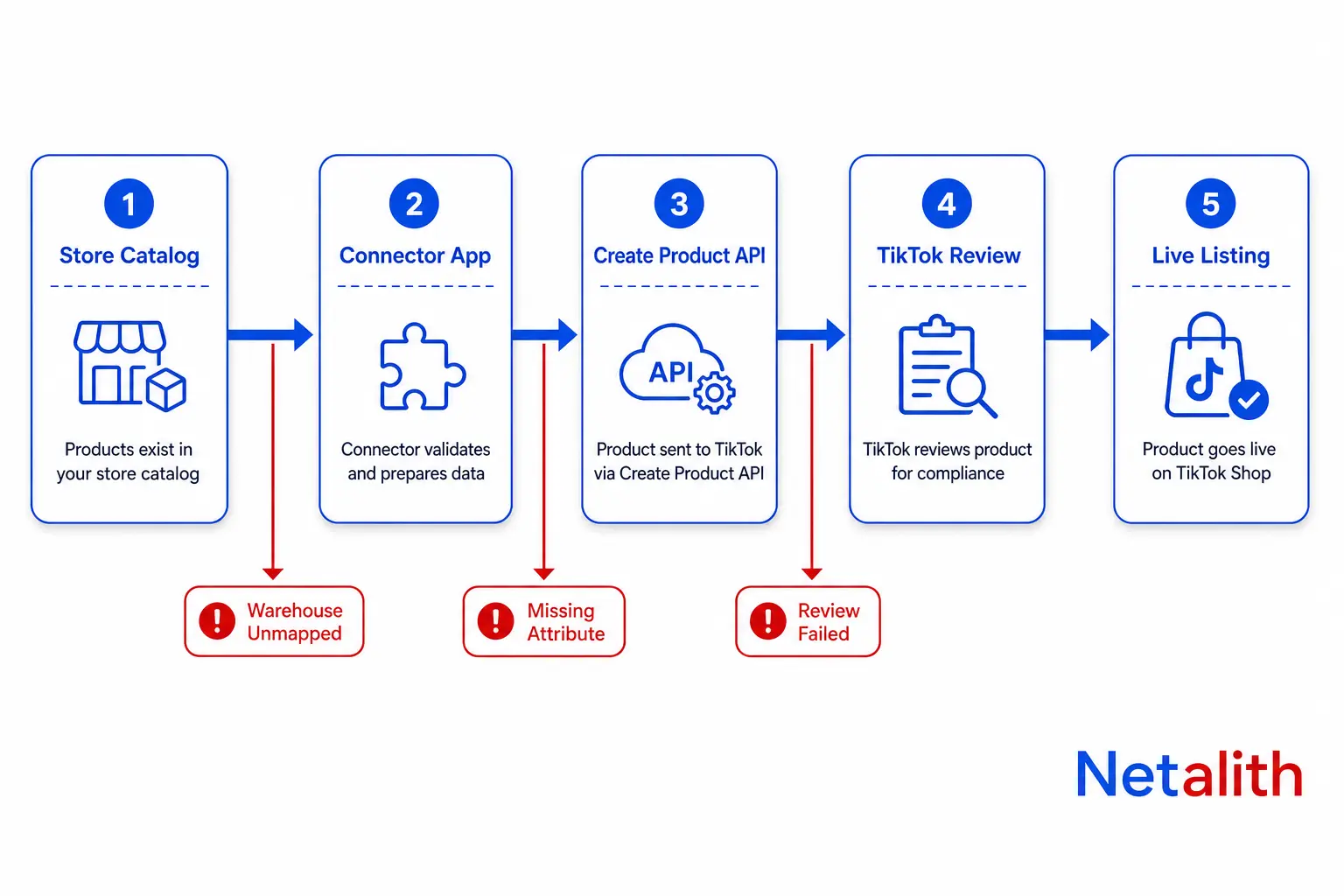
TikTok Shop products not syncing: the short answer
"Products not syncing" is three unrelated failures wearing one label, and the fix for one is useless for the other two. Before you touch a setting, work out which one you actually have.
| What you see | What is actually happening | Where the real error lives |
|---|---|---|
| Sync errors instantly; the product never reaches Seller Center | TikTok's Create Product call rejected your payload | Your connector app's error / exception log |
| Product reaches Seller Center but never goes live | It passed field validation and is in (or failed) TikTok's review queue | Seller Center → Products → Suspended |
| Everything worked, then every product stopped at once | The authorization between your store and the shop broke | The app's connection / token status |
Ordered by how often each one is the culprit on a real seller account: warehouse and inventory mapping, category-required attributes, review-stage rejection, then authorization. Work them in that order and most "sync is broken" tickets close without support ever replying.
Products will not sync at all: warehouse and inventory mapping
The single most common blocker, and the one with the most misleading error message. A sync fails with something like param body.skus(0)inventory is empty while the seller is staring at a product that clearly has stock.
Inventory is not empty. The mapped warehouse is empty. Your connector pushes stock per location, TikTok accepts stock per warehouse, and if the store location holding the stock is not mapped to a TikTok warehouse, the quantity array arrives with nothing in it.
- Map the location that actually holds stock. In the TikTok app inside your store: Shop Settings → Shop Management → Fulfillment → Pickup Warehouse Mapping. If you fulfil through a print-on-demand or 3PL provider, map that location, not your default store location.
- Inventory must be tracked and above zero at the mapped location. Untracked inventory reads as empty, not as unlimited.
- Regions must match. A UK Seller Center will not accept products from a store whose TikTok integration is configured for the US. Region mismatch usually shows up as a validation error, not as a region error.
- New shops are on probation. TikTok caps daily product uploads for new sellers. A batch that syncs 40 products and then silently stops is almost always that cap, not a bug — check the current limit in Seller Center rather than re-running the job all afternoon.
Field-level sync errors and what they actually mean
TikTok does not validate products against one global schema. It validates against the rules of the category you assigned. That is why the same spreadsheet that listed fine last month fails today under a different category — and why "it works for my other products" is not evidence of anything.
| Error you see | What it really means | Fix |
|---|---|---|
| inventory is empty | Store location not mapped to a TikTok warehouse | Map the warehouse, then re-sync |
| product package size is invalid | Package weight or dimensions are blank, zero, or in a format the category rejects | Set package weight and dimensions on the category template, not just on the product |
| category is invalid | A parent category was sent instead of a leaf, or the category is restricted for your shop | Always assign the deepest leaf category |
| missing required attribute | The category demands an attribute your product data does not carry | Read the category's attribute list before pushing, not after failing |
| GTIN required | The category requires a barcode and does not grant your shop an exemption | Supply the GTIN, or the exemption reason if the category allows one |
| brand not authorized | Branded product without brand authorization on the shop | Complete brand authorization, or list it unbranded if genuinely unbranded |
If you are building the integration yourself rather than relying on an off-the-shelf app, the sequence matters more than the endpoint list. Fetch the category, then TikTok's Get Category Attributes endpoint and the category rules, resolve every required attribute locally, and only then call Create Product. Pushing first and reading the rejection afterwards is how teams end up with half a catalogue stuck in draft. We do this category-rules-first sequence on every TikTok Shop API integration we build, because it turns an opaque remote rejection into a readable local validation error.
Synced, but the product still is not on TikTok Shop
Your app says synced. Buyers cannot find the product. Nothing is broken — you are reading the wrong signal. "Synced" means TikTok's API accepted the payload. It is not a promise the listing is live.
Every product that reaches Seller Center moves through a pipeline:
- Pending — queued in your connector, not yet pushed.
- Reviewing — TikTok is checking it against listing policy. Not purchasable yet.
- Live, Failed, Suspended, or Deactivated.
Three things about that review stage are worth knowing before you open a ticket:
- There is no published review SLA. Hours is normal; longer happens, especially in sensitive categories.
- Editing a product under review restarts the review. This is the most common self-inflicted delay I see. A seller edits the title three times in two hours wondering why nothing has gone live, and each edit resets the clock.
- Failed is not the same as Suspended. Failed listings sit under Products → Suspended → Failed with a per-product reason you can act on. Suspended is a TikTok-initiated enforcement action; editing fields will not lift it.
The rejection reasons that account for most failures are not exotic: traffic redirection (contact details, links to other stores, watermarks pointing elsewhere), misleading claims in the title or description, category mismatch, and duplicate or low-quality images. Read the exact wording TikTok gives you — it names the policy, and the policy names the field.
Sync worked yesterday and stopped today
When every product fails at once and nothing about your catalogue changed, stop looking at product data. It is authorization.
- Token refresh failed. TikTok Shop connectors hold a short-lived access token kept alive by a long-lived refresh token. One failed refresh is recoverable. A refresh job that has been quietly erroring for weeks is not — you will have to re-authorize.
- The shop authorization expired. The seller's grant to the app has a one-year life. It does not warn you. Put the re-authorization date in a calendar the day you connect the shop.
- The OAuth popup is being blocked. Merchants have lost connections purely because a browser started blocking third-party cookies and the re-auth window never completed. If re-connecting silently does nothing, try a different browser profile before blaming the app.
- Scopes changed. The tell is asymmetry: order sync still works, product writes fail. Read calls and write calls use different scopes, and an app update can change what was approved.
Hard question worth answering honestly: when did the last successful product push happen? If you cannot answer that in under a minute, the real problem is not the sync — it is that you have no monitoring, and you found out about the outage from a drop in sales.
Why only some products sync and the rest do not
A partial sync is more informative than a total one, because the products that failed share something. Find the shared attribute and you have found the cause.
- They share a category. Most likely answer. One category demands an attribute, a certification, or a GTIN the others do not. Group the failures by category before anything else.
- They share a variant shape. Deep or nested variant structures, duplicate SKUs, and SKUs that differ between store and shop all break mapping. TikTok maps on SKU; if the SKU moved, the link is gone.
- They share an image problem. Undersized images, watermarks, promotional text burned into the image, and another marketplace's branding are all rejected.
- They share a brand. Branded items need brand authorization on the shop; unbranded listings go through untouched.
- They are new. Products created after a re-link sometimes never appear in the app's mapping list at all. Re-linking the store, or mapping manually once, usually clears it.
The ten-minute diagnostic order
Run these in sequence. Each step either finds the cause or rules out a whole class of causes, which is why the order matters more than the individual checks.
- Does Seller Center show the product at all? No → it is a push failure, go to step 2. Yes → skip to step 5.
- Open the connector's error log and read the actual error string. Not the UI's summary — the API response.
- Is it failing for every product or some? Every product → check authorization and warehouse mapping. Some → group the failures by category.
- Check Pickup Warehouse Mapping and confirm the mapped location has tracked stock above zero.
- In Seller Center, check the product's status: Reviewing, Failed, Suspended, or Deactivated.
- If Failed: Products → Suspended → Failed, read the per-product reason, fix the named field, resubmit once.
- If Suspended: do not resubmit cosmetic edits. Match the enforcement notice to the policy it cites, and appeal with the product ID and the exact wording.
Resubmitting the same listing with small changes is the most expensive mistake in this list. If the product category is restricted for your shop, no amount of title editing will fix it, and repeated rejections are not free.
How to stop the sync breaking again
Every fix above is reactive. Four things make the problem stop recurring:
- Subscribe to product webhooks. TikTok pushes product status and product information changes. Wire those into an alert and a delisting reaches you the hour it happens, instead of three weeks later via a sales report.
- Reconcile nightly. Pull the shop's product list, diff it against your store, alert on anything missing or not active. This single job catches more real problems than any dashboard.
- Validate before pushing. Fetch category rules and required attributes first and fail locally with a readable message. Remote rejections are expensive to debug; local validation errors are not.
- Treat package data as catalogue data. Weight and dimensions belong on category templates, maintained deliberately — not filled in per product by whoever uploaded last.
If you have worked through the diagnostic order and still cannot tell whether the fault is your product data, the connector, or the shop configuration, that ambiguity is itself the finding — and it usually means the integration has no observability. A $20 Audit + Roadmap returns a prioritised list of what is actually broken and the order to fix it in, within 24–48 hours.
FAQ
Questions fréquentes
Why does TikTok Shop say inventory is empty when my product clearly has stock?
Because TikTok is reading the mapped warehouse, not your store. If the location holding the stock is not mapped to a TikTok warehouse in Shop Settings > Shop Management > Fulfillment > Pickup Warehouse Mapping, the quantity array arrives empty. Map the location that actually fulfils the order, including your print-on-demand or 3PL location if you use one, and confirm inventory is tracked and above zero there.
My product shows as synced but is not on TikTok Shop. Why?
Synced means TikTok's API accepted the payload, not that the listing is live. The product then enters a review stage, after which it becomes live, failed, suspended, or deactivated. Check its status in Seller Center under Products. If it is under Suspended > Failed, TikTok gives a per-product reason naming the field or policy to fix.
How long does TikTok Shop take to review a synced product?
There is no published SLA. Hours is typical, longer happens in sensitive or restricted categories. Importantly, editing a product while it is under review restarts the review, so repeated edits while waiting make the delay worse rather than better.
Why did all my TikTok Shop products stop syncing at once?
When everything fails simultaneously and the catalogue did not change, it is almost always authorization rather than product data: a failed token refresh, an expired shop authorization that needs to be re-granted after a year, a blocked OAuth popup preventing re-connection, or a change in the app's approved scopes. The tell for a scope issue is asymmetry, such as order sync still working while product writes fail.
Why do some products sync to TikTok Shop and others fail?
The failures share something. Group them by category first, since TikTok validates against per-category rules rather than one global schema, and one category may require an attribute, certification, or GTIN the others do not. After category, check for shared variant structures, duplicate or changed SKUs, image problems such as watermarks or promotional text, and branded products missing brand authorization.
Should I keep resubmitting a listing that TikTok Shop rejected?
Only once, after fixing the specific field TikTok named. Resubmitting the same listing with cosmetic changes is counterproductive if the real issue is that the product category is restricted or the item is prohibited for your shop. In that case, match the rejection wording to the policy it cites and appeal with the product ID, category, and exact wording instead.