Odoo TikTok Shop Integration: What Syncs and What Doesn't
Odoo TikTok Shop integration explained: what the native Odoo 19 connector syncs, how often, setup steps, its limits, and options for Odoo Community.

Long Nguyen
Développeur fullstack · Ingénieur IA · Chercheur
Does Odoo integrate with TikTok Shop?
Yes. Odoo ships a native TikTok Shop Connector. It pulls seller-fulfilled TikTok Shop orders into Odoo as sales orders, pushes your available stock back to TikTok Shop, and attaches shipping labels and tracking numbers to the matching delivery orders.
Three facts decide whether it fits your shop:
- Version: Odoo documents the connector for 19.0 and the releases after it. The Odoo 18 documentation has no TikTok Shop page.
- Edition: the connector is not part of the open-source Community code. The 19.0 branch of Odoo's public repository contains no TikTok module (checked on ), so plan on Odoo Enterprise.
- Scope: it is an order and inventory sync, not a full TikTok Shop back office. Refunds, disputes and fee reports stay on TikTok's side.
The rest of this guide covers what syncs and how often, the setup, the limits that are easy to miss, and what to do on Community or an older version.
What the Odoo TikTok Shop connector syncs, and how often
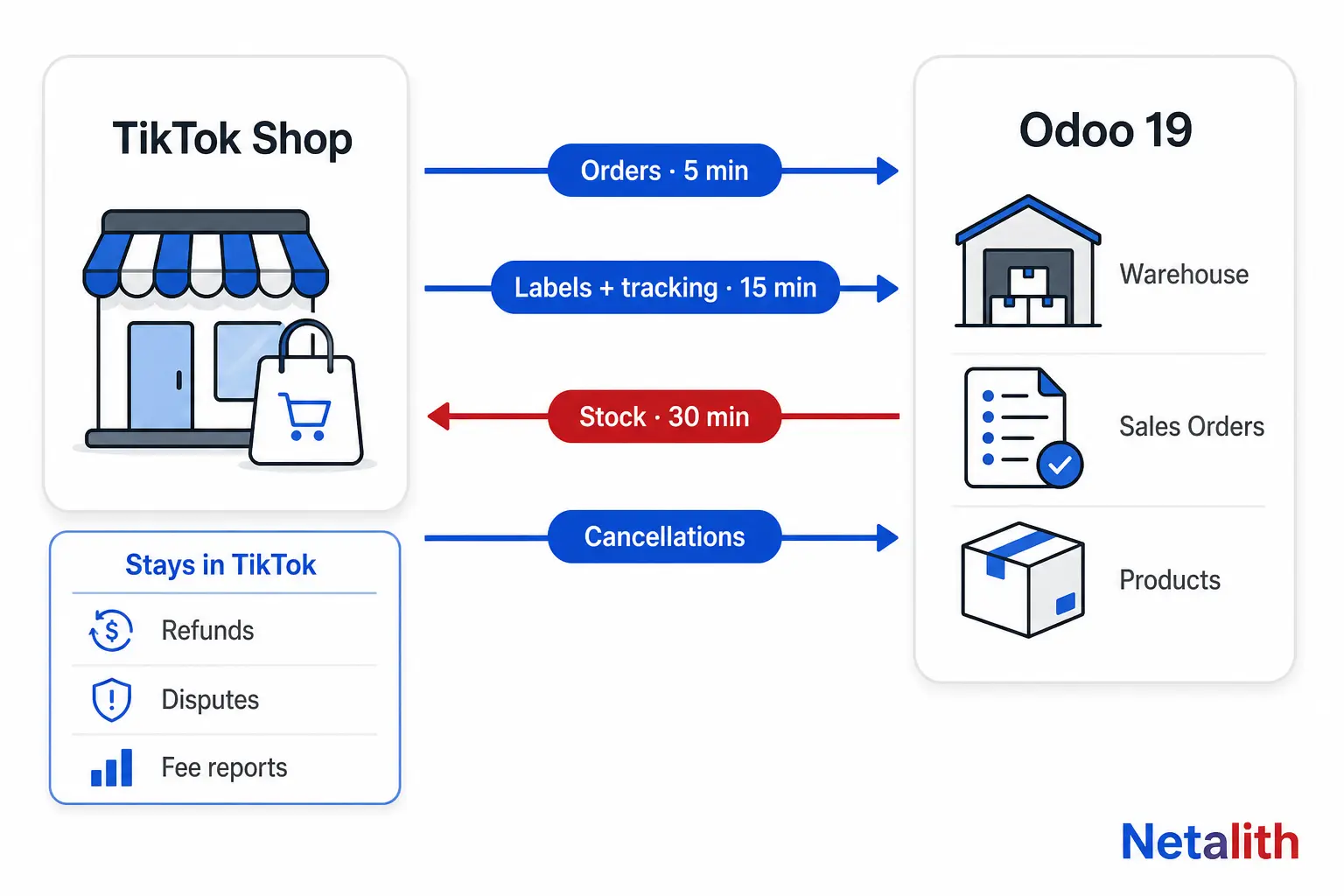
The sync is not real time. Odoo runs each data type on its own schedule:
| Data | Direction | Runs | What happens |
|---|---|---|---|
| Orders (seller-fulfilled) | TikTok Shop → Odoo | Every 5 minutes | Only orders in AWAITING_SHIPMENT or AWAITING_COLLECTION. Odoo creates a sales order, a picking in Inventory and, if no match exists, a contact. |
| Order status changes (webhooks) | TikTok Shop → Odoo | Processed every 5 minutes | A cancellation made on TikTok Shop updates the order in Odoo. |
| Shipping labels and tracking numbers | TikTok Shop → Odoo | Every 15 minutes | Fetched once the order is Awaiting Collection and attached to the delivery order. If the PDF cannot be generated, Odoo stores a link to the label. |
| Stock quantities | Odoo → TikTok Shop | Every 30 minutes | Only when inventory sync is enabled on the shop, and only from the warehouses set in the FBS Warehouse field. |
| Product catalog | TikTok Shop → Odoo | On demand (Sync Catalog) | Fetches active TikTok Shop products and matches them to Odoo products by SKU. |
Orders, labels, inventory and catalog can also be synced by hand with their buttons on the shop record. The intervals come from Odoo's TikTok Shop order management documentation.
Two wording traps in the official docs:
- FBS and FBM mean the same thing here. One page says Fulfilled By Seller, another says Fulfilled By Merchant. Both mean you ship the parcel yourself.
- Partner Center is the developer portal. You create the API app there. Daily seller work such as arranging shipment or bulk editing products happens in Seller Center, the seller-xx.tiktok.com sites the docs list per country.
Which TikTok Shop markets Odoo supports
Odoo lists 16 TikTok Shop marketplaces for the connector:
| Region | Marketplaces |
|---|---|
| The Americas | United States, Mexico, Brazil |
| Europe | United Kingdom, Germany, France, Spain, Italy, Ireland |
| Asia | Indonesia, Japan, Malaysia, Philippines, Singapore, Thailand, Vietnam |
The connector supports several seller accounts, with one marketplace per account. A brand selling in Germany, France and Spain therefore sets up three shop records in Odoo, each with its own warehouse rule and sales team.
How to connect TikTok Shop to Odoo
You need a TikTok Shop Seller account, a separate TikTok Shop Partner Center account, a short description of what the integration is for, and your Odoo database URL with a tester login.
- Register in Partner Center. Choose Add category and market, pick App developers (ISV) as the business category, fill in region and target market, then click Get app key now and wait for approval.
- Create the app. Under App & Service, set the type to Custom and the service category to eCommerce Management / Connectors. Turn Enable API on.
- Set the redirect URL to
https://<your database url>.odoo.com/tiktok/return_from_authorization. - Enable eight API scopes under Manage API: Finance Information, Fulfillment Basic, Logistics Basic, Order Information, Product Basic, Product Modify, Shop Authorized Information, Global Shop Information.
- Publish the app and copy the Service ID, App key and App secret.
- Install the connector in Odoo. In Apps, search for TikTok Shop Connector and activate it.
- Connect the shop. Go to Sales → Configuration → Shops, click Connect New Shop, and enter the three credentials. Log in with the seller account you want to link.
- Re-authorize. Back in Odoo, click Re-authorize Shop to obtain a fresh refresh token.
- Configure before go-live. Set the FBS Warehouse, run Sync Catalog, and only then enable inventory sync.
Field names and screenshots are in Odoo's TikTok Shop connector configuration guide.
Setup points to plan for
- Approval takes calendar time. The partner registration is reviewed, and new accounts may also have to submit the app for review before the API works. Start this step first, not on launch week.
- Log in with the right seller account. The authorization links whichever shop you are logged in to. Agencies and multi-shop sellers should use a clean browser session.
- Turn inventory sync on last. Stock flows from Odoo to TikTok Shop. If Odoo's on-hand numbers are wrong or still zero when you enable it, those numbers are what TikTok Shop receives.
SKU mapping: the rule that keeps stock correct
The TikTok Shop Seller SKU must match the Odoo Internal Reference of the product or variant exactly. A trailing space or a different letter case is a mismatch.
The failure is quiet. When Odoo cannot find the product, it books the order line on a default product instead. The order still appears, so nothing looks broken, but the real item's stock does not move and the next stock push can send TikTok Shop a quantity that is too high.
Check your references before the first sync. On a self-hosted or Odoo.sh database, run this in the Odoo shell:
from collections import Counter

products = env['product.product'].search([('sale_ok', '=', True)])
refs = products.mapped('default_code')

missing = [p.display_name for p in products if not p.default_code]
duplicates = [r for r, n in Counter(r for r in refs if r).items() if n > 1]
padded = [r for r in refs if r and r != r.strip()]

print('No Internal Reference:', len(missing))
print('Duplicate references:', duplicates)
print('References with stray spaces:', padded)
On Odoo Online, group the product variant list by Internal Reference to get the same answer. All three lists should be empty for anything you sell on TikTok Shop.
How you start depends on where your catalog lives:
- Products already in Odoo: run Sync Catalog to match active TikTok Shop listings to them.
- Products only on TikTok Shop: export the catalog with the bulk edit feature on TikTok's side, import it into Odoo, and map the TikTok Shop Item ID to the product external ID.
Odoo TikTok Shop connector limitations
Each limit below comes from Odoo's own documentation. The workaround column is our recommendation.
| Limit | What it means for you | Workaround |
|---|---|---|
| Stock is pushed every 30 minutes | During a live stream or flash sale, TikTok Shop can sell units Odoo has already promised elsewhere. | Keep reserve stock in a warehouse that is not selected in FBS Warehouse, so TikTok Shop never sees your last units. |
| Only orders awaiting shipment or collection are imported | UNPAID, SHIPPED, CANCEL and COMPLETED orders are skipped. Order history from before the connection does not arrive. |
Treat go-live as the reporting start date. Import older sales separately if you need them in Odoo. |
| Only seller-fulfilled orders are in scope | The docs describe FBS orders and stock only. Orders fulfilled by TikTok are not listed as synced. | Confirm on a test order before relying on Odoo for FBT revenue. |
| Cancelling is one-way | Cancelling in Odoo does not cancel the order on TikTok Shop. | Always cancel on TikTok Shop and let the status flow back. |
| Refunds, disputes and fee reports are not handled | These stay in TikTok's own portals. | Record refunds in Odoo as credit notes by hand, or automate it with a custom module. |
| Invoices cannot be emailed | TikTok Shop does not share the buyer's email, so Odoo cannot send the invoice. | Generate the invoice in Odoo and upload it on TikTok's side when a buyer needs one. |
| Payouts arrive in batches | One bank line covers many orders. | Use a dedicated bank journal with a suspense account and reconcile with batch payments. |
| A tracking number is mandatory | TikTok Shop requires a tracking reference for every delivery. | If the carrier does not return one, enter it manually on TikTok's side. |
One more gap to note: the documentation covers importing the catalog from TikTok Shop and mapping it, not publishing or editing listings from Odoo. To send Odoo products to TikTok Shop, the docs point to bulk upload in Seller Center. Titles, images and prices are still managed on TikTok.
TikTok Shop integration for Odoo Community, 17 or 18
If you are not on Odoo 19 Enterprise or later, the native connector is not available. You have four routes:
| Route | Fits when | Main cost |
|---|---|---|
| Upgrade to Odoo 19+ Enterprise | The native scope covers your needs and you wanted to upgrade anyway. | Enterprise licences, plus migrating every custom module you already run. |
| Third-party module from the Odoo Apps Store | You stay on Community or an older version and the module supports your market. | Module price, and your dependence on one vendor to follow TikTok's API changes. |
| Custom Odoo module on the TikTok Shop API | You need what no packaged option gives: refunds, settlement lines, FBT orders, faster stock updates, listing management. | Development and maintenance. |
| Multichannel tool sitting between the two | You also sell on Amazon, eBay or Shopify and want one place for listings. | A monthly subscription and a second system to keep in sync. |
Before installing any third-party connector, check five things:
- Licence. Paid modules are often sold under the Odoo Proprietary License (OPL-1). Confirm you may modify the code and deploy it on every database you need.
- Where your credentials go. Your App secret and tokens should stay in your own database. A module that routes calls through the vendor's server gives that vendor access to your shop.
- Readable source. You, or a developer you hire, must be able to audit and patch it.
- Markets and Odoo version. Confirm your exact country and Odoo version are supported, not just TikTok Shop in general.
- Maintenance record. Look at the last update date. An integration nobody maintains breaks when TikTok changes its API.
A custom module uses the same building blocks the native setup needs: a Custom app in Partner Center, the scopes you enable, and the seller authorization. The difference is that you decide what syncs and when. Netalith builds this kind of connector as part of its Odoo development and custom module service, on both Community and Enterprise.
Is the native connector enough for your shop?
| Your situation | Verdict |
|---|---|
| Odoo 19+ Enterprise, one or two markets, you ship from your own warehouse | Use the native connector. It covers the daily order and stock loop. |
| You run live sales or hold low stock per SKU | Native works if you hold reserve stock outside the FBS warehouse. Otherwise you need faster stock updates. |
| You rely on Fulfilled by TikTok | Test first. The documented scope is seller-fulfilled orders. |
| Finance wants fees, refunds and payouts posted per order | Native is not enough. This needs custom work on the finance data. |
| Odoo Community, 17 or 18 | Native is unavailable. Choose a vetted third-party module or a custom one. |
| Your TikTok Shop market is not among the 16 listed | Native is unavailable for that shop. |
The practical order of work: clean your Internal References, start the Partner Center registration early, connect one shop, sync the catalog, check that unmatched products are zero, then enable inventory sync.
If the gaps above are the parts you need, or you are on Community, tell us your Odoo version, your TikTok Shop markets and your monthly order volume. Netalith's TikTok Shop API integration service scopes the connector to what your shop actually uses, priced to scope.
FAQ
Questions fréquentes
Does Odoo have a native TikTok Shop integration?
Yes. Odoo documents a native TikTok Shop Connector for Odoo 19.0 and later. It imports seller-fulfilled orders into Odoo, pushes available stock to TikTok Shop, fetches shipping labels and tracking numbers, and syncs or maps the product catalog.
Is the TikTok Shop connector available in Odoo Community?
No. The open-source Community code for Odoo 19 does not contain a TikTok module, so the native connector requires Odoo Enterprise. On Community you need a third-party module from the Odoo Apps Store or a custom module built on the TikTok Shop API.
How often does Odoo sync with TikTok Shop?
Orders and order status webhooks are processed every 5 minutes, shipping labels every 15 minutes, and inventory every 30 minutes. Each of these can also be triggered manually from the shop record under Sales, Configuration, Shops.
Which TikTok Shop countries does the Odoo connector support?
Odoo lists 16 marketplaces: the United States, Mexico and Brazil; the United Kingdom, Germany, France, Spain, Italy and Ireland; and Indonesia, Japan, Malaysia, the Philippines, Singapore, Thailand and Vietnam.
Can I connect more than one TikTok Shop to one Odoo database?
Yes. The connector supports multiple seller accounts, with one TikTok Shop marketplace per account. Each shop gets its own record in Odoo, where you can set its warehouse and assign a dedicated sales team for separate reporting.
Does Odoo handle TikTok Shop refunds and returns?
No. Odoo states that issuing refunds, handling disputes and downloading monthly fee reports must be done on TikTok's side. The connector is limited to sales orders and inventory, so refunds have to be recorded in Odoo manually or through custom development.
Do I need a developer account to connect TikTok Shop to Odoo?
Yes. You need a TikTok Shop Partner Center account, which is separate from your Seller account. There you create a Custom app, enable the required API scopes, and copy the Service ID, App key and App secret into Odoo.