Amazon MCF Shopify Integration: Setup, Order Routing, and the 2026 Traps
Amazon MCF Shopify integration, end to end: which app to use after the old MCF app shut down, SKU and ship-speed mapping, auto-routing, and 2026 fee traps.

Long Nguyen
Lập trình viên Fullstack · Kỹ sư AI · Nhà nghiên cứu
Amazon Multi-Channel Fulfillment (MCF) lets your Shopify orders ship out of the same FBA inventory pool you already stock, in unbranded boxes, without a second warehouse contract. That part is well documented. What is not well documented is everything that decides whether the integration behaves in production: which connector you pick, how SKUs map, how a Shopify shipping rate turns into an Amazon ship speed, and which orders Shopify decides to hand to Amazon in the first place.
Two things changed recently enough that most guides on this topic are now wrong. Amazon retired the old Amazon MCF: US Fulfillment app on , and holiday peak fulfillment fees start on . If you are standing up this integration this month, both land on you at once.
What the Amazon MCF Shopify integration actually moves
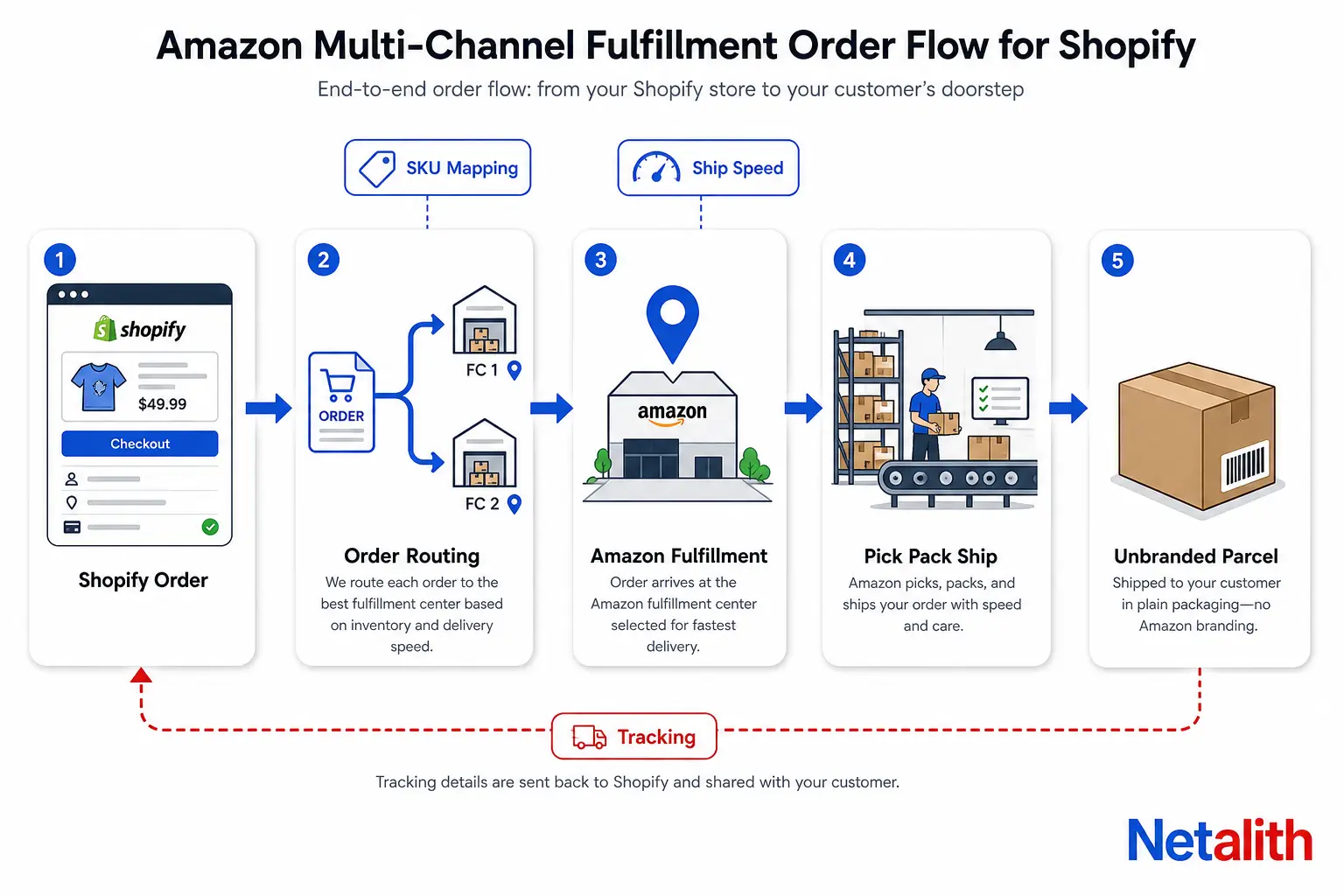
MCF is not a sales channel and it is not a Shopify app that lists your products on Amazon. It is a fulfillment backend. The integration wires up exactly four data flows:
- The app creates a Shopify location called Amazon Fulfillment (or Amazon Fulfillment – UK for the UK marketplace).
- Amazon pushes fulfillable inventory for every mapped SKU into that location.
- A buyer checks out, and Shopify order routing decides which location owns each line item.
- Line items sitting at the Amazon Fulfillment location become an MCF fulfillment request at the ship speed you mapped, and Amazon writes the tracking number back into the Shopify order.
Everything outside those four flows stays yours, and that is where most of the operational surprises live.
| Concern | Handled by the integration | Still your problem |
|---|---|---|
| Inventory | Fulfillable quantity pushed from Amazon into the Amazon Fulfillment location | Inbound stock is invisible — units still in transit to a fulfillment center do not count and will not sell |
| Order submission | Fulfillment request and tracking writeback | Deciding which orders go to Amazon at all (routing rules and automation) |
| Packaging | Unbranded packaging by default | Branded boxes and marketing inserts — not an option on MCF |
| Carrier | Amazon selects the carrier | Blocking Amazon Logistics on US orders is possible, for a surcharge |
| Returns | Nothing — returns are not processed through the app | Refunds in Shopify, and return postage to Amazon, which Amazon does not cover |
| Customer service | Nothing | All of it, including the delivery exceptions Amazon created |
There are also hard ceilings worth knowing before you model this for a high-AOV or kitted catalog: a single MCF order accepts up to 250 units and 100 unique SKUs. Larger orders have to be split and resubmitted. Partial fulfillment is supported, which sounds helpful and is the cause of the most common support ticket in this setup — see the routing note below.
Official app, third-party connector, or the MCF API
There are three ways to connect Shopify to MCF, and the deciding factor is almost never features. It is country coverage, catalog size, and whether Shopify or something else is your system of record.
| Path | Coverage | Pick it when | What you give up |
|---|---|---|---|
| Multichannel Fulfillment and Buy with Prime app (Amazon's own) | US, UK, Canada, Mexico, Germany, France, Italy, Spain, India | Shopify is your system of record and your catalog is small enough to map by hand | No bulk SKU mapping in normal operation; no returns handling; no custom routing logic beyond Shopify Flow |
| Third-party connector (ByteStand, WebBee, Pipe17) | Fills the gaps — Japan and Australia are MCF countries the official app does not cover | You sell in a country the official app skips, or you need live MCF rates at checkout and bulk catalog tooling | A monthly fee and a second vendor in the critical path of every order |
| Direct MCF API | The full MCF network, which Amazon operates across 11 countries | An ERP, OMS or multi-store setup owns fulfillment decisions, or you need mapping and routing logic no app exposes | You own the retries, the idempotency, the rate limits and the alerting |
The API path is underrated for anyone running more than one storefront. Once you have two Shopify stores, a marketplace or two, and a warehouse of your own, the question stops being how do I connect Shopify to MCF
and becomes what decides where each order ships from
. That decision does not belong inside a fulfillment app. If that is the shape of your problem, it is the same work as any other Amazon SP-API and multichannel order integration: one service that owns routing, and connectors that only execute.
A useful rule: start on the official app, because it costs nothing and proves the inventory and ship-speed assumptions. Move to the API when routing logic, not fulfillment, becomes the bottleneck.
The old Amazon MCF: US Fulfillment app is gone — what to do now
Amazon consolidated MCF and Buy with Prime into one Shopify app and deactivated the legacy Amazon MCF: US Fulfillment app on . If you were on it, migration is no longer optional, and the sequence matters because both apps can create their own Shopify location.
- Install and onboard the new app first. Do not uninstall the old one yet.
- Move the catalog in bulk instead of remapping by hand: in the legacy app, open Manage product catalog, choose Update using CSV, and download the CSV with both Mapped and Unmapped selected. Upload that file on the same screen in the new app.
- Fix order routing before you test. In Settings → Shipping and delivery → Order routing, use the ranked-locations rule and rank Amazon Fulfillment above Amazon MCF. Skip this and orders silently keep routing to the dead location.
- Place test orders and confirm four things: SKU mapping, routing, ship-speed mapping, and that a fulfillment request shows as Accepted in Shopify with a matching order in Seller Central.
- Only then uninstall the legacy app.
Amazon's MCF and Buy with Prime app user guide for Shopify carries the current version of these steps, including the per-country connect and disconnect flow if you run more than one marketplace.
One pre-check before you schedule the cutover: the new app ships Buy with Prime alongside MCF, and Buy with Prime carries payment requirements of its own. Confirm your gateway setup is eligible rather than discovering it mid-migration.
SKU mapping and ship-speed mapping, the two steps that decide everything
Make auto-mapping do the work
The app auto-maps a product when the Shopify SKU string matches the Amazon seller SKU exactly. Anything that does not match has to be mapped one at a time, and there is no bulk mapping tool in normal operation — the CSV import exists on the migration path, not as a general feature.
So the single highest-leverage thing you can do on a catalog of any size is normalize your Shopify SKUs to your Amazon seller SKUs before you install the app. An hour of find-and-replace in a product CSV beats a week of clicking through a mapping table. Watch the usual culprits: trailing whitespace, case differences, and the variant suffixes Shopify adds that Seller Central never had.
Bundles have two valid shapes. Either build the bundle in Shopify with any bundling app and map each component SKU, or create the bundle in Seller Central so it gets a single Amazon SKU and mirror that SKU in Shopify. The second is cleaner; the first is the only one that lets MCF fulfill part of a bundle.
Shipping rates are yours, ship speeds are the mapping
The app does not calculate shipping rates and does not add options at checkout. Customers only ever see rates you configured yourself. The setup is:
- Create a Shopify shipping profile for the Amazon Fulfillment location and set the rates you want to sell.
- In the app, set a default MCF speed, then map each of those Shopify rates to an Amazon ship speed.
- Amazon lists two domestic speeds: Standard at 3 business days and Expedited at 2 business days.
Be deliberate here, because this mapping is a margin decision disguised as a configuration screen. Every rate you point at Expedited raises the per-unit fulfillment fee on every order that picks it, including the free-shipping tier if you mapped it carelessly. Guides that still describe a three-tier Standard, Expedited and Priority lineup with a 3-to-5 day Standard are quoting a rate card Amazon has moved on from; check the current speeds rather than the blog that ranks for them.
How to make Shopify submit orders to MCF automatically
Installing the app does not make orders flow. Fulfillment requests still have to be triggered, and you have three options:
| Method | Cost | Control |
|---|---|---|
| Shopify auto-fulfill (Settings → General → Order processing) | Free | Blunt — it fires on every order's line items with no conditions |
| Shopify Flow | Free | Full conditional logic, and the option worth using |
| Order Automator or similar | Monthly fee | Rule builder, for teams who will not touch Flow |
The Flow workflow is small: trigger on Order ready to fulfill, condition Location name equals Amazon Fulfillment, action Submit fulfillment request.
Build it in Flow rather than using blanket auto-fulfill, for one reason: MCF is fast and effectively unrecallable. Once the request is accepted, a fraudulent order, a pre-order that should not have shipped yet, or a wholesale order that needed an invoice first is already in a tote. Adding two or three extra conditions to that Flow — hold flagged-risk orders, hold a specific tag, hold pre-orders — costs ten minutes and is the difference between automation and an unmonitored outbound pipe.
The same caution applies to order routing. Because MCF supports partial fulfillment, an order containing one Amazon-stocked item and one item at your own warehouse will split: two parcels, two tracking numbers, one confused customer. Decide on purpose whether you want that split or whether routing should keep mixed orders whole at a single location.
The 2026 fee layers that decide whether MCF beats a 3PL
MCF pricing is not one number. It is a stack, and modelling only the base fulfillment fee is how merchants end up surprised in Q4.
| Layer | How it behaves |
|---|---|
| Base fulfillment fee | Varies by size tier, unit weight, units per order, and the ship speed you mapped |
| Fuel and logistics surcharge | 3.5% applied to US MCF fulfillment fees |
| Holiday peak fulfillment fees | Apply through , with the 3.5% surcharge applied on top |
| Storage | Standard FBA storage on the shared inventory pool, including monthly and long-term charges |
| Channel fee | No Amazon referral fee on an MCF order, but your own channel's fees still apply |
Amazon's Multichannel Fulfillment service page is the source to check these against, because the surcharge and peak windows move more often than the rate card itself.
Two things in that table carry most of the decision. The first is units per order: MCF's per-unit cost falls sharply on multi-unit orders and is at its worst on single light units, which is exactly the profile a regional 3PL prices best. If your Shopify AOV is one small item, run the comparison before you commit; if your customers buy three at a time, MCF is hard to beat without signing a volume contract somewhere.
The second is reporting. MCF fees never appear in Shopify. They show up in Seller Central under Reports → Payments → All statements, where the per-order FBA/MCF fee sits in column O of the downloaded file. Until you pull that report into whatever you use for margin, every profit number in your Shopify dashboard is overstated by the cost of shipping. Building that reconciliation once, on day one, is worth more than any configuration tweak in this article.
When MCF orders stop flowing, check these in order
| Symptom | Most likely cause | Fix |
|---|---|---|
| Product shows zero inventory despite stock at Amazon | SKU not mapped, or Track quantity is off in Shopify | Confirm the mapping, then force a resync: switch Inventory located at to a non-Amazon location, save, switch it back, save. The sync lands in 5–10 seconds |
| Stock exists but still will not sell | The units are inbound, not fulfillable | Nothing to configure — MCF ignores inbound inventory entirely. Plan replenishment lead time accordingly |
| Orders sit unfulfilled | No automation rule, or routing sent the line items to another location | Check the Flow workflow fired, then check ranked locations in order routing |
| No Amazon shipping options at checkout | No rates configured in the Amazon Fulfillment location's shipping profile | Checkout only shows rates you created; the app never injects them |
| Customers get two parcels for one order | Partial fulfillment across two locations | A routing decision, not a bug — change the rule if you want mixed orders kept whole |
| Margins look better than the bank balance | MCF fees are invisible to Shopify | Reconcile against the Seller Central statement report |
Most broken MCF setups fail at one of two joints: the SKU mapping, or the routing rule that decides which location owns a line item. Both are cheap to get right at setup and expensive to untangle once orders are flowing. If the shape of your problem is less which button
and more which system should own fulfillment decisions across our stores and marketplaces
, that is an architecture question — tell us what your stack looks like and we will tell you honestly whether an app covers it or not.
CÂU HỎI THƯỜNG GẶP
Câu hỏi thường gặp
Can Amazon fulfill Shopify orders without me selling on Amazon?
Yes. You can create a Multichannel Fulfillment account instead of a full selling account if you only want Amazon to ship your off-Amazon orders. If you already sell on Amazon with FBA, MCF draws from the same inventory pool rather than a separate one, so there is nothing extra to stock.
Which countries does the Amazon MCF app for Shopify support?
The official Multichannel Fulfillment and Buy with Prime app for Shopify supports the US, UK, Canada, Mexico, Germany, France, Italy, Spain and India. MCF itself operates in more countries than the app covers, so for Japan or Australia you need a third-party connector such as WebBee, ByteStand or Pipe17, or a direct MCF API integration.
What happened to the Amazon MCF: US Fulfillment app?
Amazon deactivated it on September 30, 2026 and consolidated its functionality into the Multichannel Fulfillment and Buy with Prime app. Merchants migrating should export the SKU mapping CSV from the legacy app's Manage product catalog screen, import it into the new app, then re-rank Amazon Fulfillment above Amazon MCF in Shopify order routing before uninstalling the old app.
Can I map Shopify SKUs to Amazon SKUs in bulk?
Not as a standard feature. The app auto-maps any product whose Shopify SKU exactly matches the Amazon seller SKU, and everything else is mapped individually. The practical workaround is to normalize your Shopify SKU values to match your Amazon seller SKUs before installing the app so auto-mapping covers the catalog.
Does Amazon MCF ship Shopify orders in Amazon-branded boxes?
No. MCF ships in unbranded packaging by default, so nothing identifies Amazon on the outside of the parcel. You cannot add your own branding or inserts, and Amazon selects the carrier. Blocking Amazon Logistics on US orders is possible but carries a surcharge.
Where do I see what MCF charged me for a Shopify order?
Only in Seller Central, not in Shopify. Go to Reports, then Payments, then All statements, set a date range and download the file; the FBA/MCF fee charged per order appears in column O. Pull this into your margin reporting, otherwise Shopify will show profit figures that exclude fulfillment cost entirely.
Is there a limit on how large an MCF order can be?
Yes. A single MCF fulfillment request accepts up to 250 units and 100 unique SKUs. Larger orders have to be split into multiple orders and resubmitted, which matters for wholesale or kitted catalogs running through a Shopify storefront.