LitExtension Alternative: 5 Store Migration Options Compared (2026)
Need a LitExtension alternative? Compare Cart2Cart, Matrixify, Shopify's free Store Migration app, CSV and custom migration by cost, limits and data risk.

Long Nguyen
Développeur fullstack · Ingénieur IA · Chercheur
Why look for a LitExtension alternative?
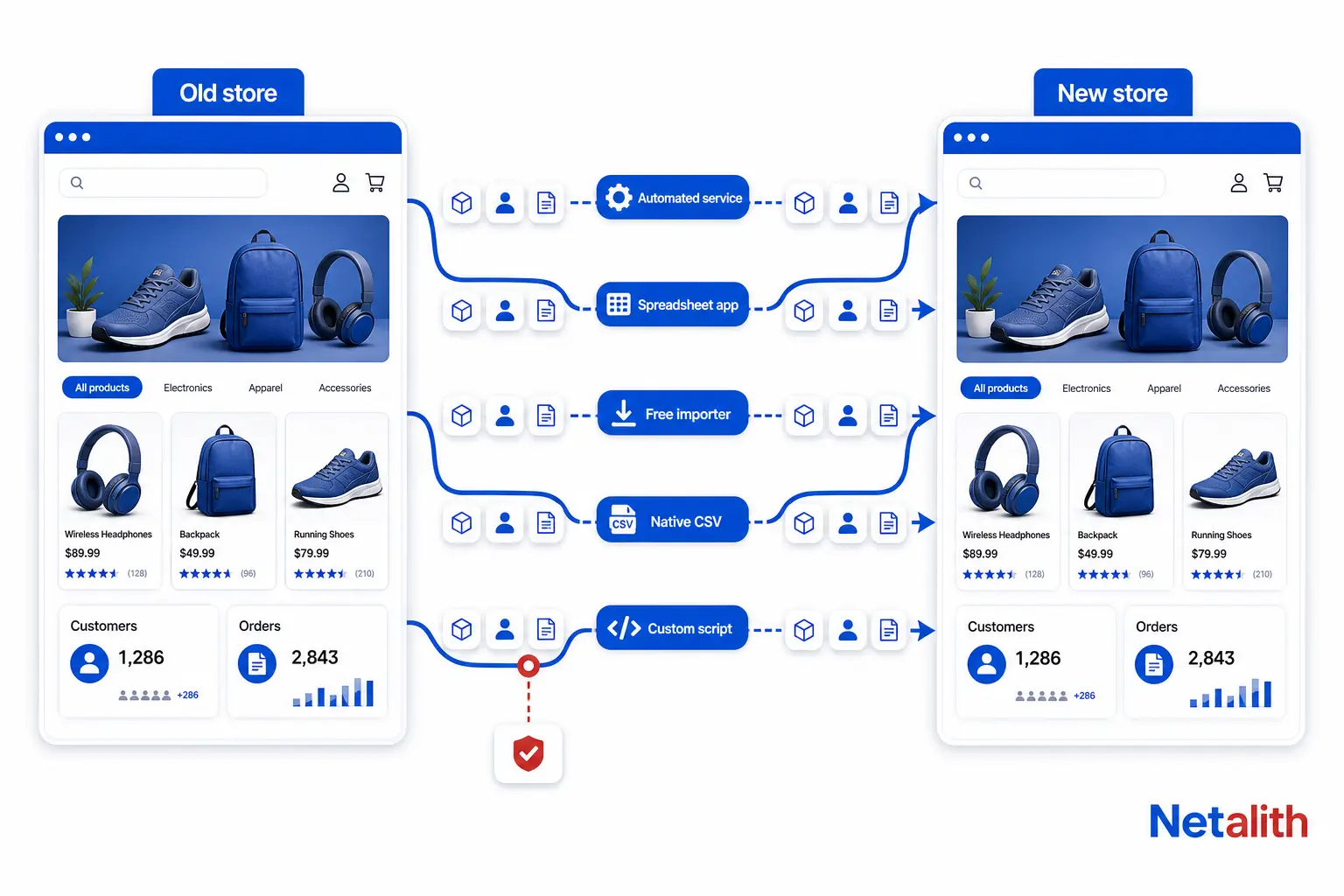
LitExtension is an automated cart-to-cart migration service: you connect the old store and the new one, and it copies products, customers, orders and blog posts across. For a standard catalog moving between two mainstream platforms, it is a reasonable choice and you may not need an alternative at all.
Here is what its public pricing page says, checked on :
- Price model: set by the number of entities (products, customers, orders, blog posts) and by the source and target platform. The calculator opens at $59.
- Two tiers: an automated migration you run yourself, and All-in-One Migration, which is expert-managed with a personal assistant, QA testing, every additional option included and two free re-migrations.
- Paid add-ons on the automated tier: SEO URLs migration, 301 redirects and customer password migration.
- Safety net: unlimited free demo migration and a 30-day money-back guarantee.
People usually start comparing alternatives for one of four reasons:
- The add-ons change the total. Redirects and SEO URLs are not optional for a store that earns from search, so the opening quote is rarely the final one.
- The target is Shopify and someone on the team can work a spreadsheet. A monthly import app can cost less than a per-entity migration.
- The store is small. A free importer plus an afternoon of cleanup is enough.
- The data is not standard. Subscriptions, B2B price lists, bundles or a custom-built source do not fit a generic entity mapper from any vendor.
LitExtension alternatives compared
Five alternatives, with LitExtension as the baseline. Prices and limits come from each vendor's own public page on and will change, so re-check before you buy.
| Option | Works for | Pricing model | You do | Main limit |
|---|---|---|---|---|
| LitExtension (baseline) | Most platform pairs | Per migration, by entity count; calculator opens at $59 | Connect both stores, pick entities | SEO URLs, 301 redirects and passwords are paid add-ons on the automated tier |
| Cart2Cart | 85+ platforms | Per migration, by source, target and item count; no published minimum | Connect both stores, pick entities | Free demo moves up to 10 products with their related customers and orders |
| Matrixify | Shopify only | Subscription: $20, $50 or $200 per month; free Demo plan capped at 10 items per job | Build and map the import files yourself | Per-job caps: Basic allows 5,000 products but only 1,000 orders |
| Shopify Store Migration app | Into Shopify from Square, WooCommerce, Etsy, Wix, Amazon, eBay, Clover, Lightspeed R/X, or CSV | Free | Connect an account or upload CSV, then fix gaps by hand | Listing covers product and customer data, not orders |
| Native CSV export and import | Any pair where both sides handle CSV | Free | Rename and reshape every column | Slow past a few hundred products; relations between records are easy to break |
| Custom scripted migration | Any source with an API or database access | Priced to scope | Describe the data and approve test runs | Costs more and starts slower than a tool; only worth it for non-standard data |
Cart2Cart: the closest like-for-like alternative
Cart2Cart works the same way as LitExtension: connect source and target, choose entities, pay per migration. If you want a hands-off tool and simply want a second quote, this is the one to compare.
- Coverage: its site lists 85+ supported platforms.
- Price: depends on source platform, target platform and the number of products, customers and orders. No fixed starting price is published.
- Free demo: up to 10 products plus their related customers and orders, in about 10 to 15 minutes.
- Extras: migration preview, Smart Update, re-migration, CSV file migration and database dump migration.
How to compare the two fairly: enter identical counts in both calculators, then add every option you actually need (redirects, SEO URLs, a second run to pick up orders placed during the switch). Compare that total, not the first number on screen.
One practical difference: LitExtension advertises an unlimited demo, while the Cart2Cart demo is capped at 10 products. A capped demo is still useful, but only if it contains your difficult products. See the test at the end of this article.
Matrixify: the cheaper route if your target is Shopify
Matrixify is a different kind of tool. It does not connect to your old store. It imports spreadsheet files (Excel, CSV, Google Sheets) into Shopify and exports them back out. You prepare the data; it loads it.
| Plan | Price per month | Products per job | Customers per job | Orders per job |
|---|---|---|---|---|
| Demo | Free | 10 | 10 | 10 |
| Basic | $20 | 5,000 | 2,000 | 1,000 |
| Big | $50 | 50,000 | 20,000 | 10,000 |
| Enterprise | $200 | Unlimited | Unlimited | Unlimited |
Three things the table does not make obvious:
- Orders decide your plan, not products. A shop with 800 products and 6,000 past orders fits Basic on products and misses it on orders.
- It is a subscription you can stop. A migration is a one-month job, so the real cost is one month of the plan plus your hours.
- Your hours are the real price. Mapping old columns to Shopify's format is the work LitExtension charges for. If nobody on the team is comfortable in a spreadsheet, the saving disappears.
Matrixify also imports URL redirects as a data type, so the redirect map from the SEO section below can go in through the same tool.
Free LitExtension alternatives: Shopify Store Migration and CSV
Shopify's own Store Migration app
Shopify publishes a free importer, the Store Migration app on the Shopify App Store. According to its listing, it brings data in from Square, WooCommerce, Etsy, Wix, Amazon, eBay, Clover and Lightspeed R/X, or from CSV files exported from another platform.
- The listing describes product and customer data. Orders are not mentioned, so plan for order history separately.
- Shopify states that some platforms do not export all data or use compatible formats, so small edits in Shopify may be required.
- When we checked, the app was rated 3.2 out of 5 from 77 reviews, with results split between clean imports and incomplete ones. Treat it as a first pass, not a finished migration.
Native CSV export and import
Most platforms export products and customers to CSV and import the same. This costs nothing and works for a small catalog. It fails in predictable places:
- Variants: each platform lays out options and variants differently, so one product can turn into many rows or lose its options.
- Images: the import needs image URLs that are still live. Cancel the old hosting too early and the images are gone.
- Relations: customers arrive without their order history, and products arrive without their category structure.
When a custom migration beats any tool
Automated tools are built around a fixed set of entities: products, customers, orders, blog posts. Anything outside that set is where you should stop and test before paying anyone. Check these in the demo:
- Subscriptions. The stored payment method lives with the payment processor, not in the store, so moving the customer record does not move the ability to charge them.
- Reviews kept in a third-party plugin or app rather than in the platform itself.
- Custom fields that drive logic: B2B price lists, customer groups, bundles, made-to-order options.
- Images inside product descriptions. Description HTML is copied as text, so images in it can keep loading from the old domain and break the day that domain or hosting is switched off.
- Internal links inside descriptions, pages and blog posts that still point to old URLs.
- Category trees. Shopify collections are flat, so a nested category structure has to be redesigned rather than copied.
- More than one language or currency.
If two or more of these apply, a scripted migration is usually the safer route: a developer reads from the old platform's API or database, transforms each record with rules written for your data, loads it through the new platform's API, and runs it repeatedly on a test store until the counts match.
Disclosure: this is the route Netalith sells, through our eCommerce data migration service. It is the wrong choice for a standard catalog. A tool will be cheaper and faster there, and we will tell you so.
How to switch platforms without losing SEO
Whichever option you pick, own the redirect map yourself. A new platform almost always means new URLs. A WooCommerce product at /product/blue-shirt/ becomes /products/blue-shirt on Shopify, and without a redirect the old address returns an error.
Google's guidance on moving a site with URL changes gives the rules to follow:
- List the old URLs first from sitemaps, server logs, analytics and the CMS, before the old store goes offline.
- Map each old URL to its new one and use permanent server-side redirects (301 or 308).
- Redirect straight to the final address. Avoid chains of redirects.
- Keep the redirects for at least one year.
- Small and medium sites should move all URLs at once. Large sites can move one section at a time.
- Expect rankings to fluctuate while Google recrawls. For a medium-sized site it can take a few weeks or more before the new URLs show.
- Watch Search Console: indexed pages should fall on the old URLs and rise on the new ones.
What this means for the tools: on LitExtension's automated tier, SEO URLs and 301 redirects are paid add-ons, so confirm they are in your quote. With Matrixify, CSV or the Shopify app, building the map is your job. In every case, export the old URL list before you change DNS. It is the one file you cannot rebuild afterwards.
How to choose: a 30-minute test before you pay
| Your situation | Start with |
|---|---|
| A few hundred products, moving to Shopify from a supported platform | Shopify Store Migration app, then fix gaps by hand |
| Moving to Shopify, clean data, someone who can work a spreadsheet | Matrixify for one month |
| Any platform pair, standard data, no time to spare | LitExtension or Cart2Cart, quoted with identical counts and all add-ons |
| Subscriptions, B2B pricing, bundles, several languages or a custom-built source | Custom scripted migration |
| Most revenue comes from organic search | Any of the above, with a redirect map you control |
Then run this test. Free demos are small (10 products on Cart2Cart, 10 items per job on Matrixify's Demo plan), so what you put in them matters more than how many you run.
- Pick your 10 hardest products: most variants, longest descriptions, most images, any custom fields.
- Run them through each free demo. If a demo picks products for you and none of the hard ones are in it, the demo has proved little.
- Check each product on the new store: variant count, SKU and price per variant, image count, whether description images still load from the old domain, URL, meta title and description, category.
- Check one customer who has order history: are the orders attached?
- Count failures per option. The option with the fewest manual fixes wins, even if its quote is higher.
If every demo fails on the same products, the data is the problem, not the tool. Send us the source platform, the target, rough product and order counts and the products that broke, and request a free quote from Netalith. No cost and no account needed.
FAQ
Questions fréquentes
What is the best LitExtension alternative?
It depends on the store. Cart2Cart is the closest like-for-like option because it uses the same connect-and-copy model. Matrixify is usually cheaper if the target is Shopify and you can prepare spreadsheets. Shopify's free Store Migration app suits small catalogs. A custom scripted migration fits stores with subscriptions, B2B pricing, bundles or a custom-built source.
Is there a free LitExtension alternative?
Yes. Shopify's Store Migration app is free and imports product and customer data from Square, WooCommerce, Etsy, Wix, Amazon, eBay, Clover, Lightspeed R/X or CSV files. Native CSV export and import is also free on most platforms. Matrixify has a free Demo plan, but it is capped at 10 items per job, so it is for testing rather than a full migration.
How much does LitExtension cost?
LitExtension prices each migration by the number of products, customers, orders and blog posts and by the source and target platform. On 8 October 2026 its pricing calculator opened at $59. On the automated tier, SEO URLs migration, 301 redirects and customer password migration are paid add-ons. The All-in-One tier includes all additional options and two free re-migrations.
Is Cart2Cart cheaper than LitExtension?
Neither publishes a flat price. Both calculate cost from the source platform, the target platform and the number of items. Enter the same counts in both calculators, add every option you need such as redirects and a re-migration, and compare the totals.
Can Matrixify replace LitExtension?
Only when the target store is Shopify. Matrixify imports spreadsheet files into Shopify and does not connect to the old store, so you prepare and map the data yourself. Plans cost $20, $50 or $200 per month, with per-job limits; the $20 Basic plan allows 5,000 products but only 1,000 orders per job.
Will switching eCommerce platforms hurt my SEO?
Rankings can fluctuate while Google recrawls the site. Google's guidance is to map every old URL to its new one with permanent 301 or 308 redirects, avoid redirect chains, and keep the redirects for at least one year. For a medium-sized site it can take a few weeks or more for new URLs to replace the old ones in search results.