OSI Model vs TCP/IP Model: Key Differences, Layer Mapping, and Practical Use
Beginner-friendly OSI model vs TCP/IP model comparison with layer mapping, protocol examples, troubleshooting guidance, and interview takeaways.

Long Nguyen
Fullstack Developer · AI Engineer · Researcher
OSI model vs TCP/IP model: What this article covers
The OSI model vs TCP/IP model comparison comes up often when you’re learning networking fundamentals and computer networking basics. One is a conceptual vs practical model split: OSI is a teaching framework, while TCP/IP describes the Internet protocol stack you work with day to day.
This guide explains what each model is, provides a layers comparison, shows real-world protocol placement, and highlights where troubleshooting fits for interviews and on-the-job work.
Quick at-a-glance comparison
Use this quick summary when you need a fast OSI vs TCP/IP refresher.
- OSI: 7 layers (Application → Physical) used for learning and clean separation of responsibilities.
- TCP/IP: 4 layers (Application → Network Interface) aligned to the Internet protocol stack.
- Encapsulation: Data moves down the stack as headers are added; it’s reversed on receipt.
- Practical takeaway: Use OSI to reason about problems; use TCP/IP to match protocols to real implementations.
What is the OSI model?
The OSI (Open Systems Interconnection) model is a conceptual framework that standardizes how people describe network models and layer responsibilities. In an OSI and TCP/IP comparison, OSI is valuable because it makes boundaries explicit—one reason why OSI is taught so widely.
Even if real networks don’t follow OSI perfectly, OSI helps you think clearly about encapsulation, interfaces between layers, and how components interact.
OSI model — Layer-by-layer breakdown
Here’s a brief layers comparison, including encapsulation context and examples of real-world protocol placement.
- Layer 7 — Application: User-facing services (HTTP, FTP, SMTP).
- Layer 6 — Presentation: Data formatting, encryption, compression (often handled by libraries/protocol features like TLS).
- Layer 5 — Session: Session control and dialog management (often blended into apps).
- Layer 4 — Transport: End-to-end delivery (TCP, UDP) and ports.
- Layer 3 — Network: Logical addressing and routing (IP).
- Layer 2 — Data Link: Local delivery, frames, MAC addressing (Ethernet, switching).
- Layer 1 — Physical: Signals and media (copper, fiber, radio).
What is the TCP/IP model?
The TCP/IP model is a practical protocol stack describing how Internet protocols work together. If you’re asking TCP/IP vs OSI which to learn, TCP/IP is the stack you’ll see in tools, documentation, and real deployments.
It groups functionality into fewer layers so you can map directly from a problem (for example, DNS failure or a blocked port) to the protocols and configuration that likely need attention.
TCP/IP model — Layer-by-layer breakdown
This breakdown focuses on encapsulation and common protocol examples, including TCP vs UDP ports and protocols.
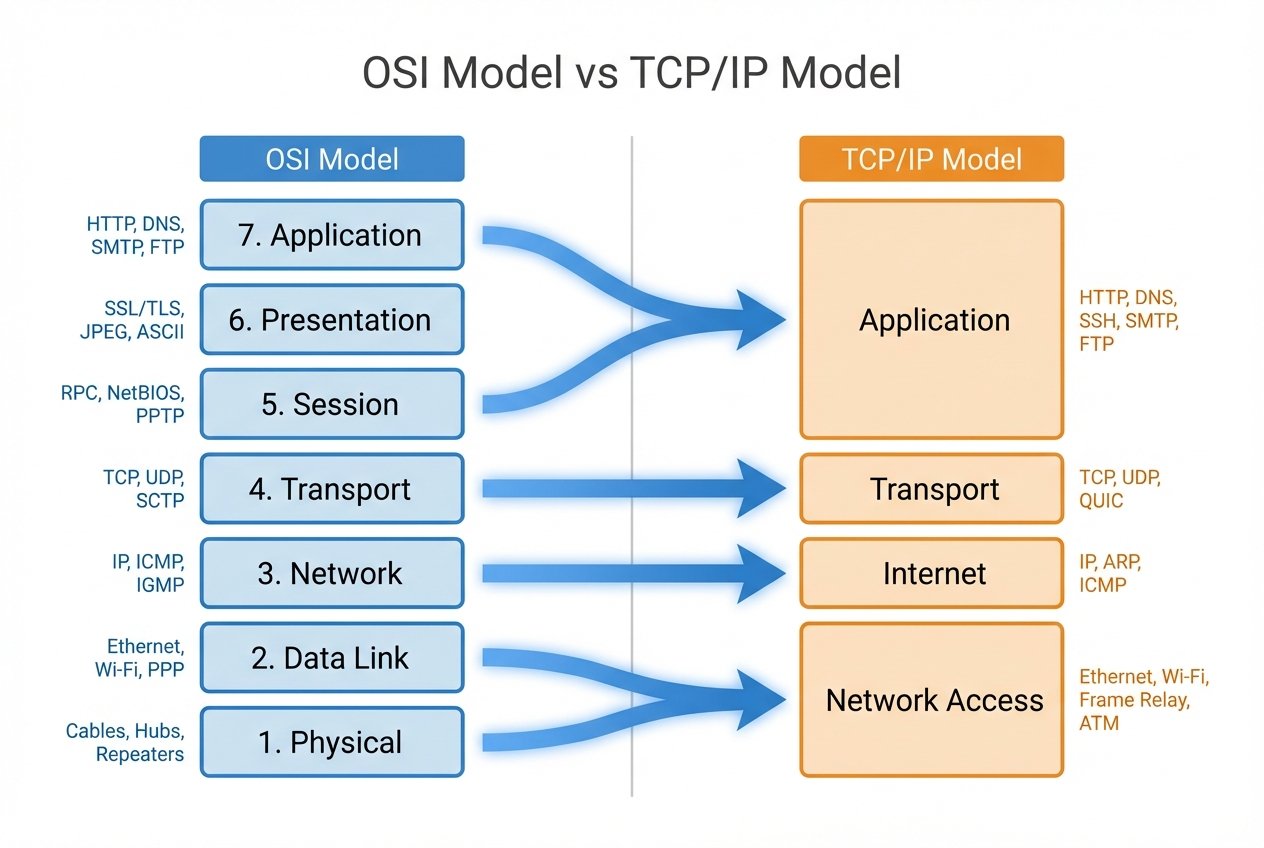
- Application: HTTP, DNS, DHCP, SMTP, SSH (roughly OSI Layers 7–5 combined).
- Transport: TCP and UDP (ports, reliability, retransmission, and latency tradeoffs).
- Internet: IP (IPv4/IPv6), ICMP; routing happens here.
- Network Interface (Link): Ethernet, Wi‑Fi, ARP; frames and access to the physical network.
OSI model vs TCP/IP model: Side-by-side comparison
This OSI and TCP/IP comparison section summarizes the OSI TCP/IP difference in structure and purpose, plus how the models compare in practice.
| OSI layer (7) | TCP/IP layer (4) | Example protocols / responsibilities |
|---|---|---|
| Application / Presentation / Session | Application | HTTP, DNS, DHCP, TLS, application sessions |
| Transport | Transport | TCP, UDP; ports, reliability vs speed |
| Network | Internet | IP, ICMP; addressing, routing |
| Data Link / Physical | Network Interface | Ethernet, Wi‑Fi, ARP; frames and signaling |
Key differences and similarities
The core OSI TCP/IP difference is intent: OSI is a prescriptive reference model, while TCP/IP is a descriptive model derived from deployed protocols. Both are layered approaches that make a network layer models comparison easier and support troubleshooting.
- Similarity: Both use layered abstraction to separate concerns and explain encapsulation.
- Difference: OSI emphasizes clarity with seven layers; TCP/IP collapses functions into four practical layers.
- Why OSI is taught: It makes “where does this problem live?” easier to answer during learning and interviews.
How the models map to each other — protocol placement examples
Mapping clarifies real-world protocol placement and shows where troubleshooting fits when diagnosing issues across a protocol stack.
- HTTP: OSI Layer 7 → TCP/IP Application.
- DNS: OSI Layer 7 → TCP/IP Application (name resolution; common cause of “internet is down” reports).
- TCP/UDP: OSI Layer 4 → TCP/IP Transport (ports, connection behavior).
- IP/ICMP: OSI Layer 3 → TCP/IP Internet (addressing, routing, ping/traceroute signals).
- Ethernet/Wi‑Fi: OSI Layers 2/1 → TCP/IP Network Interface.
Why OSI is still taught
Why OSI is taught comes down to clarity. OSI’s clean separation supports learning difficult topics—encapsulation, interfaces, and layered responsibility—without tying the explanation to a single vendor or tool.
This conceptual vs practical model perspective also improves communication: teams can describe issues like “Layer 3 routing” or “Layer 7 application” even when implementations vary.
Is the OSI model used in real networks? Practical relevance
So, is OSI model used in real networks? Not as a strict implementation blueprint. Real networks follow the TCP/IP protocol stack, and many functions blend across boundaries (for example, TLS and session behavior living inside applications).
Still, OSI remains useful for documentation, architecture discussions, and a shared language for real-world protocol placement.
Which model should you learn? — interviews vs real-world jobs
OSI vs TCP/IP for interviews is common because interviewers want to see how you reason. Learn OSI for the mental model (layer responsibilities, where problems can occur) and learn TCP/IP for the commands and configs you’ll touch.
If you must prioritize, start with TCP/IP because it ties directly to daily work: IP addressing and subnetting basics, routing vs switching, DNS and DHCP explained, NAT and port forwarding, and TCP vs UDP ports and protocols.
Troubleshooting and where each model helps
Where troubleshooting fits is usually easiest to explain with OSI layers, then validate with TCP/IP-centric tools. The goal is to isolate the failure domain before changing configurations.
- Physical / Data Link: cables, Wi‑Fi signal, NIC status, switch port errors.
- Network / Internet: IP address, subnet, gateway, routing table, ACLs; ping and traceroute context.
- Transport: TCP handshake failures, blocked ports, UDP reachability; firewall and security group checks.
- Application: DNS resolution, certificates/TLS, service configuration, authentication.
Common interview questions & quick answers
- Q: What layers are in OSI? A: Seven layers from Application to Physical.
- Q: How do OSI layers map to TCP/IP? A: OSI (7–5) → TCP/IP Application; OSI 4 → Transport; OSI 3 → Internet; OSI 2–1 → Network Interface.
- Q: Give protocol examples per layer. A: HTTP/DNS (Application), TCP/UDP (Transport), IP/ICMP (Internet/Network), Ethernet/Wi‑Fi (Link).
- Q: What’s the biggest OSI and TCP/IP comparison difference? A: OSI is a reference model for learning; TCP/IP is the deployed Internet protocol stack.
Conclusion — OSI model vs TCP/IP model: final guidance
To use the OSI model vs TCP/IP model effectively, treat OSI as your conceptual map for layers comparison and troubleshooting, and treat TCP/IP as the practical protocol stack you configure and observe in real networks. Learn the mapping, practice identifying protocol placement, and you’ll be ready for both interviews and day-to-day networking work.