Sync Inventory Across Amazon, eBay & Walmart: What the APIs Allow
How to sync inventory across Amazon, eBay and Walmart: each API's write path, batch limits, overselling guards and a read-back check that catches drift.

Long Nguyen
Fullstack Developer · AI Engineer · Researcher
One ledger, three write paths
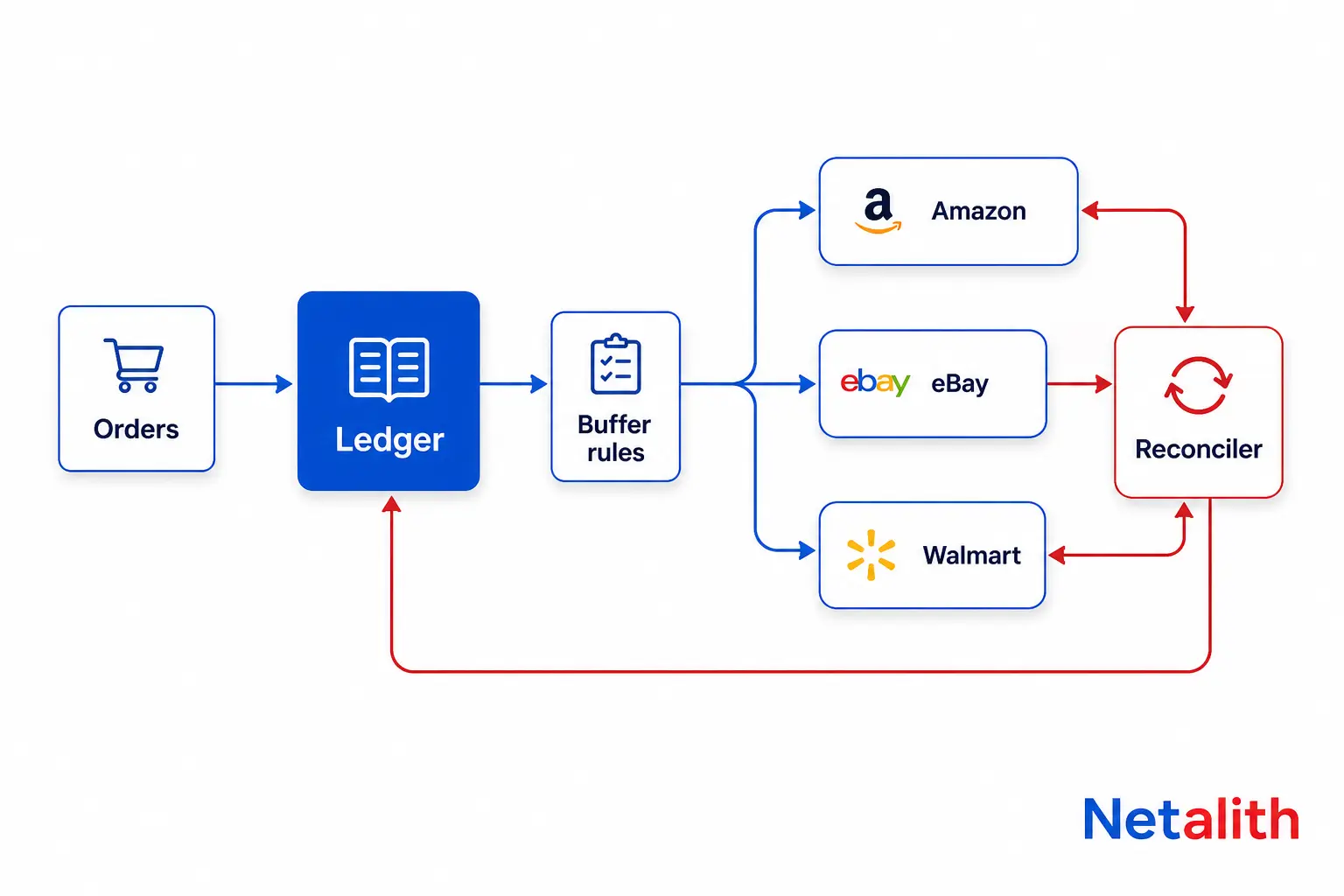
The short answer: keep one inventory number in a system you control, and push that number out to each marketplace through its own write API. Amazon, eBay and Walmart do not talk to each other, and none of them will tell you when another channel sold your last unit. The sync is your job.
It is harder than it sounds because the three APIs disagree on almost everything: how a quantity is addressed, how many items fit in one call, and what a success response actually means. This guide covers each channel's write path first, then the design rules that keep the numbers honest. Facts below were checked against the platforms' developer documentation on .
The architecture that holds up is one ledger plus one thin adapter per channel:
- Ledger: on-hand stock minus units reserved by open orders from every channel.
- Rules layer: per-channel buffers and caps that turn the ledger number into a sellable number.
- Adapters: translate the sellable number into Amazon, eBay or Walmart calls and record what each channel accepted.
- Reconciler: reads live quantities back from each channel and flags drift.
How to update inventory on Amazon with SP-API
Amazon gives you two write paths. The Listings Items API updates one listing at a time, and for bulk work Amazon's Listings Items API guide points you to the JSON_LISTINGS_FEED feed type in the Feeds API, which carries the same schemas. Both need the Inventory and Order Tracking or Product Listing role on your application.
Quantity for a merchant-fulfilled offer lives in the fulfillment_availability attribute, with the channel code DEFAULT. A request looks like this (ATVPDKIKX0DER is the US marketplace ID; use the listing's real product type, since PRODUCT is the fallback for types the API does not fully support):
PATCH /listings/2021-08-01/items/{sellerId}/{sku}?marketplaceIds=ATVPDKIKX0DER
{
  "productType": "PRODUCT",
  "patches": [
    {
      "op": "replace",
      "path": "/attributes/fulfillment_availability",
      "value": [
        { "fulfillment_channel_code": "DEFAULT", "quantity": 12 }
      ]
    }
  ]
}
Four Amazon behaviors that break naive syncs
- Patch, never put. A put replaces the listing content, and attributes you leave out can be dropped. For a quantity change, use patch. Amazon also supports a merge operation that updates only
quantityinsidefulfillment_availability, so you do not have to resend fields such as restock date or lead time. - Two views of the same number. The attributes section shows the last value you submitted; the
fulfillmentAvailabilitysection shows live availability. Amazon's own example: you submit 1, the unit sells, and attributes still says 1 while live availability says 0. Reconcile against the live section, not against what you last sent. - Accepted is not live. A patch response only tells you the submission was accepted for processing. Problems found afterwards show up when you call getListingsItem.
- FBA is not yours to set. Quantity applies to seller-fulfilled stock. Where a listing has both FBA and merchant-fulfilled stock, Amazon's multi-fulfillment guidance says FBA units are used first and merchant-fulfilled units after they run out.
How to update inventory on eBay with the Inventory API
eBay splits the model in two. An inventory item is the SKU-level record with the total ship-to-home quantity. An offer is the marketplace-specific listing built on that SKU. The bulkUpdatePriceQuantity call can change the total quantity of up to 25 inventory items, and the price or quantity of specific published offers, in one request. It needs the sell.inventory OAuth scope.
POST https://api.ebay.com/sell/inventory/v1/bulk_update_price_quantity
{
  "requests": [
    {
      "sku": "WIDGET-BLK-01",
      "shipToLocationAvailability": { "quantity": 11 },
      "offers": [
        { "offerId": "9876543210", "availableQuantity": 11 }
      ]
    }
  ]
}
Four eBay behaviors to design around
- The lower number wins. An offer's
availableQuantityis the quantity for that marketplace and should not exceed the SKU's total. The live listing shows the minimum of the two, so a stale offer value silently caps what buyers see. Send both together. - Read the response row by row. The response returns a status, offer ID and SKU for each row, with errors and warnings per row. Check every row instead of trusting the call as a whole.
- 25 per call adds up. A 10,000-SKU catalog is 400 calls for one full sweep, before retries. Plan the sweep schedule around that.
- Legacy listings need migrating. Listings created through the Inventory API cannot be revised with the older Trading API. If your eBay listings came from CSV uploads or Trading API tools, use the
bulkMigrateListingcall to convert eligible active listings into the Inventory API model before you automate anything.
How to update inventory on Walmart Marketplace
Walmart's Marketplace Inventory API overview maps each scenario to an endpoint. The SKU must already be set up with Walmart before you can manage its inventory, and the API covers sellers in the US, Canada, Mexico and Chile.
| Scenario | Endpoint |
|---|---|
| One SKU, default ship node | PUT /v3/inventory |
| One SKU, several ship nodes | PUT /v3/inventories/{SKU} |
| Many SKUs, one fulfillment center | POST /v3/feeds?feedType=inventory |
| Many SKUs, several ship nodes | POST /v3/feeds?feedType=MP_INVENTORY |
A ship node is a fulfillment center, such as one of your warehouses. A single-node bulk feed in JSON looks like this:
POST https://marketplace.walmartapis.com/v3/feeds?feedType=inventory
{
  "InventoryHeader": { "version": "1.4" },
  "Inventory": [
    {
      "sku": "SKU_012345",
      "quantity": { "unit": "EACH", "amount": 10 },
      "inventoryAvailableDate": "2026-10-01"
    }
  ]
}
Three Walmart behaviors to design around
- Bulk is asynchronous. Submitting a feed returns a feed ID, not a result. Poll the Feed Status API to get line-item statuses, and treat a line as done only when it reports done.
- Bulk endpoints are throttled. Walmart's bulk inventory guide flags the feed POST endpoints as throttled, so queue submissions and back off rather than retrying in a tight loop.
- Multi-node feeds need ship nodes. If you do not include ship nodes in a multi-node feed, the feed fails.
Walmart also offers an inventory out-of-stock event through its Notifications API, which is a useful trigger for an immediate re-check instead of waiting for the next sweep.
Amazon vs eBay vs Walmart: inventory update comparison
| Amazon | eBay | Walmart | |
|---|---|---|---|
| Single update | patchListingsItem | bulkUpdatePriceQuantity with one row | PUT /v3/inventory |
| Bulk update | JSON_LISTINGS_FEED via Feeds API | bulkUpdatePriceQuantity, up to 25 items per call | Feed with feedType=inventory or MP_INVENTORY |
| How you learn it worked | Accepted for processing; live state read from getListingsItem | Per-row status in the response | Feed ID, then line-item status from Feed Status API |
| What the quantity means | Seller-fulfilled stock; FBA not set by you | Total ship-to-home per SKU, plus per-offer availability | Per SKU, per ship node |
| Biggest trap | Using put and dropping attributes | Offer quantity lower than SKU total | Multi-node feed without ship nodes |
How to prevent overselling across channels
No API design removes the race entirely: two channels can sell the same unit in the same second. What you can do is bound the damage and catch it fast. These rules do that.
- Decrement the ledger from orders, not from your pushes. Because Amazon's live number can differ from what you last submitted, orders are the reliable signal that stock moved.
- Push absolute quantities, never deltas. If a push is retried or arrives twice, an absolute number is harmless. A delta double-counts.
- Hold a buffer on each channel. Withhold a few units from the fastest-moving channel so a race lands on stock you kept back.
- Reserve at order creation, then recompute all three channels. An order on eBay should lower the sellable number on Amazon and Walmart within one cycle.
- Reconcile by reading back. Pull live quantities (Amazon's fulfillmentAvailability, eBay's getInventoryItem, Walmart's
GET /v3/inventory) and alert when drift exceeds your buffer.
The rules layer can be this small. The buffer and cap values are illustrative; tune them to your sell-through rate.
from dataclasses import dataclass

@dataclass
class ChannelRule:
    buffer: int   # units held back from this channel
    cap: int      # max units listed here, 0 means no cap

RULES = {
    'amazon':  ChannelRule(buffer=2, cap=0),
    'ebay':    ChannelRule(buffer=3, cap=50),
    'walmart': ChannelRule(buffer=2, cap=0),
}

def sellable(channel, on_hand, reserved):
    rule = RULES[channel]
    qty = max(on_hand - reserved - rule.buffer, 0)
    return min(qty, rule.cap) if rule.cap else qty
With 20 units on hand and 6 reserved, this returns 12 for Amazon, 11 for eBay and 12 for Walmart. Each adapter then sends its own number.
Real-time or batch: which sync schedule to run
Run both. The write paths already push you that way: Amazon's listing call is one item at a time, eBay batches 25, and Walmart bulk is an asynchronous feed. Match the method to how fast a SKU moves.
| SKU type | Sync approach | Why |
|---|---|---|
| Fast movers and low stock | Event-driven, single-item calls after each order | The oversell window is widest here |
| Long tail | Scheduled sweep using bulk calls and feeds | Fewer calls, gentler on throttling |
| Everything | Periodic read-back reconciliation | Heals missed events and failed rows |
Keep the sweep and the event path on separate queues, so a retry storm on one channel never delays order-driven updates on the others.
Build it yourself or use a tool
Off-the-shelf multichannel tools are the right call for a standard catalog on two or three channels with ordinary rules. Building makes sense when your rules are not ordinary: bundles and kits, several warehouses, per-channel caps, or order and stock data that must flow into your own ERP or warehouse system.
Budget for the ongoing cost, not just the first version. Each channel has its own authorization flow, its own roles or scopes, and its own way of reporting failure, and all three evolve. If you would rather have the integration built to your rules, that is the work Netalith does in its marketplace integration for Amazon, eBay and Walmart: listings, inventory, orders and tracking.
Go-live checklist
- Build one SKU mapping table: internal SKU to the Amazon SKU, the eBay SKU plus offer ID, and the Walmart SKU.
- Migrate legacy eBay listings into the Inventory API model.
- Test each adapter in the platform sandbox first. eBay and Walmart both provide one, and Amazon's Listings Items API has a static sandbox.
- Launch with a generous buffer and lower it once read-back shows no drift.
- Alert on rejected eBay rows and failed Walmart feed lines, not just on HTTP errors.
- Schedule the reconciliation job before you need it.
Have a catalog and a set of rules but not the time to build the pipeline? Request a free quote with your channels and volumes and get a scoped answer.
FAQ
Frequently asked questions
Can Amazon, eBay and Walmart sync inventory with each other directly?
No. Each marketplace only accepts stock updates through its own API. To sync inventory across Amazon, eBay and Walmart you need a central source of truth that pushes a quantity to each channel and learns about sales from orders.
What is the fastest way to bulk update inventory on each marketplace?
On Amazon, use the JSON_LISTINGS_FEED feed type through the Feeds API. On eBay, use bulkUpdatePriceQuantity, which takes up to 25 inventory items per call. On Walmart, submit an inventory feed with feedType=inventory, or MP_INVENTORY when you update several ship nodes.
Does updating quantity through the Amazon API change my FBA stock?
No. The quantity you submit applies to seller-fulfilled stock. FBA inventory is managed by Amazon, and where a listing carries both, Amazon's guidance says FBA units are used first.
Why does my eBay listing show a lower quantity than I sent?
eBay shows the minimum of the offer's availableQuantity and the SKU's total ship-to-home quantity. If the offer value is lower or stale, it caps what buyers see. Update both values in the same call.
How often should inventory sync run?
Use event-driven updates for fast-moving and low-stock SKUs, a scheduled bulk sweep for the long tail, and a periodic read-back to catch drift. One fixed interval for every SKU either wastes calls or leaves a wide oversell window.
Can I fully eliminate overselling across marketplaces?
Not entirely, because two channels can sell the same unit at the same moment. Per-channel buffers, order-driven ledger updates, absolute-quantity pushes and regular read-back reconciliation keep the rate low and catch the rest quickly.