Merchant Center missing GTIN: the fix is usually in your feed, not your catalog
Merchant Center flags missing GTIN as a warning, not a disapproval. How to tell a feed mapping bug from a product that has no GTIN, and fix both.

Long Nguyen
Fullstack Developer · AI Engineer · Researcher
Is missing GTIN a warning or a disapproval?
Three different Merchant Center messages get called “missing GTIN” in forum threads, and they do not carry the same weight. Read the exact string before you touch anything.
| Message | Severity | What it actually means |
|---|---|---|
| Limited performance due to missing value [gtin] | Warning — product still serves | Google expects products in this category to carry a GTIN and yours arrived without one |
| Invalid value [gtin] | Error — product disapproved | A value arrived but failed format or check-digit validation |
| Incorrect identifier [gtin] | Error — product disapproved | A valid GTIN arrived, but it belongs to a different product |
The warning is not cosmetic. Google's own position is that products submitted without unique product identifiers are harder to classify and may not be eligible for every Shopping program or feature, and that a product which does have an assigned GTIN but is submitted without one can be disapproved, not merely throttled.
The order of operations matters more than the urgency. An invented GTIN converts a warning into a disapproval, and a disapproval is strictly worse than limited visibility. So: diagnose first, and never clear a warning by inventing data.
Why Merchant Center says GTIN is missing when your products have barcodes
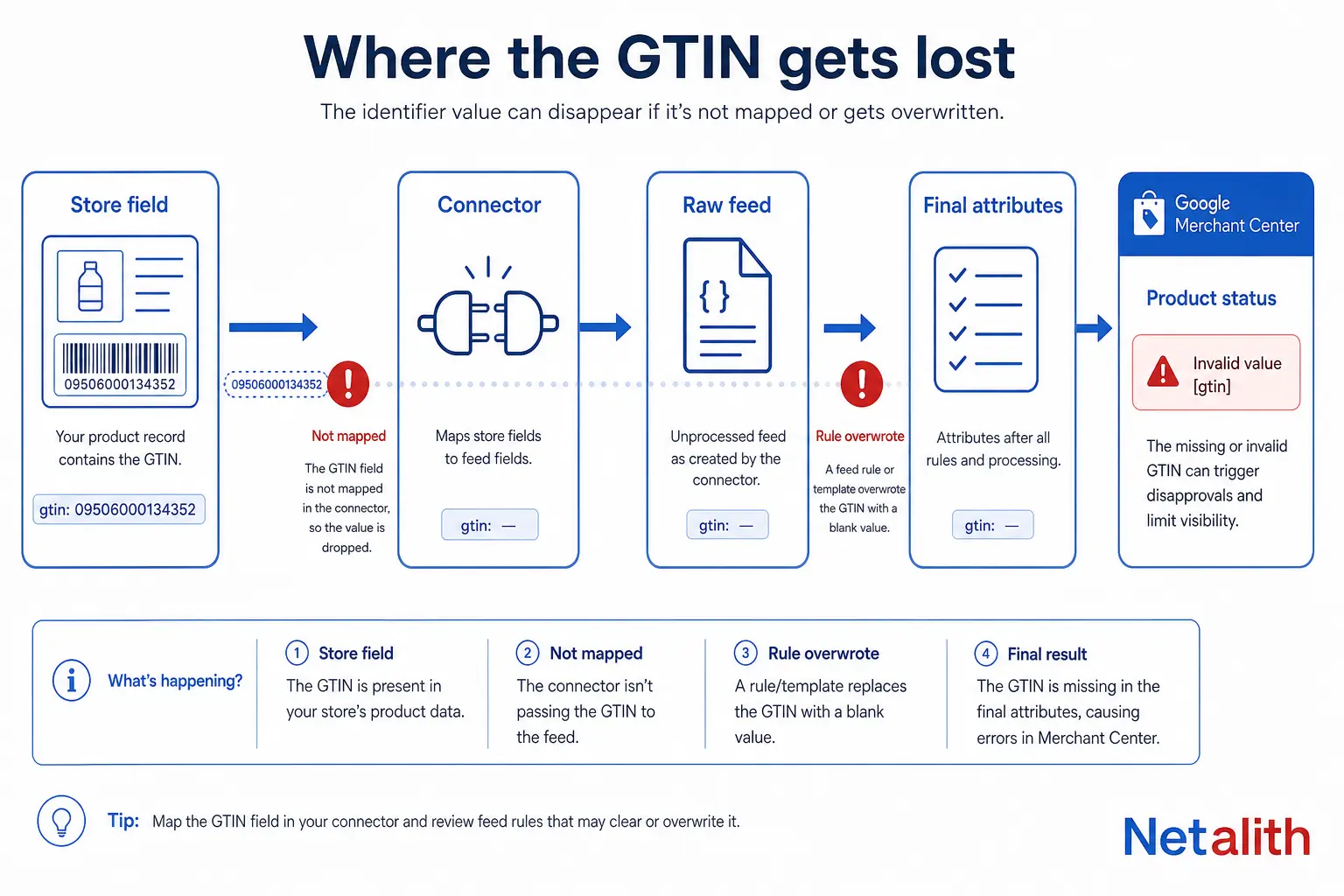
This is the most common version of the problem, and in most stores the catalog is fine. The value exists in the product record and never survives the trip to Google. There are four places it can be dropped.
| Stage | Where the value lives | How it gets lost |
|---|---|---|
| Store field | Shopify Barcode, WooCommerce GTIN, UPC, EAN, or ISBN, Odoo barcode, your own column | Field populated on the parent product but empty on the variants that are actually submitted |
| Connector / app | The integration that pushes products to Merchant Center | The field is not mapped at all, or a “custom product” flag suppresses it |
| Raw feed attributes | What Merchant Center received | Nothing arrived — the problem is upstream of Google |
| Final attributes | What Google uses after feed rules and automatic improvements | A feed rule or supplemental feed overwrote or cleared the value |
Two platform-specific traps are worth knowing by name. WooCommerce only gained a native identifier field in version 9.2 (August 2024) — stored as _global_unique_id — and connectors took months to read it, so stores that migrated from an older GTIN plugin kept the value in a custom field no one was mapping. On Shopify, the “custom product” setting on the Google channel is a declaration that the product has no identifiers; when it is on, the barcode is withheld even though it is sitting right there in the admin.
Diagnose it in one place: open any flagged product in Merchant Center and compare Raw feed attributes against Final attributes. If gtin is absent from raw, the connector or store field is at fault. If it is present in raw but gone from final, a feed rule ate it. That single comparison tells you which team fixes it, and it takes thirty seconds.
Products that genuinely have no GTIN: use brand and MPN
Plenty of catalogs legitimately cannot supply a GTIN, and Google names the categories explicitly: store-brand goods, replacement parts, OEM parts and their equivalents, custom-made products, books published before ISBN became an ISO standard in 1970, vintage items, and pre-orders. Replacement parts are the one that catches people out — a parts catalog can run to thousands of SKUs where a manufacturer part number exists and a retail barcode never did.
For those products the answer is not a workaround. It is a different pair of attributes.
| Situation | gtin | brand | mpn |
|---|---|---|---|
| Manufactured product, barcode known | The GTIN | Manufacturer brand | Manufacturer part number |
| Manufactured product, barcode not available to you | Leave blank | Manufacturer brand | Manufacturer part number |
| Replacement or OEM part with no retail barcode | Leave blank | Part manufacturer | The part number |
| Store brand / private label you sell exclusively | Leave blank | Your store brand | An identifier of your choice (your SKU is acceptable here) |
| Custom-made or personalised goods | Leave blank | Your store name | An identifier of your choice |
The line everyone crosses: your internal SKU belongs in mpn only when you are the manufacturer. On a product someone else made, a store-specific code in the MPN field is wrong data, and wrong data gets disapproved while blank data only gets throttled. The same rule applies to the GTIN field — leaving it empty is a supported state, filling it with a SKU is not.
Should you set identifier_exists to “no”?
Most of the advice circulating on this error tells you to set identifier_exists to no or false. That advice has aged badly.
Google's current guidance for products without identifiers does not ask you to flag anything — it asks you to leave gtin, brand and mpn blank and submit what you do have. The attribute still exists in the Merchant API, so a connector can still send it, but it is now a legacy switch rather than the fix. Setting it to false on a product that genuinely does have identifiers is a documented route to disapproval, and it is the exact failure mode behind the Shopify “custom product” complaints: the flag is set, so the barcode is suppressed, so Merchant Center reports a missing value for a product with a perfectly good barcode.
Practical rule: treat identifier_exists as something to find and turn off when it is wrongly set, not as something to add. If you manage feeds through a plugin or app, check whether it still writes the attribute automatically — several have removed that behaviour precisely because it was causing disapprovals.
Why inventing a GTIN makes things worse
A fabricated code almost never passes. Google validates GTINs against the GS1 rules before the product ever serves, and each of these checks produces a disapproval rather than a warning:
| Rule | Detail |
|---|---|
| Length | 8, 12, 13 or 14 digits (UPC-E must be converted to 12 digits; ISBN-10 to ISBN-13) |
| Check digit | Must be present and mathematically correct |
| Digits only | Letters or symbols mean it is not a GTIN |
| Restricted prefixes | Codes beginning 02, 04 or 2 are internal-use ranges and are rejected |
| Coupon prefixes | Coupon ranges are rejected |
| Uniqueness | One GTIN per variant; the same code on two products with identical condition, multipack, colour and size is a duplicate |
| GTIN-14 levels | Packaging levels 1–8 only, for genuine multi-item packages; never the bulk indicator 9 |
Worth knowing if you are writing your own validator: Google's two help pages list the coupon prefixes slightly differently — the GTIN attribute page gives 05, 98 and 99, while the unique product identifiers page gives 99 and 981–984. Validate against the union of both and you will not be surprised by a rejection.
The duplicate rule is the one that bites apparel and bundle sellers. Each colour and size is its own product with its own GTIN. If you created a multipack or bundle yourself, you submit the identifiers of the individual product or the main product — reusing the single-unit GTIN on your two-pack produces exactly the duplicate error people spend weeks chasing.
How to fix missing GTIN across thousands of products
Fix it at the source when the source can hold the data: populate the store field, map it in the connector, re-push. That is the version that stays fixed.
When the source cannot hold it — a parts catalog where identifiers live in a supplier spreadsheet, a platform whose connector refuses to map the field, a migration still in flight — a supplemental feed is the pragmatic answer. It is a second data source keyed on id that patches attributes onto the primary feed without touching your platform:
id	gtin
AP-10429	3234567890126
AP-10430	3234567890133
Three things decide whether this works:
- The id must match exactly, including case. A mismatched id fails silently — the row is simply ignored and the warning stays.
- Only include products that have a GTIN. Rows with blank values achieve nothing; products with no identifier belong in the brand-and-MPN path instead.
- Verify in Final attributes, not in the file you uploaded. The supplemental feed is applied after the primary feed, so Final attributes is the only honest confirmation.
A Google Sheet refreshed on a schedule is enough for a few thousand rows. Past that, it is worth owning the feed as a build step so identifiers, availability and price come from one pipeline rather than three — which is the shape of most of the Google Merchant Center and product feed work we take on.
Do you need to buy GS1 barcodes?
Usually not, and this is where merchants waste money reacting to the warning.
Google does not require you to obtain a GTIN for a product that does not have one. Buying GS1 prefixes makes sense in two situations: you manufacture products and intend to sell them through retail or marketplaces that require barcodes, or a specific channel you want to be on demands them. Clearing a Merchant Center warning on products you resell is not one of those situations — the manufacturer's existing GTIN is the correct value, and your job is to obtain it from the packaging, the manufacturer, or the distributor.
Avoid barcode resellers offering codes outside GS1. Those numbers are frequently issued against prefixes already used elsewhere, which trades a missing-value warning for a duplicate-identifier disapproval and a company prefix you do not control.
If your feed has been throwing identifier errors for months and you would rather hand the diagnosis to someone who does this daily, tell us what you are selling and where — scoping a feed audit costs nothing.
FAQ
Frequently asked questions
Will my products stop showing if Merchant Center says the GTIN is missing?
Not immediately. “Limited performance due to missing value [gtin]” is a warning: the product keeps serving but competes with less information than rivals who supply identifiers, and it may be excluded from features that depend on product matching. Google also states that a product which has an assigned GTIN but is submitted without one can be disapproved, so it is not safe to leave indefinitely.
Can I use my SKU as the GTIN?
No. A SKU is internal to your store and will fail GTIN validation on length, digits or check digit, which turns a warning into a disapproval. A SKU is only acceptable in the mpn field, and only for products you manufacture yourself.
My barcode is filled in on the product page but Google still reports it missing. Why?
The value is being dropped between your store and Merchant Center. Open the product in Merchant Center and compare Raw feed attributes with Final attributes: absent from raw means your connector is not sending it (an unmapped field, or a “custom product” flag suppressing it); present in raw but absent from final means a feed rule or supplemental feed removed it.
Should I set identifier_exists to no to clear the warning?
Only if the products genuinely have no identifiers, and even then it is no longer the recommended route. Google's current guidance is to leave gtin, brand and mpn blank rather than flag anything. Setting the attribute false on products that do have identifiers risks disapproval and is a frequent cause of this exact warning.
How do I fix missing GTIN on thousands of products at once?
Use a supplemental feed keyed on the product id, containing only the products you have real GTINs for. It patches the primary feed without changing your platform. Match the id exactly, including case, and confirm the result in Final attributes rather than in the uploaded file.
Do replacement and OEM parts need a GTIN?
Google explicitly lists replacement parts and OEM parts among the products that may have no assigned GTIN. Submit the part manufacturer as brand and the part number as mpn, and leave gtin empty. Do not generate a code to fill the field.