DataFeedWatch Alternative: 5 Options by Cost and Fit (2026)
Need a DataFeedWatch alternative? Compare the free Merchant Center route, GoDataFeed, Channable, Feedonomics and a custom feed, with 2026 pricing.

Long Nguyen
Fullstack Developer · AI Engineer · Researcher
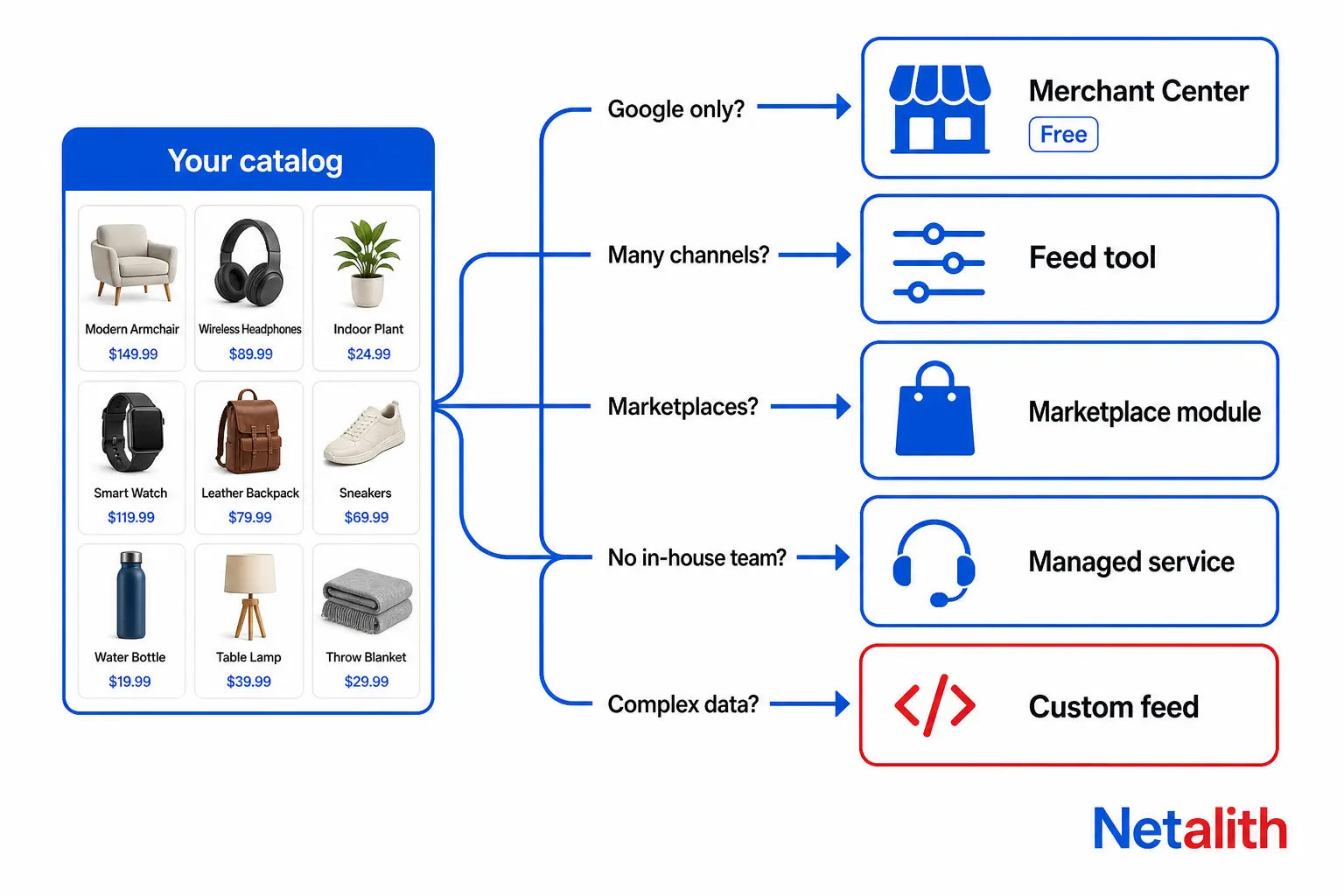
Which DataFeedWatch alternative fits your store
DataFeedWatch is a product feed management tool. It pulls your catalog from your store, lets you rewrite it with rules, and sends a tailored feed to each sales channel. Sellers look for an alternative for one of three reasons: the plan limits stop fitting, they resent a monthly bill for work Google partly does for free, or their product data is too awkward for a rule builder. Each reason points to a different answer.
| If this is you | Look at | Cost model |
|---|---|---|
| One store, selling mainly on Google, catalog data already clean | Merchant Center's own platform connection plus attribute rules | Free |
| Several ad channels, no developer, you want a rule builder | GoDataFeed or Channable | Monthly, scales with SKUs and channels |
| Marketplaces as well as ads, with listings and orders to manage | Channable with its Marketplaces module, or GoDataFeed marketplace channels | Monthly plus per-module or per-channel fees |
| Large catalog and nobody in-house to run feeds | Feedonomics or another fully managed service | Quoted by sales |
| Data in several systems, prices or stock changing all day, or rules a UI can't express | A custom-built feed on Google's Merchant API | One-time build plus maintenance |
The rest of this article explains each row, starting with what you are paying DataFeedWatch today, because that number decides whether switching is worth the effort.
What DataFeedWatch costs in 2026
These figures come from DataFeedWatch's public pricing page, checked on . All prices are in USD. Annual billing takes about 17% off.
| Plan | Monthly billing | Annual billing, per month | SKUs | Feeds | Shops | Feed syncs |
|---|---|---|---|---|---|---|
| Shop | $64 | $53.12 | 1,000 | 3 | 1 | 1 per day |
| Merchant | $84 | $69.72 | 5,000 | 10 | 2 | 2 per day |
| Agency | $239 | $198.47 | 30,000 | 150 | Unlimited | 5 per day |
| Enterprise | Custom | Custom | 100,000 | Unlimited | Unlimited | 5 per day |
Every plan has a 15-day free trial and includes the AI features for titles and categorization. The add-ons matter as much as the plan price:
- Extra SKUs, per 1,000: $5 on Shop, $3.50 on Merchant, $2.50 on Agency, $2 on Enterprise.
- Extra shop: $24 per month.
- Coaching: $450 per month.
- Managed service: from $750 per month.
Where the limits actually bite
- Feeds, not SKUs. Extra SKUs are cheap. Feeds are the hard edge. Shop gives you three outputs, and Google, Meta and Microsoft use all three. A fourth channel means the Merchant plan.
- Sync frequency. Shop syncs once a day. If a product sells out at noon, your ads can keep pointing at it until the next sync. Five syncs a day starts at Agency, which is $155 a month more than Merchant, or $1,860 a year.
- Help costs more than the tool. At the entry rate, the managed service is $9,000 a year. If you are paying someone to run a feed tool for you, compare that figure, not the $64.
On monthly billing, a year costs $768 on Shop, $1,008 on Merchant and $2,868 on Agency. Keep your own number in mind for the sections below.
The free DataFeedWatch alternative: Merchant Center on its own
Google now calls feeds data sources, and Merchant Center accepts product data in several ways without any third-party tool. Google's help page on how to upload your products to Merchant Center lists them:
| Method | How it works | The catch |
|---|---|---|
| E-commerce platform connection | Your store platform, such as Shopify, sends products and keeps them updated automatically | Store changes can take 24 to 48 hours to show in Merchant Center |
| Automatic crawl of your website | Google reads products from your product pages | Needs schema.org structured data on every product page, and does not work for local inventory ads or free local listings |
| File | A one-time upload, or a hosted file URL that Google fetches every 24 hours | Every column must map to Google's attribute list |
| Google Sheets template | A spreadsheet that updates Merchant Center after setup | Must follow Google's template exactly |
| Merchant API | Your own code sends product data directly | Needs a developer. Google recommends it when you have many feeds or make frequent changes |
Attribute rules replace the most-used feed tool feature
Most people pay for a feed tool to rewrite titles and fill in missing attributes. Merchant Center's attribute rules do a large part of that for free. A rule can fill one attribute by combining columns from any primary or supplemental data source with fixed text. A title rule of brand, then product name, then color is a few clicks. Rules run in order, so a second rule can refine the first. For price and availability, a 'Take latest' option uses whichever source was updated most recently.
A supplemental data source is the other half of the trick. Keep a small Google Sheet with one row per product ID and the columns you want to override, such as custom labels or a better title. Merchant Center merges it onto the main source by ID.
Where the free route stops
- It only feeds Google. Meta, Microsoft, Pinterest and TikTok each have their own catalog import. Microsoft can import a Google Merchant Center catalog, but your fixes for the others end up in separate places.
- It is not faster. A platform connection with a 24 to 48 hour delay is slower than DataFeedWatch's cheapest plan. Turn on automatic item updates so Google can correct price and availability from your product pages between syncs. Treat that as a safety net, not a sync.
- Rules live in a settings screen. There is no version history to roll back when a rule breaks 4,000 titles.
For one store on one platform selling mainly through Google, with reasonably clean titles, this is the right DataFeedWatch alternative. Paying $768 a year to reformat titles that attribute rules can reformat is hard to justify.
Channable, GoDataFeed and Feedonomics compared with DataFeedWatch
If you need many channels and nobody on the team writes code, the realistic move is to another feed tool. They do the same core job. They differ in how they charge and how much they do for you.
| Tool | How pricing works | Fits best when |
|---|---|---|
| DataFeedWatch | Flat plans from $64 per month, limited by SKUs, feeds, shops and syncs per day | You want predictable tiers and a very wide channel list |
| GoDataFeed | Build-your-own plan. You pick a SKU count from 1,000 to over 1 million, then add channels: $29 per month for each extra shopping-ads channel and $99 per month for each marketplace channel, which needs the Pro plan or higher. Extra SKUs are $5 per 1,000. 14-day trial | You sell on a few channels and want to pay only for those |
| Channable | Three parts added together: a package sized by items, projects and channels, a Core plan (Standard, Plus or Pro), and optional modules such as Marketplaces. The pricing page's own example package is 5,000 items, 2 projects and 6 channels | You run feeds and marketplaces from one tool and want the module for each |
| Feedonomics | Sold through sales as a full-service product. Their team builds and maintains the feeds | You have a large catalog and would rather buy the outcome than run a tool |
Two things the pricing pages don't make obvious:
- 'Cheaper' depends on your channel count. When checked, GoDataFeed's plan builder suggested its Plus plan at $99 per month. That is more than DataFeedWatch's $64 Shop plan. A switch saves money only if your mix of SKUs and channels lands in a cheaper cell on the other tool's grid. Price your exact setup on both before deciding.
- Marketplaces change the math. At $99 per marketplace channel, three marketplaces cost $297 a month before the base plan. For that money, compare tools built for marketplace listings and orders, not only feed tools.
Productsup sits at the enterprise end with Feedonomics. Neither is a like-for-like swap for a store on DataFeedWatch's Shop or Merchant plan.
When a custom-built product feed beats any feed tool
A custom feed is a scheduled job that reads your products, applies your rules in code, and either writes a feed file to a URL or pushes products through the Merchant API. It is the right DataFeedWatch alternative in four situations:
- Your data lives in more than one system. Stock is in the ERP, content is in a spreadsheet, prices are in the store. A feed tool reads one source well and the others badly.
- Prices or stock change faster than a sync schedule. An API push sends a change when it happens, not at the next of five daily syncs.
- Your rules need data the tool can't see. A custom label based on margin needs your cost price. Bundles, per-market pricing and supplier lead times are similar.
- You are paying for the top plan only for sync frequency or catalog size. $2,868 a year, every year, is the budget a one-time build competes with.
This is what 'rules in code' means in practice. The example builds a title and sets a custom label from margin, then writes a tab-delimited file Merchant Center can fetch:
import csv

def build_title(p):
    parts = [p['brand'], p['name'], p.get('color'), p.get('size')]
    return ' '.join(x for x in parts if x)[:150]

def margin_label(p):
    margin = (p['price'] - p['cost']) / p['price']
    if margin >= 0.4:
        return 'high'
    return 'mid' if margin >= 0.2 else 'low'

def write_feed(products, path):
    fields = ['id', 'title', 'price', 'availability', 'custom_label_0']
    with open(path, 'w', newline='', encoding='utf-8') as f:
        writer = csv.DictWriter(f, fieldnames=fields, delimiter='\t')
        writer.writeheader()
        for p in products:
            writer.writerow({
                'id': p['sku'],
                'title': build_title(p),
                'price': '{:.2f} USD'.format(p['price']),
                'availability': 'in_stock' if p['stock'] > 0 else 'out_of_stock',
                'custom_label_0': margin_label(p),
            })
A real feed needs more attributes, including link, image link, description, brand and GTIN. The point is that a margin label is six lines here and impossible in a tool that never sees your cost price. This is the kind of work Netalith does under product feed management for Google Merchant Center and other catalogs.
Check which Google API a custom feed uses
If you move to a custom script, an older plugin, or a small feed app, ask which API it calls. Google's Content API for Shopping deprecation notice says that API reached its sunset on . From , requests from clients without an active extension fail intermittently with an HTTP 410 Gone status. Full shutdown is scheduled for early 2027. Anything new should be built on Merchant API v1. A feed that fails intermittently is worse than one that fails outright, because nobody notices until products drop out of Shopping.
What a custom feed costs you
- You own the maintenance. When a channel changes its specification, someone has to change the code.
- No rule builder. A marketer cannot change a title rule without a developer unless you pay to build that screen.
- One channel at a time. Each new channel is new work. A feed tool with a ready template wins when you add channels often.
How to switch from DataFeedWatch without losing Shopping history
Whatever you move to, the risk is the same: Google treats a product with a new ID as a new product. Its performance history does not follow it.
- Save a baseline. Download the feed DataFeedWatch produces for each channel before you change anything.
- Keep every product ID identical. This is the classic trap when moving to a native platform connection. Shopify's Google channel has typically generated IDs in the pattern
shopify_US_productid_variantid, while a feed tool is often set to send the SKU or variant ID. Check which your current feed uses and make the new source match. - Rebuild the fields your campaigns depend on. If Shopping or Performance Max campaigns are split by custom labels or product type, those values must come out the same, or the product groups empty out.
- Compare the new feed with the baseline. Check row count, IDs, GTINs, prices and availability. A difference in row count is the first thing to explain.
- Switch one channel, then watch. Don't leave two sources sending the same products. After the switch, check Merchant Center's product issues daily for a few days.
- Cancel last. Keep the DataFeedWatch account until the new feed has run clean, so you can switch back.
When DataFeedWatch is still the right choice
Switching is not always the answer. Stay where you are if:
- You sell through many channels, including smaller comparison sites and affiliate networks. A ready template for each is the real product you are paying for.
- A marketer, not a developer, changes your feed rules every week.
- You fit inside the Merchant plan. At $84 a month for 5,000 SKUs and 10 feeds, no custom build pays for itself quickly.
Leave when the reason is structural: you only need Google, your data comes from several systems, or you are on a high plan for one limit. If you are not sure which case you are in, describe your catalog and channels in Netalith's free quote form and you will get a straight answer on whether a build is worth it.
FAQ
Frequently asked questions
Is there a free alternative to DataFeedWatch?
Yes, for Google. Merchant Center accepts products from a store platform connection, a file, a Google Sheet, a website crawl or the Merchant API at no cost, and its attribute rules can rewrite titles and fill attributes. The free route covers Google only, so other channels need their own catalog import.
How much does DataFeedWatch cost in 2026?
As of October 8, 2026, the Shop plan is $64 per month, Merchant is $84 and Agency is $239, with Enterprise priced on request. Annual billing takes about 17% off. Extra SKUs cost $2 to $5 per 1,000 depending on the plan, an extra shop is $24 per month, and the managed service starts at $750 per month.
Is GoDataFeed or Channable cheaper than DataFeedWatch?
It depends on your SKU and channel count. Neither uses flat tiers like DataFeedWatch. GoDataFeed prices by SKU count plus per-channel fees, and Channable adds a package, a Core plan and optional modules. Price your exact setup on each before switching, because a small store can end up paying more.
Will I lose Google Shopping performance history if I switch feed tools?
Not if every product keeps the same ID. Google treats a product with a new ID as a new product, so its history does not carry over. Check which ID format your current feed sends and make the new source match it, along with any custom labels your campaigns are split by.
When does a custom product feed make more sense than a feed tool?
When product data comes from several systems, when prices or stock change more often than a tool syncs, when rules need data the tool cannot see such as cost price, or when you are on a top plan for one limit. The trade-off is that you own the maintenance and each new channel is new work.
Does the Content API for Shopping shutdown affect my product feed?
It affects anything that still calls that API, such as older custom scripts and plugins. Google lists August 18, 2026 as the sunset date, with intermittent HTTP 410 errors from September 1, 2026 and full shutdown in early 2027. New work should use Merchant API v1.