Walmart item ingestion errors: read them, retry them, fix them
DATA_ERROR, SYSTEM_ERROR, TIMEOUT_ERROR explained: how to pull Walmart item-level ingestion errors, which to retry, and why PROCESSED feeds still fail.

Long Nguyen
Développeur fullstack · Ingénieur IA · Chercheur
What a Walmart item ingestion error actually is
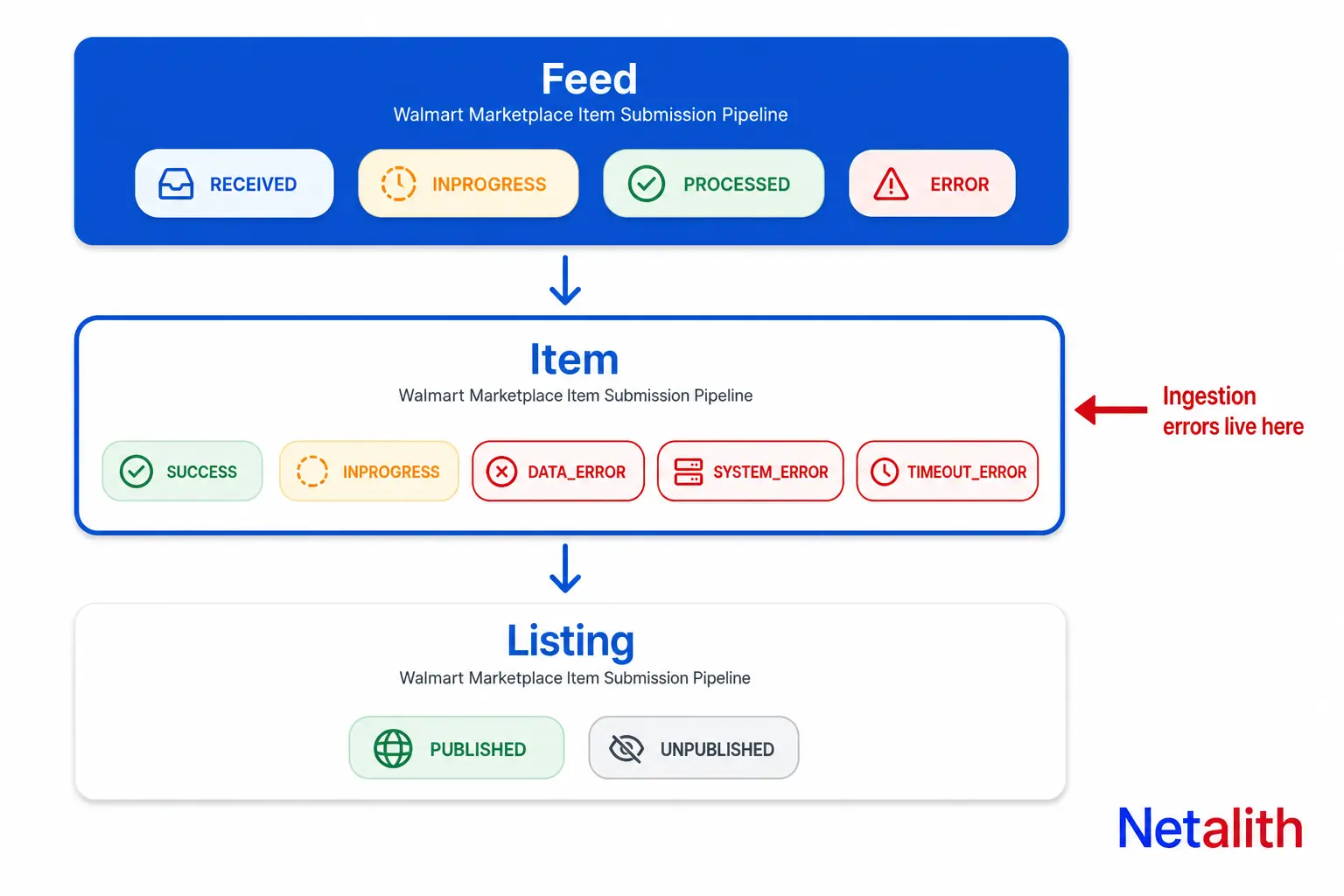
Most integrations that break on Walmart break because the developer treated "feed accepted" as "item listed". Those are two different checkpoints, and there is a third after them.
When you POST an item feed you get back a feedId and nothing else. Walmart then processes the feed asynchronously, and the result lands in three separate places:
| Layer | Field | What it answers |
|---|---|---|
| Feed | feedStatus |
Did the file itself get through the pipeline? |
| Item | ingestionStatus |
Did this specific SKU pass validation and get created? |
| Listing | published / unpublished | Is the item actually buyable on Walmart.com? |
An item ingestion error lives in the middle layer. The feed can be perfectly healthy while 400 of its 500 SKUs failed, because feedStatus: ERROR only means the feed as a whole failed and no elements were processed. A feed that reaches PROCESSED says nothing about the individual items inside it — that distinction is in Walmart's own wording, and it is the single most common misreading in seller integrations.
The practical consequence: any sync job whose success condition is feedStatus == 'PROCESSED' is reporting a green build on a red catalog.
Every ingestion status value, and the one conflict in Walmart docs
Feed-level status has four values and they are stable across every Walmart marketplace: RECEIVED, INPROGRESS, PROCESSED, ERROR.
Item-level status is where it gets awkward. Walmart currently documents two different vocabularies for the same field, on two pages that are both live and both maintained:
| Source page | Documented ingestionStatus values |
|---|---|
| Feed item status API reference | SUCCESS, INPROGRESS, DATA_ERROR, SYSTEM_ERROR, TIMEOUT_ERROR |
| Monitor feed processing guide | PROCESSED, ERROR |
The API reference set is the granular one and is what the Walmart Feed item status API documentation specifies, with the collapsed pair appearing in the newer guide page. You do not get to pick. Parse defensively: treat SUCCESS and PROCESSED as the same outcome, treat a bare ERROR as a DATA_ERROR until the detail proves otherwise, and make any unrecognised string a loud log line rather than a silent else: pass.
Three failure values, three different root causes:
DATA_ERROR— your payload is wrong. Resubmitting the identical file will fail identically.SYSTEM_ERROR— Walmart's side failed. Your payload may be fine.TIMEOUT_ERROR— a downstream Walmart system was unavailable during ingestion. Always transient.
How to pull item-level ingestion errors for a feed
One endpoint carries the whole picture:
GET https://marketplace.walmartapis.com/v3/feeds/{feedId}
| Parameter | Default | Notes |
|---|---|---|
includeDetails |
false |
Off by default. Without it you get counts only, no per-item results. |
offset |
0 |
Zero-based; only valid alongside includeDetails=true. |
limit |
50 |
Maximum 1000. A 5,000-SKU feed is 5 calls, not 100. |
Two things bite people here. First, includeDetails defaults to false, so a monitoring job written against the default response will never see a single error — it will see itemsFailed and nothing to act on. Second, Walmart feedId values contain an @, and it must be percent-encoded as %40 in the path. An unencoded @ does not throw a helpful error; it produces a request against a path your HTTP client assembled differently than you expected.
import urllib.parse

BASE = 'https://marketplace.walmartapis.com/v3/feeds/'

# The feedId contains '@'. Unencoded, it silently becomes a different path.
feed_id = 'F129C19240844B97A3C6AD8F1A2C4997@AU8BAQA'
url = BASE + urllib.parse.quote(feed_id, safe='')
params = {'includeDetails': 'true', 'offset': 0, 'limit': 1000}

OK          = {'SUCCESS', 'PROCESSED'}
RETRYABLE   = {'SYSTEM_ERROR', 'TIMEOUT_ERROR'}
NEEDS_FIX   = {'DATA_ERROR', 'ERROR'}

def classify(item):
    status = item.get('ingestionStatus')
    if status in OK:
        return 'done'
    if status in RETRYABLE:
        return 'retry'          # same payload, later
    if status in NEEDS_FIX:
        return 'fix_payload'    # never auto-retry
    if status == 'INPROGRESS':
        return 'wait'           # compliance or GTIN review
    return 'unknown'            # log loudly, do not swallow
The counts in the same response — itemsReceived, itemsSucceeded, itemsFailed, itemsProcessing — are your reconciliation check. If succeeded plus failed plus processing does not equal received, you are still mid-flight and have not seen the final answer yet. Checking that sum before you declare a sync complete costs one comparison and catches a whole class of silent partial failures. If you are integrating several marketplaces at once, that reconciliation logic is the part worth building properly rather than per-channel — it is the same shape of problem we solve on marketplace API integration projects.
Which ingestion errors to retry, and which to never retry
A single retry policy across all three failure types is how sellers get rate-limited and still end up with nothing published. The three statuses need three different behaviours:
| Status | Cause | Correct action | Auto-retry? |
|---|---|---|---|
DATA_ERROR |
Invalid or rejected payload | Fix the field, resubmit only the affected SKUs | Never |
SYSTEM_ERROR |
Walmart-side processing failure | Resubmit the same payload after a delay | Yes, with backoff |
TIMEOUT_ERROR |
Downstream Walmart system unavailable | Wait, then resubmit unchanged | Yes, with backoff |
INPROGRESS |
Still processing, or under review | Keep polling; do not resubmit | No — poll instead |
Walmart's own retry guidance is exponential backoff on 429 and 5xx, reusing the same correlation ID when you retry the same call. Reusing the ID matters more than it looks: when you eventually open a support ticket, a single correlation ID spanning the whole retry chain is the difference between a resolved ticket and a week of back-and-forth.
One rule worth hard-coding: cap retries per SKU, not per feed. A feed-level retry resubmits 4,900 healthy SKUs to fix 100 broken ones, and every resubmission re-enters the queue behind the rest of your catalog.
Why the feed error report returns nothing for MP_ITEM feeds
There is a Feed error report API that returns a zipped CSV of detailed error information, and a lot of integration code is written on the assumption that it covers item feeds. It does not. Walmart documents its current support as FITMENT_ACES and FITMENT_PIES only.
So for a normal MP_ITEM setup or maintenance feed, the error report is not your error channel. Paging itemDetails.itemIngestionStatus[] with includeDetails=true is.
The response codes are also easy to misread. The report endpoint returns 204 with no body both when the feed failed to process entirely and when it processed with zero ingestion errors; it returns 200 with the zipped CSV only when ingestion errors exist. Treating 204 as "all good" is wrong half the time. Check feedStatus before you interpret a 204.
Fitment feeds do have their own file-level codes — FITMENT_ERROR_001 through FITMENT_ERROR_015, covering things like an empty or corrupted zip, a missing ACES or PIES XML, multiple Brand AAIA IDs in one file, and Excel files containing formulas or newline characters inside cells. Those last two catch a surprising number of auto-parts sellers who built their catalog in a spreadsheet.
Feed says PROCESSED but the item is not live
This is the hardest state to debug because nothing in it is an error. Three mechanisms produce it.
GTIN exemption under manual review
For MP_ITEM and MP_WFS_ITEM feeds, an item requesting a GTIN exemption can require manual review. During that review feedStatus can read PROCESSED while the item's ingestionStatus stays INPROGRESS. If Walmart approves, you must resubmit the item to complete setup — approval alone does not finish the job. If Walmart denies it, setup fails.
Compliance review
An item under compliance review returns ingestionStatus: INPROGRESS with an optional pendingStatusDescription explaining the review and its timeframe, which can run up to 24 hours. While it runs, edits and resubmissions cannot be processed. A retry loop here does nothing except burn your rate limit. Surface the message to the seller instead. Separately, items placed on compliance hold expose an item status of In Review, Action Needed, or Prohibited, and Action Needed comes with details describing what to fix — the full flow is in Walmart's feed processing and compliance guide.
Ingested successfully, then unpublished
The item was created cleanly and the listing layer rejected it afterwards. Walmart lists the usual reasons as no price, no primary image, reasonable price not satisfied, and start or end date problems. These never appear as ingestion errors because ingestion worked. Query the Unpublished Items API for the reason code — and build that call into your pipeline rather than leaving it as a manual check, because a catalog quietly sliding into unpublished is invisible from the feed side.
The data errors behind most item setup failures
Walmart names invalid GTIN or UPC lengths, conflicting titles and prices, and outdated spec versions as the frequent item setup errors. In practice the fixes are preventable before you ever call the API:
- GTIN length and check digit. Walmart expects a 14-digit GTIN; a 12-digit UPC needs left-padding with zeros, not submitting raw. Validate the check digit locally — it is a few lines of arithmetic and it eliminates an entire error class before the call.
- Stale spec version. Item specs are versioned and attribute requirements shift between versions. A payload built against last year's spec produces attribute-level
DATA_ERRORresults that read as random missing-field complaints. Pull the current spec rather than hard-coding one. - Conflicting title and price data. Typically a sign that two systems are writing the same SKU. Decide which one owns the field before you debug the error.
- Variant group mistakes. Variants that disagree on group ID or variant attributes fail per-SKU, so a partially broken group leaves you with a half-published family — exactly the state the reconciliation check in the earlier section catches.
Worth noting for anyone validating locally: Walmart's sandbox runs feed validations, so schema-level mistakes can be caught before they touch production inventory.
A monitoring design that catches ingestion errors early
Everything above collapses into a short checklist. A feed submission job is correctly instrumented when it does all of this:
- Poll on Walmart's schedule. Suggested intervals are 15 minutes, then 1 hour, 2 hours, and every 4 hours after that. Polling every 30 seconds does not make ingestion faster; it makes you rate-limited.
- Always request
includeDetails=trueand page withlimit=1000rather than the default 50. - Reconcile the counts before declaring success: received must equal succeeded plus failed plus processing.
- Alert on sustained rates, not single events. A one-off
SYSTEM_ERRORis noise; a risingDATA_ERRORrate means a mapping change broke your payload builder. - Store the request and response payloads with the correlation ID. Walmart support asks for them, and feed results are not retained forever.
- Convert
feedSubmissionDatefrom epoch milliseconds to ISO 8601 before it reaches your logs, or every incident timeline will be unreadable. - Separate the three error types in your dashboards. One "failed items" number mixes a Walmart outage with your own bad data, and the two need opposite responses.
The pattern that distinguishes a reliable integration from a fragile one is not better error handling — it is treating item-level status as the source of truth and the feed as a transport receipt. If your Walmart sync is currently reporting success while SKUs quietly fail, tell us what your pipeline looks like and we will tell you where the gap is.
FAQ
Questions fréquentes
What does ingestionStatus DATA_ERROR mean on a Walmart feed?
DATA_ERROR means the item payload itself was rejected during validation — a bad GTIN, a missing required attribute, a stale spec version, or conflicting values. It is not transient. Resubmitting the identical payload produces the identical failure, so fix the field first and resubmit only the affected SKUs.
Why does my Walmart feed show PROCESSED but the item is not listed?
feedStatus describes the feed, not the items inside it. A PROCESSED feed can contain items with DATA_ERROR, items still INPROGRESS under compliance or GTIN-exemption review, or items that ingested cleanly and were then unpublished for a missing price or primary image. Call the feed item status API with includeDetails=true to see per-item results.
How do I get the detailed error list for a Walmart MP_ITEM feed?
Call GET /v3/feeds/{feedId} with includeDetails=true and page through itemDetails.itemIngestionStatus[] using offset and limit (max 1000). The separate feed error report API that returns a zipped CSV currently supports only FITMENT_ACES and FITMENT_PIES feeds, so it is not the error channel for standard item feeds.
Which Walmart ingestion errors are safe to retry automatically?
SYSTEM_ERROR and TIMEOUT_ERROR are Walmart-side failures and are safe to retry unchanged with exponential backoff. DATA_ERROR must never be auto-retried. Items sitting at INPROGRESS should be polled, not resubmitted — during a compliance review, edits and resubmissions cannot be processed at all.
How often should I poll Walmart for feed and item status?
Walmart suggests polling at 15 minutes, then 1 hour, 2 hours, and every 4 hours afterwards. Tighter polling does not speed up ingestion and risks 429 responses. Use exponential backoff on 429 and 5xx, and reuse the same correlation ID across retries of the same call.
Why does my request to the feed status endpoint return the wrong feed?
Walmart feedId values contain an @ character, which must be percent-encoded as %40 in the URL path. If your HTTP client leaves it raw, the request is assembled against a different path and the failure is not obvious. Encode the feedId before building the URL.