Walmart WFS API Integration: Every Call in Order, and the Traps
Walmart WFS API integration mapped endpoint by endpoint: item conversion, inbound shipments, WFS orders, inventory limits and the traps that break syncs.

Long Nguyen
Lập trình viên Fullstack · Kỹ sư AI · Nhà nghiên cứu
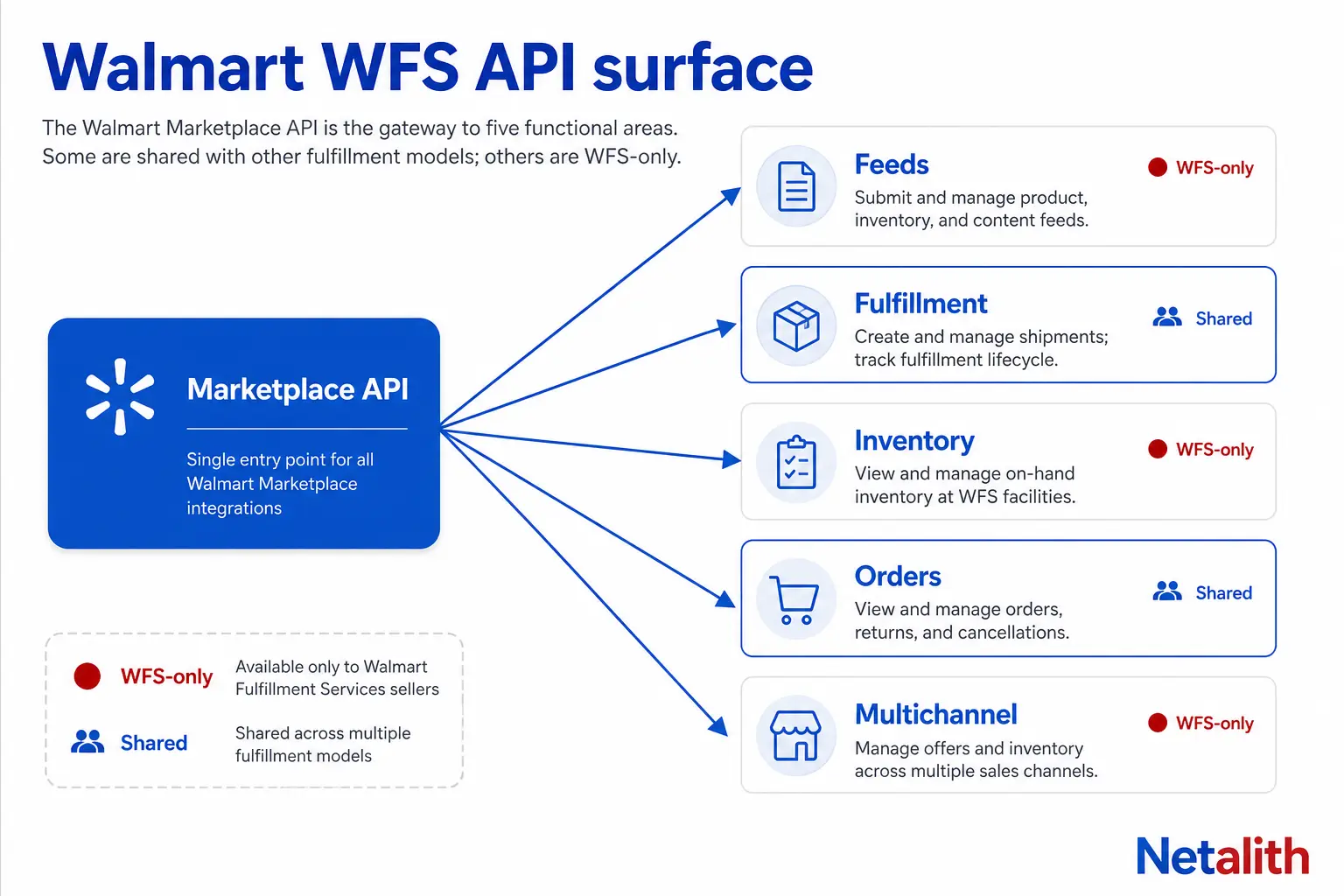
Which APIs actually make up a Walmart WFS integration
There is no separate "WFS API" with its own host, its own credentials or its own SDK. Walmart Fulfillment Services lives inside the Walmart Marketplace API at marketplace.walmartapis.com: a group of WFS-only endpoints under /v3/fulfillment/, a pair of WFS feed types, and a set of behaviour changes in endpoints you are probably already calling.
That distinction decides your architecture. WFS is not a second connector you bolt on next to your Marketplace connector — it is a fulfillment mode that changes how your existing connector behaves per SKU and per order.
| Job | Endpoint / feed | WFS-only? |
|---|---|---|
| Create items directly as WFS | POST /v3/feeds?feedType=MP_WFS_ITEM |
Shared endpoint, WFS feed type |
| Convert existing items to WFS | POST /v3/feeds?feedType=OMNI_WFS |
Shared endpoint, WFS feed type |
| Send inventory to a fulfillment center | /v3/fulfillment/inbound-shipments and siblings |
Yes |
| Read WFS stock on hand | WFS inventory (New) + reconciliation, health and per-item log reports | Yes |
| Pull customer orders | GET /v3/orders with shipNodeType |
Shared endpoint, parameter changes |
| Fulfil non-Walmart orders from WFS stock | Multichannel Solutions endpoints | Yes |
| Book freight to the FC | Walmart Preferred Carriers (new) / carrier rate quote (legacy) | Yes |
| Restock, convert and unpublished suggestions | Recommendations endpoints | Yes |
| Check hazmat holds | Hazmat Items On hold | Yes |
If your integration already speaks Marketplace, roughly 70% of a WFS project is new endpoints and 30% is auditing the code you already shipped for places where a WFS SKU behaves differently. The second half is where integrations break.
Authentication and the headers every WFS call needs
Every WFS call rides on the same OAuth client-credentials flow as the rest of the Marketplace API. You exchange a Client ID and Client Secret for a short-lived access token, then send that token as a header — not as a bearer Authorization value.
import base64, uuid, requests

BASE = "https://marketplace.walmartapis.com"
AUTH = base64.b64encode(f"{CLIENT_ID}:{CLIENT_SECRET}".encode()).decode()

def fetch_token():
    r = requests.post(
        f"{BASE}/v3/token",
        headers={
            "Authorization": f"Basic {AUTH}",
            "WM_SVC.NAME": "Walmart Marketplace",
            "WM_QOS.CORRELATION_ID": str(uuid.uuid4()),
            "Accept": "application/json",
        },
        data={"grant_type": "client_credentials"},
        timeout=30,
    )
    r.raise_for_status()
    body = r.json()
    return body["access_token"], int(body["expires_in"])

def wfs_headers(token):
    return {
        "WM_SEC.ACCESS_TOKEN": token,
        "WM_SVC.NAME": "Walmart Marketplace",
        "WM_QOS.CORRELATION_ID": str(uuid.uuid4()),
        "Accept": "application/json",
        "Content-Type": "application/json",
    }
Three things the reference pages state but most integrations get wrong anyway:
- Cache the token against
expires_in, never against a hardcoded TTL. Re-minting a token on every call is the fastest way to get throttled on a high-volume inbound run. WM_QOS.CORRELATION_IDmust be a fresh GUID per call, and you should log it. It is the only handle Walmart Support can trace when an inbound order silently fails; a reused or missing correlation ID turns a 20-minute ticket into a week.- Solution providers also send
WM_CONSUMER.CHANNEL.TYPE, issued at onboarding. Sellers calling on their own behalf do not need it, which is why copy-pasted vendor sample code often 400s on a direct seller account.
Getting items into the WFS catalog: MP_WFS_ITEM vs OMNI_WFS
An inbound order can only reference a SKU that already exists in the WFS catalog. Walmart's documented inbound-order failures include "SKU not in WFS catalog" — and that is almost always a sequencing bug, not a data bug: the team fired the inbound call before the item feed finished processing.
MP_WFS_ITEM |
OMNI_WFS |
|
|---|---|---|
| Use it when | The SKU does not exist on Walmart yet | The SKU is already live as seller-fulfilled |
| What it does | Creates the item with the WFS item spec | Converts an ingested item for WFS |
| Call | POST /v3/feeds?feedType=MP_WFS_ITEM |
POST /v3/feeds?feedType=OMNI_WFS |
| Spec to pull first | WFS item spec via Get spec | WFS conversion spec via Get spec |
Both are asynchronous. The response gives you a feedId, not a result. Poll the feed status endpoint until the feed leaves INPROGRESS, then read item-level errors — a feed can report success at the header level while individual SKUs fail validation underneath it.
The dimension trap
WFS fees are driven by shipping weight and dimensions, and the FC re-measures your cartons on receipt. If your item feed carries the dimensions of the product instead of the dimensions of the packed, ready-to-ship unit, every fee estimate your system produces afterwards is wrong — and you will only find out from a reconciliation report weeks later. Normalise to packed dimensions at the point where your PIM writes the feed, not downstream.
Creating an inbound shipment with the WFS API, call by call
This is the core WFS workflow: you declare what you intend to send, Walmart tells you where to send it, you print labels, you hand it to a carrier, you report tracking.
| # | Call | What it is for |
|---|---|---|
| 1 | POST /v3/fulfillment/inbound-preview |
Dry run — see how Walmart would split the order before you commit |
| 2 | POST /v3/fulfillment/inbound-shipments |
Create the inbound order (IO) |
| 3 | GET /v3/fulfillment/inbound-shipment-errors |
Check why an IO was rejected |
| 4 | GET /v3/fulfillment/inbound-shipments |
Shipment-level detail: which FCs, how many shipments |
| 5 | GET /v3/fulfillment/inbound-shipment-items |
SKU-level detail per shipment, plus receipt status |
| 6 | PUT /v3/fulfillment/shipment-quantities |
Correct quantities before the shipment is delivered |
| 7 | POST /v3/fulfillment/shipment-label |
Generate the inbound shipment label |
| 8 | POST /v3/fulfillment/shipment-tracking |
Report the carrier and tracking numbers |
| 9 | DELETE /v3/fulfillment/inbound-shipments/{inboundOrderId} |
Cancel the whole IO |
Read the endpoint pages, not the overview page
Walmart's WFS overview page lists this sequence with shortened paths such as /v3/inbound-shipments and /v3/shipment-items, and shows GET against two operations that are really PUT and POST. The per-endpoint reference pages are the ones that match production: every inbound operation sits under /v3/fulfillment/. Build from the Walmart fulfillment API reference endpoint pages and treat the overview as a diagram, not a contract.
The same page split hides a live deprecation: the label call you want is POST /v3/fulfillment/shipment-label. The older GET /v3/fulfillment/label/{shipmentId} is marked deprecated, and it is still the one most sample code on the internet calls.
One inbound order is not one shipment
This is the single biggest data-modelling mistake in WFS integrations. When you create an IO, Walmart decides whether it ships to one fulfillment center or has to be split across several — and the response tells you which. Your schema needs three levels from day one:
- Inbound order — what you asked to send, and the only level at which you can cancel
- Shipment — one per destination FC, each with its own label, carrier and tracking
- Shipment item — the SKU-level split, and later the received-versus-expected reconciliation
Teams that model an IO as a flat list of SKUs with one tracking number have to rewrite the module the first time a multi-FC split happens, which is usually in week two of production.
Cancellation is narrower than people expect
You can only cancel at the inbound order level — cancelling an IO cancels every shipment on it, and there is no way to cancel one shipment inside a multi-shipment IO. Cancellation is also blocked once a shipment reaches Receiving in Progress, Closed or Cancelled. Check status with the Get Shipments call before you expose a cancel button in your own UI, or your users will hit failures you cannot explain to them.
Pulling WFS orders without breaking your order sync
Here is the trap that generates more "WFS integration is broken" tickets than every other issue combined: GET /v3/orders defaults to shipNodeType=SellerFulfilled. WFS orders are not in that response. To read them you must ask for them explicitly:
params = {
    "shipNodeType": "WFSFulfilled",   # default is SellerFulfilled
    "createdStartDate": "2026-10-01",
    "limit": "100",
}
r = requests.get(f"{BASE}/v3/orders", headers=wfs_headers(token), params=params)
A seller converts their catalogue to WFS, sales continue, and their ERP shows zero new orders. Nothing is broken — the sync is filtering them out by default. Walmart's own WFS API guide states this explicitly, and it is still the first thing to check on any WFS go-live.
Two consequences for your order pipeline:
- Run both pulls, not one. A mixed seller needs the
SellerFulfilledpass and theWFSFulfilledpass, written into the same order table with the fulfillment channel stored on the row. - Never acknowledge, ship or cancel a WFS order line. Walmart owns pick, pack, ship and tracking for WFS. If your code calls Acknowledge Orders or Ship Order Lines on a WFS line because that is what it has always done for Marketplace orders, you are writing into a flow you do not control. Branch on fulfillment channel before any write operation on an order.
WFS inventory: what the API lets you write, and what it does not
For seller-fulfilled SKUs you own the quantity and you push it with the Inventory API. For WFS SKUs you own nothing. The quantity on hand is whatever is physically in Walmart's fulfillment centers, and it is read-only to you.
| Operation | Seller-fulfilled SKU | WFS SKU |
|---|---|---|
| Push quantity | Yes, Update inventory | No — Walmart is the source of truth |
| Read quantity | Inventory / multi-node inventory | WFS inventory (New) |
| Audit movements | Your own system | Inventory log for a WFS item |
| Reconcile against expectations | Your own system | WFS inventory reconciliation report |
| Spot ageing and health issues | Your own system | WFS inventory health report |
The design rule: in your ERP, a WFS quantity is a cached replica, never a writable field. Any code path that recalculates an available-to-sell number and pushes it back must be gated on fulfillment channel.
Use the reconciliation report and the per-item inventory log as paired tools rather than dashboards. The reconciliation report tells you a discrepancy exists; the item log tells you which movement caused it, which is the evidence you need when you open a claim for units received short or damaged. Pull both on a schedule and store them — they are the only reliable audit trail you will have, and that is the part of marketplace API integration work most teams discover they need only after the first loss.
Fulfilling off-Walmart orders from WFS stock with Multichannel Solutions
Multichannel Solutions (MCS) is the part of the WFS surface sellers most often do not know is there: it lets you fulfil orders placed on your own store or another channel out of the inventory already sitting in Walmart's FCs. It is a separate endpoint group with its own onboarding call.
- Register the channel first — Create MCS sales channel details, then read or update it. Orders submitted against an unregistered channel will not route.
- Quote before you promise — Fetch delivery promise details returns the delivery date you are safe to display at your own checkout. Rendering a guess and letting the fulfillment order fail afterwards is how you build a support queue.
- Create, track, cancel — Create MCS customer order, Get MCS fulfillment orders status, Cancel MCS fulfillment order.
- Returns are first-class — separate endpoints create, read and cancel customer return orders. Wire these at the same time as the forward flow; retrofitting returns into a shipped integration is always more expensive.
Walmart also publishes an OpenAPI specification for MCS, so the client layer is worth generating rather than hand-writing. Spend the saved time on the state machine between your order status and theirs — that is the part a generator cannot give you.
The WFS endpoints most integrations never call
Four endpoints exist specifically to make WFS cheaper to run, and they are routinely ignored because they are filed under Recommendations instead of Fulfillment:
- Get WFS Recommended Shipment Quantity — what to put in the next inbound order. Feed this into your replenishment job instead of a static reorder point.
- Restock Recommendations — which SKUs to restock, based on current stock and forecast demand.
- Fulfill with WFS Recommendations — which seller-fulfilled SKUs are likely to perform better on WFS. This is the one to surface to a client who is deciding what to convert.
- Unpublished Recommendations — which WFS items are currently unpublished and why. An unpublished WFS item is paid storage generating zero sales, which makes this the highest-value of the four and the one worth alerting on.
One caveat on freight: Walmart Preferred Carrier quotes for full truckload are not available through the API, so a system that assumes it can quote every inbound shipment programmatically will need a Seller Center step for FTL. Note also that the carrier rate quote endpoints exist in both a legacy and a new set — build against the new Walmart Preferred Carriers group.
The WFS integration gotchas that cost the most time
A pre-go-live checklist, drawn from where the documentation and real behaviour diverge:
| Symptom | Actual cause |
|---|---|
| No WFS orders in the order sync | shipNodeType defaults to SellerFulfilled |
| Inbound order rejected: SKU not in WFS catalog | IO fired before the item feed finished processing |
| 404 on inbound endpoints | Paths copied from the overview page without the /v3/fulfillment/ prefix |
| Label call returns a deprecation | Using GET /v3/fulfillment/label/{shipmentId} instead of POST /v3/fulfillment/shipment-label |
| Cancel button fails intermittently | Shipment already in Receiving in Progress, Closed or Cancelled, or an attempt to cancel one shipment inside an IO |
| Tracking numbers overwrite each other | IO modelled as one shipment; a multi-FC split produced several |
| Inventory pushes silently do nothing | Quantity writes attempted against WFS SKUs |
| Fee estimates drift from actual charges | Product dimensions sent instead of packed shipping dimensions |
| Support cannot trace a failure | No stored WM_QOS.CORRELATION_ID per call |
Most of these are cheap to prevent and expensive to find in production, because the failure mode is usually silence rather than an error. Build the correlation-ID log and the fulfillment-channel branch before the first inbound order, not after the first incident.
If you are wiring WFS into an existing multichannel stack — or you have an order sync that has quietly stopped seeing half your volume — you can tell us what you are integrating and get a scoped quote. No account, no cost to ask.
CÂU HỎI THƯỜNG GẶP
Câu hỏi thường gặp
Is there a separate Walmart WFS API with its own credentials?
No. WFS is part of the Walmart Marketplace API at marketplace.walmartapis.com and uses the same Client ID, Client Secret and token flow. What is WFS-specific is a group of endpoints under /v3/fulfillment/, two feed types (MP_WFS_ITEM and OMNI_WFS), the WFS inventory and report endpoints, Multichannel Solutions, Walmart Preferred Carriers and the WFS recommendation endpoints.
Why are my WFS orders missing from GET /v3/orders?
Because the endpoint defaults to shipNodeType=SellerFulfilled. Pass shipNodeType=WFSFulfilled to retrieve WFS orders. A mixed seller needs both pulls, stored with the fulfillment channel recorded on each order row.
Can I update inventory quantities for WFS items through the API?
No. Walmart owns the quantity for WFS SKUs because the units are physically in its fulfillment centers. You read WFS stock with the WFS inventory endpoint and audit it with the inventory reconciliation report, the inventory health report and the per-item inventory log. Treat WFS quantity as read-only in your ERP.
Which feed type do I use to put items on WFS?
Use POST /v3/feeds?feedType=MP_WFS_ITEM to create items that do not exist on Walmart yet, and POST /v3/feeds?feedType=OMNI_WFS to convert items already ingested as seller-fulfilled. Both are asynchronous, so poll the feed status and read item-level errors before creating an inbound order against those SKUs.
Can I cancel a single shipment inside a WFS inbound order?
No. Cancellation works only at the inbound order level, and cancelling an inbound order cancels every shipment on it. You also cannot cancel once a shipment has reached Receiving in Progress, Closed or Cancelled, so check status with the Get Shipments call before offering a cancel action in your own interface.
Can I fulfil Shopify or other non-Walmart orders from WFS inventory?
Yes, through Multichannel Solutions. Register the sales channel first, use the delivery promise endpoint before displaying a delivery date at your own checkout, then create, track and cancel fulfillment orders through the MCS endpoints. Returns have their own create, read and cancel endpoints and should be wired at the same time.