Defender for Business và Endpoint: Bạn cần gói nào?
So sánh Defender for Business và Defender for Endpoint về giá, EDR, giới hạn 300 người dùng để chọn gói phù hợp cho doanh nghiệp hoặc MSP năm 2026.

Long Nguyen
Lập trình viên Fullstack · Kỹ sư AI · Nhà nghiên cứu
Defender for Business và Defender for Endpoint: khác biệt cốt lõi
Cả hai sản phẩm đều sử dụng cùng một công cụ phát hiện, vì vậy đặt câu hỏi “gói nào phát hiện nhiều malware hơn” là chưa chính xác. Khác biệt thực sự nằm ở đối tượng được cấp phép cho từng SKU và mức độ điều tra, ứng phó hỗ trợ phía sau cùng một cảnh báo.
- Microsoft Defender for Business giới hạn ở 300 người dùng, đi kèm các chính sách mặc định được thiết lập theo hướng dẫn từng bước, và có thể mua độc lập hoặc được tích hợp trong Microsoft 365 Business Premium.
- Microsoft Defender for Endpoint không giới hạn số lượng người dùng và được cung cấp theo hai cấp: Plan 1 (bảo vệ) và Plan 2 (bảo vệ kèm phát hiện, ứng phó và hunting).
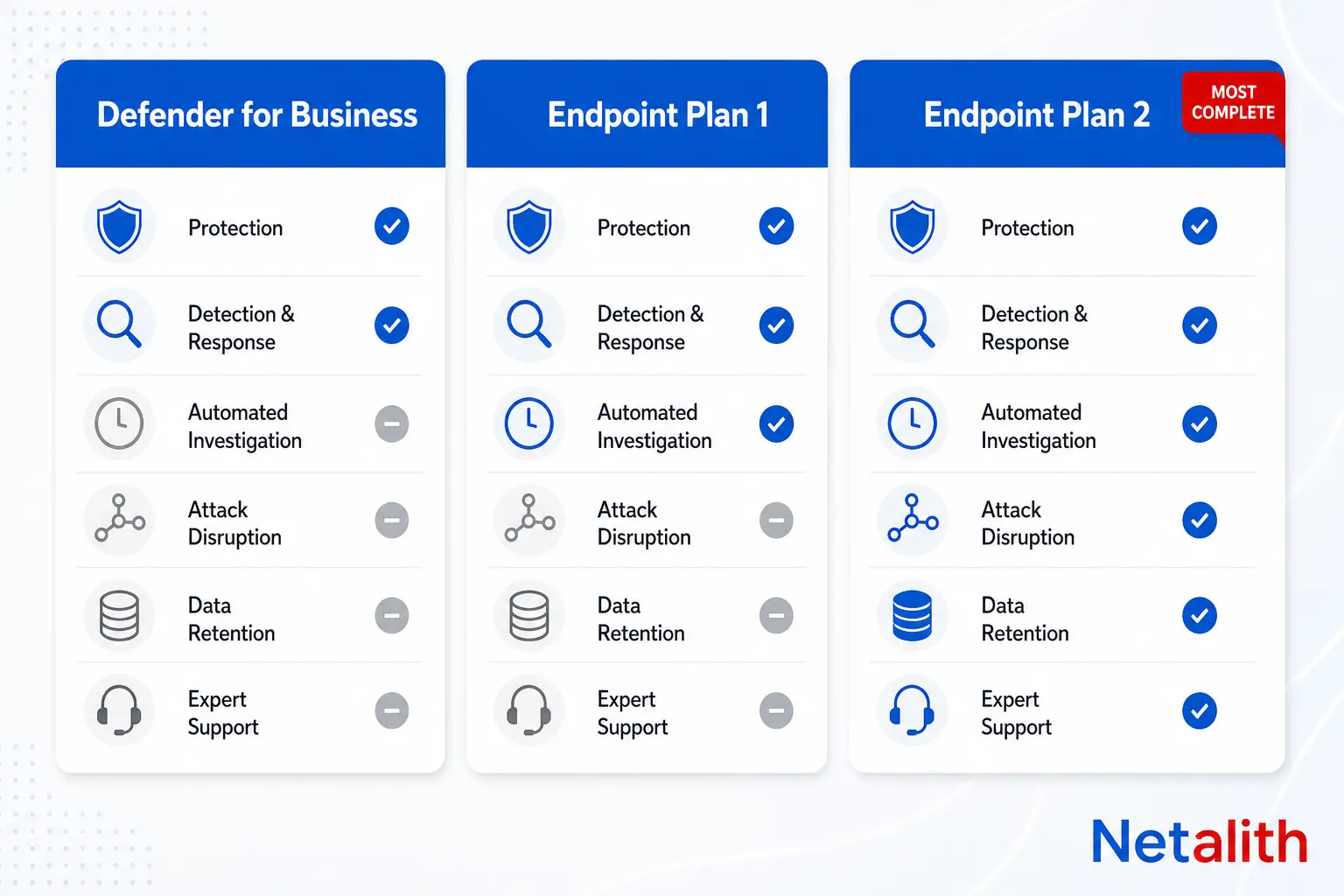
Điểm dễ gây nhầm lẫn là Defender for Business không đơn giản chỉ là “Endpoint Plan 1 dành cho doanh nghiệp nhỏ”. Theo bảng so sánh sản phẩm của Microsoft, Defender for Business bao gồm toàn bộ tính năng của Plan 1, thêm một số khả năng của Plan 2 mà Plan 1 không có — trong đó có endpoint detection and response và điều tra tự động — cùng một vài tính năng riêng như cấu hình firewall/antivirus đơn giản hóa cho Windows.
| Tính năng | Defender for Business | Endpoint Plan 1 | Endpoint Plan 2 |
|---|---|---|---|
| Bảo vệ thế hệ mới | Có | Có | Có |
| Giảm bề mặt tấn công | Có | Có | Có |
| Phát hiện và ứng phó trên endpoint (EDR) | Có (tối ưu hóa) | Không | Có |
| Điều tra và khắc phục tự động | Có | Không | Có |
| Tự động ngăn chặn cuộc tấn công | Có | Không | Có |
| Quản lý lỗ hổng (cốt lõi) | Có | Không | Có |
| Phân tích mối đe dọa | Có (tối ưu hóa) | Không | Có |
| Advanced hunting, lưu trữ dữ liệu 6 tháng | Không | Không | Có |
| Microsoft Threat Experts | Không | Không | Có |
| Cấu hình firewall/AV đơn giản hóa (Windows) | Có | Không | Không |
| Giới hạn người dùng | 300 người dùng | Không giới hạn | Không giới hạn |
Hiểu theo cách thực tế: xét trên từng người dùng, Defender for Business gần với Plan 2 được tinh gọn hơn là Plan 1 được mở rộng. Những gì gói này thiếu là chiều sâu — advanced hunting trong 30 ngày với truy vấn KQL, thời gian lưu trữ dữ liệu 6 tháng và quyền truy cập Microsoft Threat Experts để hunting được quản lý — chứ không phải bản thân EDR. Microsoft cập nhật lần gần nhất bảng so sánh này vào .
Giá và tổng chi phí sở hữu của Defender for Business và Defender for Endpoint
Giá niêm yết giữa các gói khởi điểm khá tương đương, nên quyết định hiếm khi chỉ phụ thuộc vào giá trên bảng — vấn đề nằm ở việc bạn phải mua gói nào để có EDR ngay từ đầu.
| SKU | Giá niêm yết thường gặp | Được tích hợp trong |
|---|---|---|
| Defender for Business (độc lập) | ~3 USD/người dùng/tháng | Microsoft 365 Business Premium |
| Defender for Endpoint Plan 1 | ~3 USD/người dùng/tháng | Microsoft 365 E3 |
| Defender for Endpoint Plan 2 | ~5,20 USD/người dùng/tháng | Microsoft 365 E5, tiện ích bổ sung E5 Security |
Giá niêm yết có thể thay đổi và khác nhau theo khu vực, thời hạn hợp đồng cũng như mức chiết khấu CSP. Vì vậy, hãy xem bảng trên như một ước tính để lập kế hoạch và xác nhận mức giá hiện tại trong trung tâm quản trị cấp phép Microsoft trước khi lập ngân sách.
Cạm bẫy TCO phổ biến với SMB là: Endpoint Plan 1 và Defender for Business có chi phí trên mỗi người dùng gần như nhau, nhưng Plan 1 hoàn toàn không có EDR. Do đó, tổ chức mua Plan 1 để tiết kiệm rồi sau này cần ứng phó sự cố sẽ phải chuyển sang cấp phép Plan 2 — gần như gấp đôi chi phí cho mỗi người dùng — thay vì chỉ bổ sung một module. Defender for Business tránh được bước nhảy chi phí này nhờ tích hợp EDR ngay từ đầu. Đây là lý do gói này thường phù hợp hơn với công ty từ 10–300 người dùng, ngay cả khi không mua kèm Business Premium. Biến số TCO thực sự không nằm ở dòng chi phí giấy phép, mà ở việc đội ngũ của bạn có nhân sự để sử dụng advanced hunting và thời gian lưu trữ 6 tháng mà Plan 2 bổ sung hay không — nếu không ai trong đội chạy truy vấn KQL, bạn đang trả tiền cho một phần mềm bị bỏ không.
Defender for Business và Defender for Endpoint cho doanh nghiệp nhỏ
Với công ty dưới 300 người dùng và không có bộ phận vận hành bảo mật chuyên trách, Defender for Business là lựa chọn mặc định phù hợp, không phải một phương án thỏa hiệp. Gói này đi kèm các chính sách bảo mật mặc định được cấu hình sẵn cho những mối đe dọa phổ biến, thiết lập firewall/AV đơn giản hóa chỉ có ở SKU này và quy trình onboarding tinh gọn, không đòi hỏi bạn phải có SOC analyst theo dõi hàng đợi cảnh báo.
Hãy chọn Endpoint Plan 2 thay vì Defender for Business khi có một trong các trường hợp sau, kể cả khi doanh nghiệp có dưới 300 người dùng:
- Bạn thuộc phạm vi điều chỉnh của quy định yêu cầu lưu trữ dữ liệu bảo mật từ 6 tháng trở lên.
- Bạn cần Microsoft Threat Experts để hunting mối đe dọa được quản lý vì không có analyst nội bộ.
- Bạn đã có giấy phép Microsoft 365 E5 vì các lý do khác, nên Plan 2 về cơ bản đã được thanh toán.
- Bạn dự kiến vượt 300 người dùng trong thời hạn hợp đồng hiện tại và không muốn chuyển đổi nền tảng giữa năm.
Defender for Business và Defender for Endpoint dành cho MSP
Defender for Business được xây dựng có tính đến nhu cầu của MSP, chứ không chỉ được điều chỉnh để phù hợp với MSP. Theo tài liệu của Microsoft, sản phẩm tích hợp với Microsoft 365 Lighthouse, cho phép CSP xem sự cố và cảnh báo trên tất cả tenant của khách hàng từ một giao diện duy nhất. Sản phẩm cũng hỗ trợ các công cụ RMM và PSA, để cảnh báo và tác vụ khắc phục được chuyển vào hệ thống ticket mà MSP đang sử dụng.
Với MSP quản lý nhiều khách hàng nhỏ, mô hình thực tế thường là: dùng Defender for Business (hoặc Business Premium đi kèm) cho từng khách hàng dưới 300 người dùng, còn Endpoint Plan 2 dành cho một số ít khách hàng có yêu cầu lưu trữ dữ liệu vì tuân thủ hoặc có đội ngũ bảo mật nội bộ. Chạy Plan 2 cho mọi khách hàng theo mặc định sẽ tốn kém và thường là lãng phí, vì phần lớn khách hàng SMB sẽ không bao giờ sử dụng advanced hunting.
Khâu trở nên nặng về vận hành là lập báo cáo cho từng khách hàng. Nếu bạn đang tổng hợp báo cáo bảo mật hằng tháng cho một danh sách tenant kết hợp Defender for Business, Plan 1 và Plan 2, đây chính là dạng quy trình lấy dữ liệu và lập báo cáo định kỳ nên được tự động hóa thay vì thực hiện thủ công mỗi tháng — lấy dữ liệu cảnh báo và tình trạng bảo mật từ Defender APIs vào một báo cáo duy nhất dành cho khách hàng thông qua quy trình tự động hóa bằng script, thay vì để nhân viên sao chép số liệu giữa các portal.
Gói nào thực sự phát hiện và ngăn chặn được nhiều hơn?
Cả ba cấp đều thu thập cùng loại telemetry thông qua cùng một sensor, vì vậy tín hiệu phát hiện thô không phải yếu tố phân biệt — chiều sâu ứng phó mới là điểm khác nhau. Trên thực tế, các gói khác nhau như sau:
- Endpoint Plan 1 cho bạn biết có sự việc xảy ra. Gói này có antivirus thế hệ mới và các quy tắc giảm bề mặt tấn công, nhưng không có EDR, nên không có timeline, không có khắc phục tự động và không có cách xem một process đã làm gì sau khi chạy.
- Defender for Business bổ sung EDR, điều tra và khắc phục tự động, cùng khả năng tự động ngăn chặn cuộc tấn công — tính năng của Microsoft có thể tự động cô lập thiết bị bị xâm nhập khỏi mạng khi các tín hiệu có độ tin cậy cao cho thấy ransomware đang hoạt động hoặc tài khoản đã bị xâm nhập. Đây là khả năng ngăn chặn thực sự, không chỉ là gửi cảnh báo, và được Microsoft tinh chỉnh cho những môi trường không có SOC trực 24/7 theo dõi console.
- Endpoint Plan 2 có toàn bộ tính năng của Defender for Business, sau đó bổ sung advanced hunting trong 30 ngày với KQL, thời gian lưu trữ lịch sử 6 tháng để điều tra và quyền tùy chọn truy cập Microsoft Threat Experts để thực hiện hunting với sự tham gia của chuyên gia. Khoảng cách giữa Business và Plan 2 không nằm ở câu hỏi “có phát hiện được hay không”, mà là “sau khi phát hiện, đội ngũ của bạn có thể truy vấn tự do hơn và xem ngược lại dữ liệu xa đến đâu”.
Defender for Business và Defender for Endpoint cho 50 endpoint
Với khoảng 50 người dùng/endpoint, bạn vẫn còn cách khá xa giới hạn 300 người dùng. Đây là trường hợp rõ ràng nhất để chọn Defender for Business thay vì tự mua một trong hai gói Endpoint:
| Tình huống với khoảng 50 endpoint | Hướng đề xuất |
|---|---|
| Không có nhân sự bảo mật, muốn giải pháp bảo vệ hoạt động ngay từ đầu | Defender for Business (hoặc dùng qua Microsoft 365 Business Premium nếu bạn cũng cần bộ công cụ năng suất) |
| Ngành chịu quản lý cần lưu trữ dữ liệu trong thời gian dài | Endpoint Plan 2, ngay cả ở quy mô này |
| Đã sử dụng Microsoft 365 E5 vì các lý do khác | Endpoint Plan 2 (đã được tích hợp, không phát sinh chi phí mới) |
| Dự kiến đạt hơn 300 người dùng trong 12–18 tháng | Cân nhắc chuyển thẳng lên Plan 2 để tránh di chuyển giữa hợp đồng |
Mua Endpoint Plan 1 cho công ty 50 người dùng là lựa chọn chúng tôi khuyên nên tránh ở quy mô này: bạn trả mức phí trên mỗi người dùng gần như Defender for Business nhưng lại không có EDR, đi ngược mục tiêu nếu ransomware hoặc lateral movement mới là mối đe dọa bạn thực sự muốn phát hiện.
Gói nào tốt hơn trong 2026? Khung ra quyết định
“Tốt hơn” hoàn toàn phụ thuộc vào số lượng người dùng, nghĩa vụ tuân thủ và việc có ai trong đội ngũ thực sự sử dụng deep hunting hay không. Trong 2026, mô hình lựa chọn vẫn như sau:
- Dưới 300 người dùng, không có yêu cầu bắt buộc về thời gian lưu trữ dữ liệu → Defender for Business. Gói này có EDR và khả năng ứng phó tự động mà Plan 1 không có, với mức giá tương đương Plan 1.
- Dưới 300 người dùng nhưng cần lưu trữ 6 tháng, KQL hunting hoặc Threat Experts → Endpoint Plan 2, bất kể số lượng người dùng.
- Trên 300 người dùng → Defender for Business không phải lựa chọn; bạn cần Plan 1 hoặc Plan 2, và chỉ dùng Plan 1 sẽ không có EDR.
- Đã sử dụng Microsoft 365 E5 → Bạn đã có Plan 2. Không nên trả thêm tiền cho Defender for Business.
- MSP có danh sách khách hàng hỗn hợp → Dùng Defender for Business làm mặc định cho từng khách hàng, và Plan 2 là ngoại lệ dành cho khách hàng thực sự có nhu cầu tuân thủ hoặc SOC.
Nếu chưa chắc tổ chức của mình thuộc nhóm nào — hoặc bạn tiếp quản một hệ thống cấp phép do nhà cung cấp IT trước đó thiết lập và không biết chính xác tính năng nào đang được bật — một buổi tư vấn miễn phí là cách đơn giản để có thêm ý kiến trước khi cam kết gia hạn.
CÂU HỎI THƯỜNG GẶP
Câu hỏi thường gặp
Microsoft Defender for Business có bao gồm EDR không?
Có. Defender for Business bao gồm phiên bản EDR được tối ưu hóa, cùng với khả năng điều tra và khắc phục tự động cũng như tự động ngăn chặn cuộc tấn công. Đây là hiểu lầm phổ biến vì Endpoint Plan 1, một SKU có mức giá tương đương, hoàn toàn không có EDR.
Điều gì xảy ra nếu công ty vượt quá 300 người dùng khi đang sử dụng Defender for Business?
Defender for Business chỉ được cấp phép cho các tổ chức tối đa 300 người dùng. Khi vượt ngưỡng này, bạn cần chuyển sang Microsoft Defender for Endpoint Plan 1 hoặc Plan 2. Nếu muốn tiếp tục có EDR và khả năng ứng phó tự động, hãy chọn Plan 2 vì Plan 1 không bao gồm các tính năng đó.
Defender for Business và Defender for Endpoint có bảo vệ được máy chủ không?
Không, không phải theo mặc định. Cả hai đều cần giấy phép Microsoft Defender for Servers Plan 1 hoặc Plan 2 riêng biệt, thuộc Microsoft Defender for Cloud, để onboarding máy chủ Windows và Linux. Không SKU Defender dành cho máy trạm nào bao gồm sẵn khả năng bảo vệ máy chủ.
Defender for Business có được tích hợp trong Microsoft 365 Business Premium không?
Có. Microsoft 365 Business Premium tích hợp Defender for Business. Vì vậy, nếu đang sử dụng gói thuê bao này, bạn đã có sẵn Defender for Business và không cần mua riêng.
MSP có thể quản lý Defender for Business trên nhiều tenant của khách hàng không?
Có. Defender for Business tích hợp với Microsoft 365 Lighthouse, cho phép đối tác xem sự cố và cảnh báo trên các tenant của khách hàng tại một nơi. Sản phẩm cũng hỗ trợ tích hợp với công cụ RMM và PSA cho quy trình cảnh báo và khắc phục.
Khác biệt thực sự giữa Defender for Endpoint Plan 1 và Plan 2 là gì?
Plan 1 chỉ cung cấp khả năng bảo vệ: antivirus thế hệ mới và giảm bề mặt tấn công, không có EDR. Plan 2 bổ sung EDR đầy đủ, điều tra và khắc phục tự động, tự động ngăn chặn cuộc tấn công, quản lý lỗ hổng cốt lõi, advanced hunting trong 30 ngày với thời gian lưu trữ dữ liệu 6 tháng và quyền tùy chọn truy cập Microsoft Threat Experts.