WooCommerce Amazon integration: what I check before trusting a plugin
How WooCommerce Amazon integration really works: SP-API sync limits, ASIN and GTIN traps, Codisto's closed plugin, and 8 checks before you buy one.

Long Nguyen
Fullstack Developer · AI Engineer · Researcher
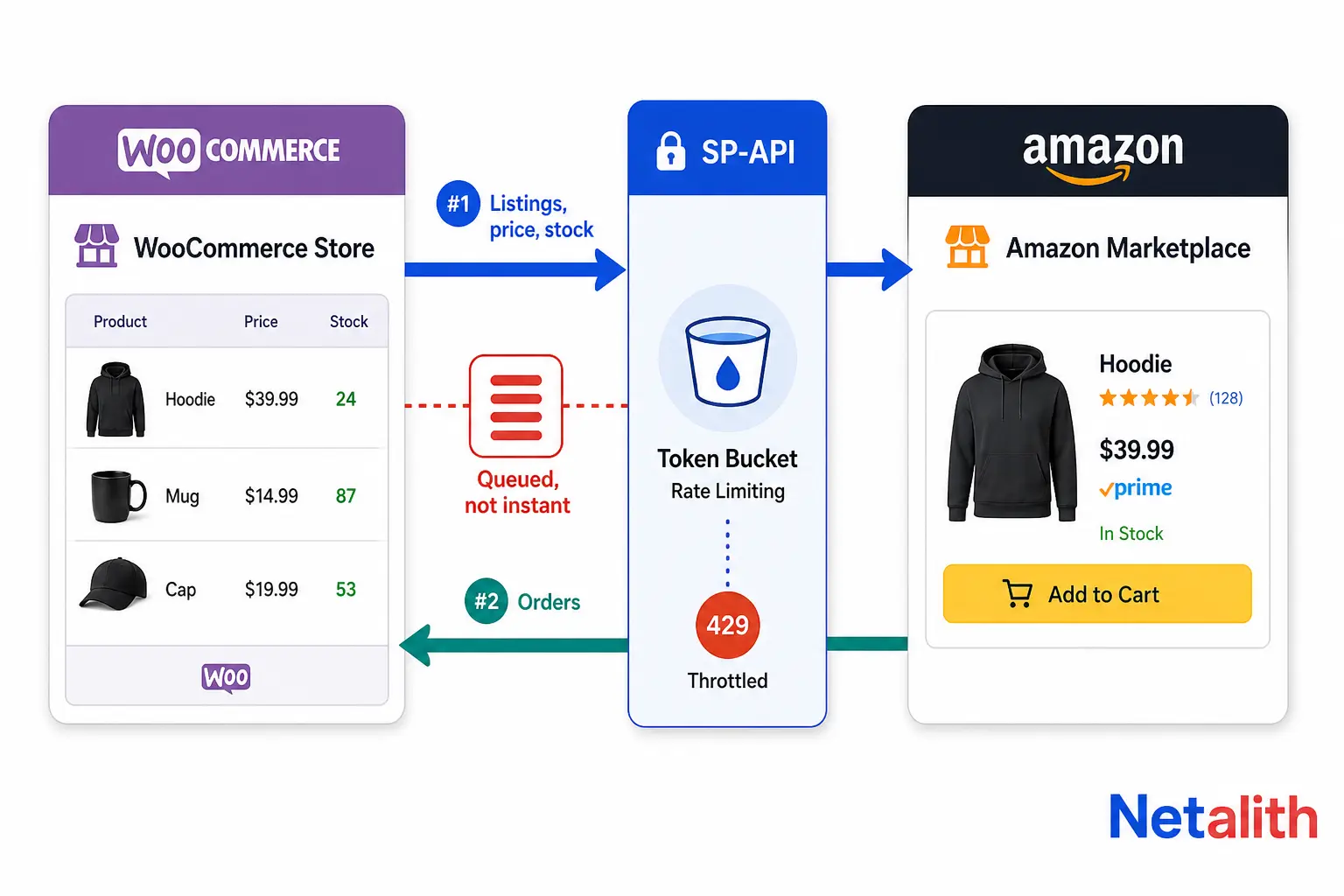
What WooCommerce Amazon integration actually means
Four different jobs hide behind the same search phrase, and they need different tools. Before you compare plugins, decide which row below you are actually in — most failed setups I am asked to rescue picked a tool built for a different row.
| What you want | Direction of data | What it needs | The usual mistake |
|---|---|---|---|
| Sell your WooCommerce catalog on Amazon | Woo → Amazon (listings, price, stock) Amazon → Woo (orders) |
Amazon Professional selling account plus a tool built on Selling Partner API (SP-API) | Treating it as a one-off product export. It is a permanent two-way sync you now have to operate. |
| Keep selling on Amazon, but run operations from WooCommerce | Amazon → Woo (orders, fulfilment status, stock) | Order import plus an explicit rule for which side owns inventory | Letting both sides decrement stock, which quietly double-counts every unit sold. |
| Fulfil WooCommerce orders from your FBA stock | Woo → Amazon (fulfilment orders) | Multi-Channel Fulfilment, not a listing integration | Forgetting that MCF draws from the same inventory pool your Amazon listings sell from. |
| Earn commission linking to Amazon products | None — no store data moves | Amazon Associates account plus an affiliate plugin | Buying a marketplace sync tool for an affiliate site. Different intent entirely. |
Rows one to three are marketplace integration. Row four is affiliate publishing. If you are in row four, stop reading comparison posts about sync plugins — nothing below applies to you.
How a WooCommerce to Amazon sync actually works under the hood
Every credible tool in this space talks to the same thing: Amazon's Selling Partner API. The plugin is a queue, a field mapper and a retry loop wrapped around it. Knowing what the API can and cannot do tells you more about a plugin's real behaviour than its feature list does.
| Job | API family | Mode | Realistic latency |
|---|---|---|---|
| Create or update a listing | Listings Items API, or a JSON listings feed through the Feeds API | Feeds are asynchronous: submit, then poll for a processing report | Minutes, and longer when the queue is deep |
| Price and quantity updates | Same two paths, usually batched | Queued and batched by the plugin | Minutes, not seconds |
| Pull new orders | Orders API | Polling, or push via notifications | Near-live with notifications; otherwise your poll interval |
| Read FBA stock levels | FBA Inventory API | Polling | Delayed, and not a live warehouse count |
The constraint that shapes everything is throttling. Amazon meters SP-API with a token bucket: tokens refill at a fixed rate up to a burst ceiling, each call spends one, and an empty bucket returns HTTP 429. Buckets are tracked per application and seller pair and per operation, and some operations use dynamic plans whose limits move with the seller's business metrics rather than with how hard the app calls. Amazon's own guidance is to back off exponentially and watch the rate limit response header. See Amazon's SP-API usage plans and rate limits documentation.
Two practical consequences that plugin marketing never states plainly:
- Real-time sync means queued. A 500-SKU price change is 500 queued operations against a shared bucket. Run a flash sale in WooCommerce and your Amazon prices will lag behind it for a while.
- You share the bucket with yourself. Two tools authorized against the same seller account compete for the same tokens. I have watched an inventory sync starve because a reporting script in the same account was burning the bucket every minute.
If you sell fast-moving, low-stock items, do not try to win this with a shorter sync interval. Hold a buffer: expose less stock on Amazon than you physically have, sized to roughly the worst-case sync lag you measured during your first busy week.
Matching an existing ASIN or creating a new listing: where most Woo catalogs stall
Teams expect the hard part to be the API. It is almost never the API. It is that Amazon's catalog refuses the product data a typical WooCommerce store holds.
Two paths exist, and the tool only automates the easy half of each:
- Match to an existing ASIN. You are reselling something already in the catalog. You supply the identifier and an offer: price, quantity, condition, fulfilment channel. Fast, when the match is clean.
- Create a new listing. You are the brand. Now Amazon wants a product type, the required attributes for that product type in that marketplace, and a product identifier — usually a GTIN such as a UPC or EAN, unless you hold a brand registry based exemption.
Stock WooCommerce has no GTIN concept at the schema level, so for most stores the identifier lives in a custom field, a plugin's field, or nowhere at all. The sync then fails at submission, per SKU, with errors that only appear inside the feed processing report. Before touching a plugin, I run this check on the catalog export:
- What percentage of SKUs have a valid, brand-owned GTIN? Recycled or purchased barcodes get listings suppressed later, not rejected now.
- Do variable products map to one Amazon parent with a legal variation theme, such as size and colour, or are they unrelated items glued together for merchandising?
- Is the brand gated, and is the category one that needs approval before any listing goes live?
Answer those three before you pay for anything. A catalog that fails all three will fail with every tool on the market, which is why plugin reviews for this category are so polarised — the same software looks excellent to a branded seller with clean data and useless to a dropshipper without identifiers.
If you are searching for Codisto for WooCommerce, it is closed
Codisto was for years the default answer to this question, and a lot of still-ranking tutorials tell you to install it. Its WooCommerce plugin was closed on the WordPress.org plugin directory as of , with the directory listing a security issue as the reason and the plugin no longer available for download, having last been updated years earlier. You can see the notice on the plugin's WordPress.org directory page.
The general lesson matters more than the specific plugin. A marketplace connector holds a live authorization to your Amazon selling account and sits inside your WordPress install. An unmaintained one is two risks at once: an unpatched attack surface on your site, and a credential path into the account that holds your revenue.
So treat maintenance as a hard filter, not a nice-to-have. If a connector has not shipped an update since before the last round of SP-API changes, it is not a cheaper option — it is an outage waiting for a schema change. And if you are currently running a closed or abandoned connector, revoke its authorization in Seller Central first, then uninstall. Deleting the plugin alone leaves the grant in place.
How to choose a WooCommerce Amazon integration plugin: eight checks
Feature grids all look the same because every tool wraps the same API. These are the questions that actually separate them, in the order I ask them.
| Check | Why it decides the outcome |
|---|---|
| Whose SP-API application are you authorizing? | Most tools use their own approved application, so your data flows through their infrastructure. That is normal, but it defines who you depend on and what happens if they fold. |
| Where does the sync actually run? | WP-Cron fires on page views. On a low-traffic store, a plugin that schedules syncs in WP-Cron will quietly go stale overnight. Vendor-side cloud scheduling does not have this failure mode. |
| Which side owns inventory truth, and can you set it per SKU? | You will eventually have SKUs fulfilled by FBA, where Amazon is authoritative, alongside SKUs you ship yourself, where WooCommerce is. One global setting cannot express that. |
| Can you see the raw feed processing errors? | If per-SKU errors are swallowed and shown as a generic failure, you find out from a suppressed listing instead of a log. This is the single biggest operational difference between tools. |
| How are variations mapped? | Woo variations and Amazon parent and child relationships are different models. Check how the tool handles a variation that Amazon will not accept in a theme. |
| Pricing model | Order-count or percentage pricing is cheap while you are testing and expensive at the volume you are building toward. Model it at your target order count, not today's. |
| Can you export the SKU to ASIN mapping? | That mapping is the asset you built, not the plugin. If you cannot export it, switching tools later means rebuilding listings from scratch. |
| Maintenance signal | Last update date, tested-up-to version, and how quickly past SP-API changes were shipped. Treat a stale connector as disqualified, whatever its feature list says. |
One licensing note, since this is a WordPress ecosystem: a self-hosted GPL plugin and a hosted SaaS connector carry different risks. Self-hosted puts the credentials and the maintenance burden on you; SaaS puts your catalog in someone else's infrastructure and makes their uptime your uptime. Neither is wrong, but pick deliberately, and if the answer is that you would rather hand the whole surface to someone who does it daily, that is what our marketplace integration service exists for.
Is there a free WooCommerce Amazon integration?
There are free tiers, and there is almost no genuinely free production sync. The honest version:
- Free tiers typically cap order volume or SKU count. They are fine for validating that your catalog can list at all, which is the question worth answering first.
- Free plugins that do only order import are real and useful. Pulling Amazon orders into WooCommerce for reporting is a far smaller problem than pushing listings.
- Building it yourself is free of licence cost and expensive in everything else. SP-API registration, token refresh, feed polling, per-marketplace required attributes and error triage are weeks of work before the first listing goes live, plus ongoing maintenance each time Amazon changes a schema.
The cost that actually bites is not the licence. It is reconciliation time when stock drifts, and lost Buy Box or suppressed listings while someone works out why. Price the tool against that, not against the monthly fee.
Adding eBay: should one tool handle Amazon and eBay?
This is a frequent follow-up, and the honest answer is that the two marketplaces are not equally hard, so a tool that handles both well is usually optimised for the harder one.
| Amazon | eBay | |
|---|---|---|
| Listing model | Attach an offer to a catalog ASIN, or create a catalog entry that passes validation | Create your own listing with your own title and description |
| Product identifiers | GTIN usually required unless exempted | Required in many categories, with wider exemptions |
| Where a Woo catalog usually fails | Missing or invalid identifiers, product type attributes | Category and item-specifics mapping |
| Content ownership | Shared detail page, so your copy may not be what shows | Your listing, your copy |
Practical guidance: get Amazon working on its own first. eBay forgives a messy catalog; Amazon does not. If Amazon is live and stable, adding eBay in the same tool is mostly configuration. Doing both at once means debugging two different failure vocabularies against one catalog, and you will not know which marketplace is telling you the truth about your data.
WooCommerce, Amazon and QuickBooks: where the accounting breaks
Once orders flow from Amazon into WooCommerce, the obvious next step is to let an existing WooCommerce to QuickBooks connector pick them up. That is where the books go wrong, for two reasons.
- Double counting. If anything else already syncs Amazon to QuickBooks, imported Amazon orders arriving a second time through WooCommerce inflate revenue. Pick exactly one path per channel and document it.
- Amazon does not pay you per order. It pays settlements: gross sales minus referral fees, FBA fees, refunds, reserves and adjustments, on Amazon's cycle. An order-level sync records revenue that never lands as cash at that amount, so your bank reconciliation will not close.
The arrangement that reconciles cleanly is to treat the two systems as answering different questions. WooCommerce holds operations — the order, the customer, the fulfilment state. QuickBooks takes Amazon revenue from the settlement report as a summarised journal entry per settlement period, with fees and refunds broken out to their own accounts. Order-level detail stays where it is useful and out of the ledger.
Do that and the Amazon deposit in your bank feed matches a single entry. Skip it and you will spend every month explaining a variance that was never a real discrepancy.
The checklist to run before you turn sync on
In order, because each step makes the next one cheaper:
- Decide the direction of the integration from the first table, and write it down.
- Export the catalog and measure GTIN coverage, variation structure and gated brands or categories.
- Confirm the Amazon account is a Professional selling plan and the target marketplaces are open.
- Pick one authority per SKU for inventory, and encode it before the first sync, not after the first oversell.
- Start with ten SKUs, not the whole catalog. Watch a full cycle: list, sell, decrement, refund.
- Read an actual feed processing report. If your tool cannot show you one, you have learned something important about your tool.
- Set a stock buffer sized to the sync lag you observed, not the lag the vendor advertises.
- Decide the accounting path before volume arrives, so settlements never get recorded twice.
- Only then enable the full catalog, and keep the ten-SKU test group as your canary.
Most of the pain in this integration is data and authority, not software. If you would rather have the catalog audit, the identifier cleanup and the sync setup handled end to end, tell us what you sell and get a quote — it costs nothing to ask, and the answer will tell you whether your catalog is ready before you buy a licence.
FAQ
Frequently asked questions
Is there a free WooCommerce Amazon integration?
There are free tiers and free order-import plugins, but almost no free production-grade two-way sync. Free tiers usually cap orders or SKUs, which is enough to test whether your catalog can list on Amazon at all. Building your own against SP-API has no licence cost but costs weeks of development plus ongoing maintenance every time Amazon changes a schema. The real expense is reconciliation time when stock drifts, not the monthly fee.
What is the best WooCommerce Amazon integration plugin?
There is no single best one, because every tool wraps the same Selling Partner API and the differences that matter are operational. Judge candidates on whether the sync runs on vendor infrastructure or on WP-Cron, whether you can see raw per-SKU feed processing errors, whether inventory authority is configurable per SKU, whether you can export the SKU to ASIN mapping, and how recently the plugin was updated against SP-API changes.
Can I still use Codisto for WooCommerce?
No. The Codisto WooCommerce plugin was closed on the WordPress.org plugin directory as of 1 December 2025, with a security issue given as the reason, and it is no longer available for download. If you are still running it, revoke its authorization in Amazon Seller Central before uninstalling, because deleting the plugin does not remove the grant.
How fast does WooCommerce Amazon stock sync actually update?
Expect minutes, not seconds. Listing, price and quantity updates go through queued, asynchronous feeds, and Amazon throttles SP-API with a token bucket that returns HTTP 429 when the bucket empties. Orders arrive faster when notifications are used instead of polling. For fast-moving, low-stock items, hold a stock buffer on Amazon rather than shortening the sync interval.
Should one tool handle both Amazon and eBay for WooCommerce?
It can, but launch Amazon first. eBay tolerates an untidy catalog because you create your own listings, while Amazon requires valid identifiers and product type attributes to attach an offer or create a catalog entry. Once Amazon is stable, adding eBay to the same tool is mostly configuration. Doing both at once means debugging two different error vocabularies against one catalog.
How should Amazon, WooCommerce and QuickBooks be connected?
Keep order-level detail in WooCommerce and send Amazon revenue to QuickBooks from the settlement report as a summarised journal entry per settlement period, with referral fees, FBA fees and refunds broken out to their own accounts. Amazon pays settlements rather than individual orders, so an order-level sync records amounts that never land as cash and your bank reconciliation will not close. Use exactly one path per channel to avoid double counting.