Shopify Walmart Integration: The Three Builds and Where Each Breaks
Shopify Walmart integration three ways: Marketplace Connect, a third-party app, or a custom API build. Real fees, feed rate limits, and where each one breaks.

Long Nguyen
Fullstack Developer · AI Engineer · Researcher
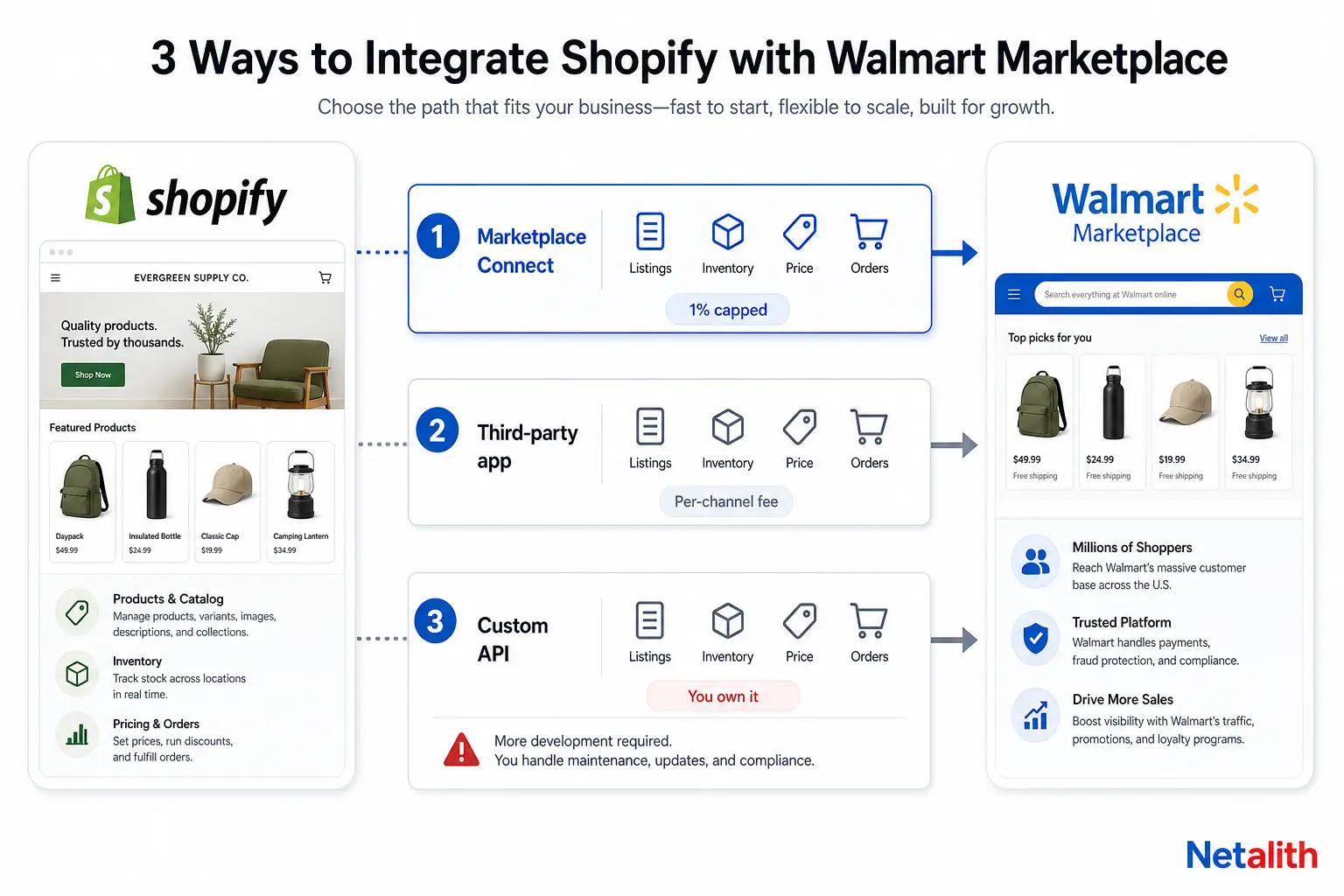
Every few weeks a Shopify seller asks the same question in a different shape: what is the right way to push my catalog onto Walmart Marketplace and keep it in sync? The honest answer is that there are three builds, they cost very different amounts of engineering attention, and each one fails in a predictable place.
This is a walkthrough of all three, with the numbers that actually constrain the design — not a list of apps.
Three ways to connect Shopify to Walmart, and who each one is for
Ignore the manual route first. Seller Center accepts spreadsheet uploads, and that is fine for a 30-SKU pilot. Past roughly 50 SKUs or 5 orders a day, the reconciliation work costs more than any of the options below.
| Approach | What it is | Right for | Where it breaks |
|---|---|---|---|
| Shopify Marketplace Connect | Shopify's own first-party channel app (formerly Codisto), covering Amazon, Target Plus, eBay and Walmart | Stores whose Shopify catalog is already clean and whose Walmart needs are listings, inventory, price and orders | Opaque failures at catalog scale — listings dropping, price resets, image upload errors — with no hook to intervene |
| Third-party channel app | Specialist Walmart connectors (CedCommerce, DPL and similar) sold per marketplace | Sellers who need Walmart-specific features: repricer, WFS flags, listing quality scoring, shipping templates | Another subscription per channel, and your product data model is now shaped by someone else's app |
| Custom build on the Marketplace API | Your own service talking to Walmart's Feeds, Items, Price, Inventory and Orders APIs | Non-standard catalogs, an ERP or PIM in the middle, bundles and kits, or multi-node fulfilment | You now own the rate limits, the retries and the feed error handling — permanently |
The decision is rarely about features. It is about who owns the failure. An app hides the Walmart API from you, which is exactly what you want until the day a feed silently rejects 400 SKUs and you need to know why.
What Shopify Marketplace Connect actually costs on Walmart
The app is free to install. The pricing that matters is usage-based: on the Shopify Marketplace Connect app listing, the first 50 marketplace-synced orders each month are free, after which there is a 1% fee per additional synced order, capped at $99 per month.
That cap is the interesting part, and almost nobody does the arithmetic. The 1% is charged on order value, so the cap engages once your billable synced GMV passes about $9,900 in a month — and after that the app is effectively a flat $99.
| Walmart orders / month | AOV | Billable orders | 1% before cap | You pay |
|---|---|---|---|---|
| 50 | $45 | 0 | $0.00 | $0 |
| 200 | $45 | 150 | $67.50 | $67.50 |
| 400 | $45 | 350 | $157.50 | $99 |
| 1,000 | $25 | 950 | $237.50 | $99 |
So the cost argument for building your own thing is weak. At volume the first-party app is cheaper than most per-marketplace subscriptions. The argument for building your own is control, and you should be clear-eyed that it is the only argument.
Worth reading the review distribution rather than the average. The listing sits at 4.1 across 2,116 reviews, but that average hides a bimodal split: 78% at five stars and 15% at one star, with recent one-star reviews describing sync problems on pricing, inventory and images at larger catalogs. That shape is typical of sync tooling — it works cleanly or it corrupts your two most important fields, and which one you get correlates with catalog size and data hygiene.
Why your Shopify catalog will not list on Walmart as-is
This is where most integrations stall, and it has nothing to do with which app you picked. Shopify's product model and Walmart's item model do not line up.
- SKU is the join key, and Shopify treats it as optional. Walmart identifies your offer by seller SKU; Shopify lets variant SKUs be blank or duplicated. Before you connect anything, run an audit for empty and duplicated variant SKUs — that single check prevents the most common class of sync corruption.
- Walmart requires a product type, not a collection. Item spec 5.0 organises the catalog into Product Type Groups and Product Types, each with its own required and recommended attributes. Shopify has no equivalent field, so you need a deliberate mapping layer — a metafield per product, or a profile per collection — before the first feed.
- GTIN or UPC is expected. Unless you hold a brand exemption, items without a valid barcode will not set up. Private-label sellers should sort this before anything else.
- The spec moves. Walmart ships new item spec versions regularly — the 5.0 line has had several releases through 2026. Do not hardcode attribute lists; pull current requirements from the spec endpoint, which is rate limited to 10 calls per minute, and cache them per product type.
A useful rule from doing this repeatedly: fix the catalog in Shopify, never in the connector. Any field you patch inside an app or a mapping sheet becomes invisible debt the next time you change channels.
The number that decides your sync design: 10 feeds per hour
If you remember one technical fact from this article, make it this one. Per Walmart's Marketplace rate limiting documentation, feed submissions are throttled by type: inventory feeds allow 10 per hour with a 10 MB file limit, and item feeds allow 10 per hour with a 25 MB limit. Limits are enforced with a token bucket, and going over returns 429 with the remaining allowance exposed in the response headers.
Work the consequences through:
- Ten inventory feeds per hour means one feed every six minutes, and that is your ceiling regardless of how many SKUs moved.
- File size is almost never the binding constraint. An inventory line is a few hundred bytes, so a 10 MB feed comfortably carries tens of thousands of SKUs. You are limited by feed count, not payload.
- Therefore: never map one Shopify
inventory_levels/updatewebhook to one Walmart call. A flash sale firing 2,000 webhook events in five minutes must collapse into a single feed.
The pattern that works is a buffering window. Accept webhooks into a queue, dedupe by SKU with last-write-wins, and flush one batched feed per window of five to six minutes. Your worst-case stock staleness becomes the window plus Walmart's processing time, which you then cover with a safety buffer on fast-moving SKUs rather than by hammering the API.
Reading status is cheap by comparison — feed status endpoints are shared at 5,000 calls per minute — so poll results aggressively even though you submit conservatively. Item feeds in particular take time to process; Walmart's own guidance on long-running item feeds is to back off progressively rather than poll in a tight loop.
Building a custom Shopify to Walmart integration that survives the rate limits
If you have concluded you need your own service, the shape is consistent. Authentication is OAuth client credentials against the token endpoint, then every subsequent call carries the access token plus a correlation ID you generate per request — that ID is what Walmart support will ask for when a feed misbehaves, so log it.
# 1. exchange client credentials for an access token
POST https://marketplace.walmartapis.com/v3/token
Authorization: Basic BASE64(clientId:clientSecret)
WM_SVC.NAME: Walmart Marketplace
WM_QOS.CORRELATION_ID: 9f14c2b7-batch-1042
grant_type=client_credentials

# 2. push ONE batched feed per window (counts against 10/hour)
POST https://marketplace.walmartapis.com/v3/feeds?feedType=inventory
WM_SEC.ACCESS_TOKEN: the_token_from_step_1

# 3. poll the returned feedId (shared 5000/min, so this is cheap)
GET https://marketplace.walmartapis.com/v3/feeds/{feedId}
Four design decisions carry most of the reliability:
- Shopify webhooks in, queue in the middle, feeds out. Webhook handlers should do nothing but validate and enqueue. Any work done inline will eventually time out and Shopify will retry it, duplicating your state.
- Idempotency keyed on SKU plus intent. Re-delivered webhooks are normal. If your queue entry is keyed on SKU and the latest desired value, replays are free.
- Treat feed acceptance as unfinished work. A 200 on submission means Walmart took the file, not that your items updated. The line-item outcome only appears in the feed status response, so persist every feedId and reconcile it; items that quietly failed validation are the usual cause of a listing that is live on Shopify and missing on Walmart.
- One dead-letter path with human-readable errors. Walmart returns item-level validation errors that name the offending attribute. Surface them to whoever owns the catalog, not to a log nobody reads.
This is a few weeks of work to build properly and an ongoing commitment to maintain, which is the real comparison against a $99 monthly cap. If you would rather hand it over, this is the kind of Walmart and Amazon marketplace API integration we build and run for sellers.
Closing the loop: orders, tracking and WFS
Listings are the easy half. Orders are where Walmart's performance standards start deciding whether your account survives.
The flow is: Walmart creates the order, you acknowledge it, you ship within two operational days unless you hold a lag-time exemption, and you send valid tracking back. Walmart measures sellers on on-time delivery, valid tracking rate, cancellation rate and response rate, and listings get suppressed when those slide. Tracking that your system fails to push back is indistinguishable, from Walmart's side, from a seller who never shipped.
Two integration traps worth naming:
- Cancellations are a sync problem, not a fulfilment problem. Seller-initiated cancellations are overwhelmingly caused by overselling, which is caused by the stale-stock window described above. Tightening the buffer fixes the metric.
- Walmart Fulfillment Services inverts the direction of truth. For WFS SKUs, Walmart holds the stock, so Shopify must stop being the inventory source for those items. Pushing Shopify quantities at a WFS SKU is a classic way to produce numbers that nobody can reconcile. Decide per SKU which system owns the count, and enforce it in code.
On economics: Walmart charges no setup or monthly marketplace fee, taking a category referral fee on completed sales instead. New sellers who start during the current promotional window get a discount on base referral fees running to — worth checking against your category before you model margin, because the discount is temporary and the base rate is what you will live with.
How to choose, in one pass
- Under about 500 SKUs, standard products, clean barcodes: use the first-party app. The fee cap makes the build-versus-buy argument hard to win.
- Walmart-specific operations matter — repricing, WFS, listing quality — and your catalog is standard: a specialist Walmart connector earns its subscription.
- An ERP or PIM is the real source of truth, or you sell bundles, kits or made-to-order items: build it. No app models those cleanly, and you will spend the saved money on workarounds.
- Whatever you pick: fix SKUs, barcodes and product-type mapping first. Every integration path fails on dirty catalog data, and no app will fix it for you.
If you want a second opinion on which path fits your catalog before committing engineering time, send us the shape of your catalog and channels for a scoped quote.
FAQ
Frequently asked questions
Does Shopify have an official Walmart integration?
Yes. Shopify Marketplace Connect, formerly Codisto, is Shopify's own first-party channel app and supports Walmart alongside Amazon, Target Plus and eBay. It is free to install; the first 50 marketplace-synced orders each month are free, then there is a 1% fee per additional synced order, capped at $99 per month.
How fast does inventory sync between Shopify and Walmart?
Not in real time, whatever an app's marketing says. Walmart throttles inventory feeds to 10 per hour, which means a practical ceiling of one update batch every six minutes, plus Walmart's own processing time before the change goes live. Design for a stale window of several minutes and hold a safety buffer on fast-moving SKUs rather than trying to push every stock change immediately.
Can I sell on Walmart from Shopify without using an app?
Yes, two ways. You can manage listings and orders manually in Walmart Seller Center with spreadsheet uploads, which works for a small pilot catalog, or you can build directly against the Walmart Marketplace API using the Feeds, Items, Price, Inventory and Orders endpoints. The custom route makes sense when an ERP or PIM is your source of truth, or when you sell bundles, kits or multi-node fulfilled items that channel apps model badly.
Why do my Shopify products fail Walmart item setup?
Usually one of three things: blank or duplicated variant SKUs, since Walmart identifies your offer by seller SKU; a missing or invalid GTIN or UPC without a brand exemption; or required attributes missing for the Walmart product type under item spec 5.0, which has no equivalent in Shopify's product model and must be mapped deliberately. Feed submission returning a success code does not mean items passed validation, so always read the feed status for line-item errors.
Does Walmart charge a monthly fee on top of Shopify?
No. Walmart Marketplace charges no setup or monthly marketplace fee; it takes a category referral fee on completed sales instead. Your running costs are that referral fee, your fulfilment costs or Walmart Fulfillment Services fees, and whatever your integration tooling charges — for the first-party Shopify app, at most $99 per month once the fee cap engages.