Amazon SP-API 403 "Access to Requested Resource Is Denied" — Cause & Fix
Amazon SP-API returns a 403 AccessDeniedException — "Access to requested resource is denied" — when requesting a report like GET_MERCHANT_LISTINGS_ALL_DATA. Here's why and how to fix it.

Long Nguyen
Fullstack Developer · AI Engineer · Researcher
When your app calls the Amazon SP-API — for example requesting the GET_MERCHANT_LISTINGS_ALL_DATA report through the Reports API — it can return a 403 response with AccessDeniedException for a specific connected seller, even though the same call works for other sellers. The request authenticates fine; it's the seller's authorization that's the problem.
The error message
Status_code: 403
Errors: [{"code": "Unauthorized", "message": "Access to requested resource is denied.", "details": ""}]
Res_headers: {... 'x-amzn-errortype': 'AccessDeniedException' ...}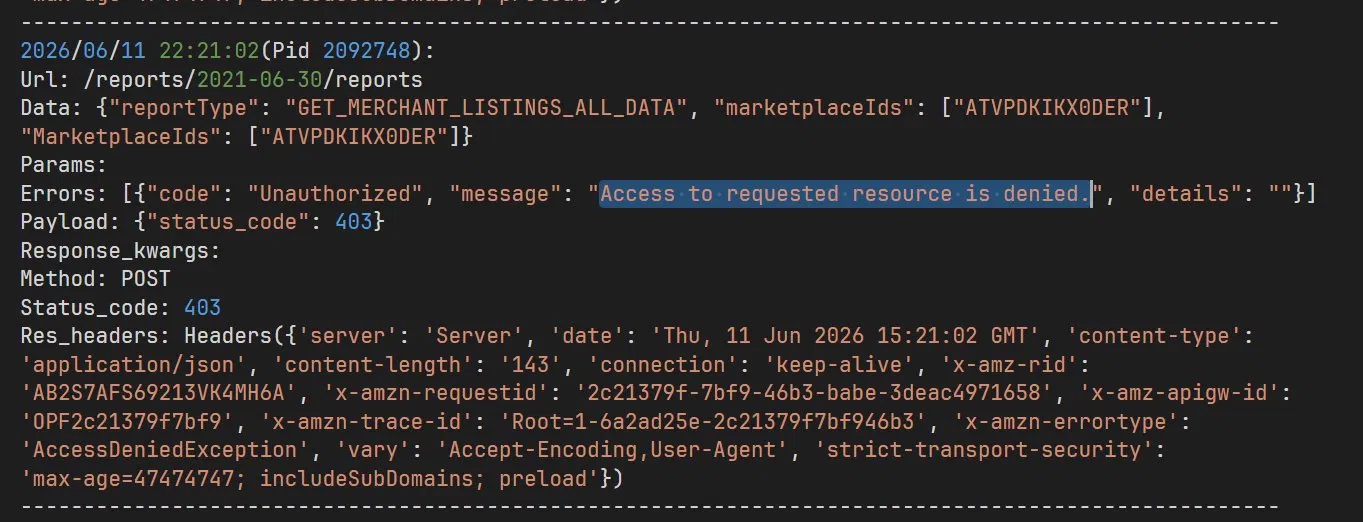
Why this happens
A 403 here is an authorization failure, not a data problem. The seller's stored authorization has gone stale — the refresh token the app holds for that seller no longer carries valid consent for the operation. This is why the same code works for your other connected sellers but returns "resource is denied" for this one. The fix is on the seller's side: they simply need to reauthorize the app.
How to fix it
Ask the affected seller to reauthorize the app in Seller Central. In Seller Central → Apps & Services → Manage Your Apps, they find the app and click Authorize again. This issues a fresh authorization for the app, after which the report request goes through. For the exact reauthorization steps, see Amazon's Renew Authorizations guide.
Having built multi-channel integrations across 20+ sales channels — Amazon SP-API, eBay, Shopify, TikTok Shop and more — I've hit and solved most of these authorization edge cases. If you need help with eCommerce support or marketplace API integration, check out Netalith's eCommerce support service or reach out to me directly on LinkedIn.
FAQ
Frequently asked questions
Does this 403 mean the app's credentials are broken?
No. The app authenticates fine — the error is that this specific seller's authorization has gone stale, so the request is denied only for that seller.
Why does it work for other sellers but not this one?
Because the problem is tied to one seller's authorization, not the app itself. The stored consent for that seller needs to be refreshed.
How does the seller fix it?
The seller reauthorizes the app in Seller Central → Apps & Services → Manage Your Apps by finding the app and clicking Authorize again. After that, the call goes through.