Automate PDF Reports With AI: Let the LLM Write, Not Calculate
Automate PDF reports with AI safely: code computes the numbers, an LLM writes the narrative, a template renders the PDF. Python pipeline and checks included.

Long Nguyen
Fullstack Developer · AI Engineer · Researcher
What it means to automate PDF reports with AI
To automate PDF reports with AI, split every report into three jobs and give each one to the tool that can do it reliably: code computes the numbers, an LLM writes the commentary, and a template lays out the page. Projects that go wrong hand all three jobs to the model.
| Job | Who does it | Why |
|---|---|---|
| Gather and calculate figures | Code (SQL, pandas) | Deterministic, testable, auditable |
| Write summary and commentary | LLM, constrained to a JSON schema | Language is the part a model is genuinely good at |
| Layout, charts, branding | HTML/CSS template plus a renderer | Identical page every run, editable by a designer |
| Check and approve | Automated checks, then a human for early runs | Catches what the first three jobs cannot |
The rest of this guide builds that pipeline in Python around a monthly sales report. Swap in your own data and the structure stays the same.
Why the LLM should not produce the PDF or the numbers
Asking a model to make a PDF works in a demo and drifts in production. There are three common designs, and each fails in a different place.
| Design | Where it breaks | Use it for |
|---|---|---|
| LLM writes and runs PDF-generation code in a sandbox | Layout and figures can change between runs, and it is hard to audit what was actually computed | One-off documents |
| LLM writes the full HTML, you convert it to PDF | The model controls structure and CSS, so pages drift; its markup is also untrusted input to your renderer | Prototypes |
| LLM fills a JSON schema, you own the template and the numbers | More up-front work | Anything recurring, client-facing or signed |
The deciding question is who is accountable for a wrong figure. If the answer is you, the number has to come from code you can test, not from a model sampling text. A recurring report also has to look the same in March as it did in February, which only a template guarantees.
The pipeline: code computes, the LLM writes, a template renders
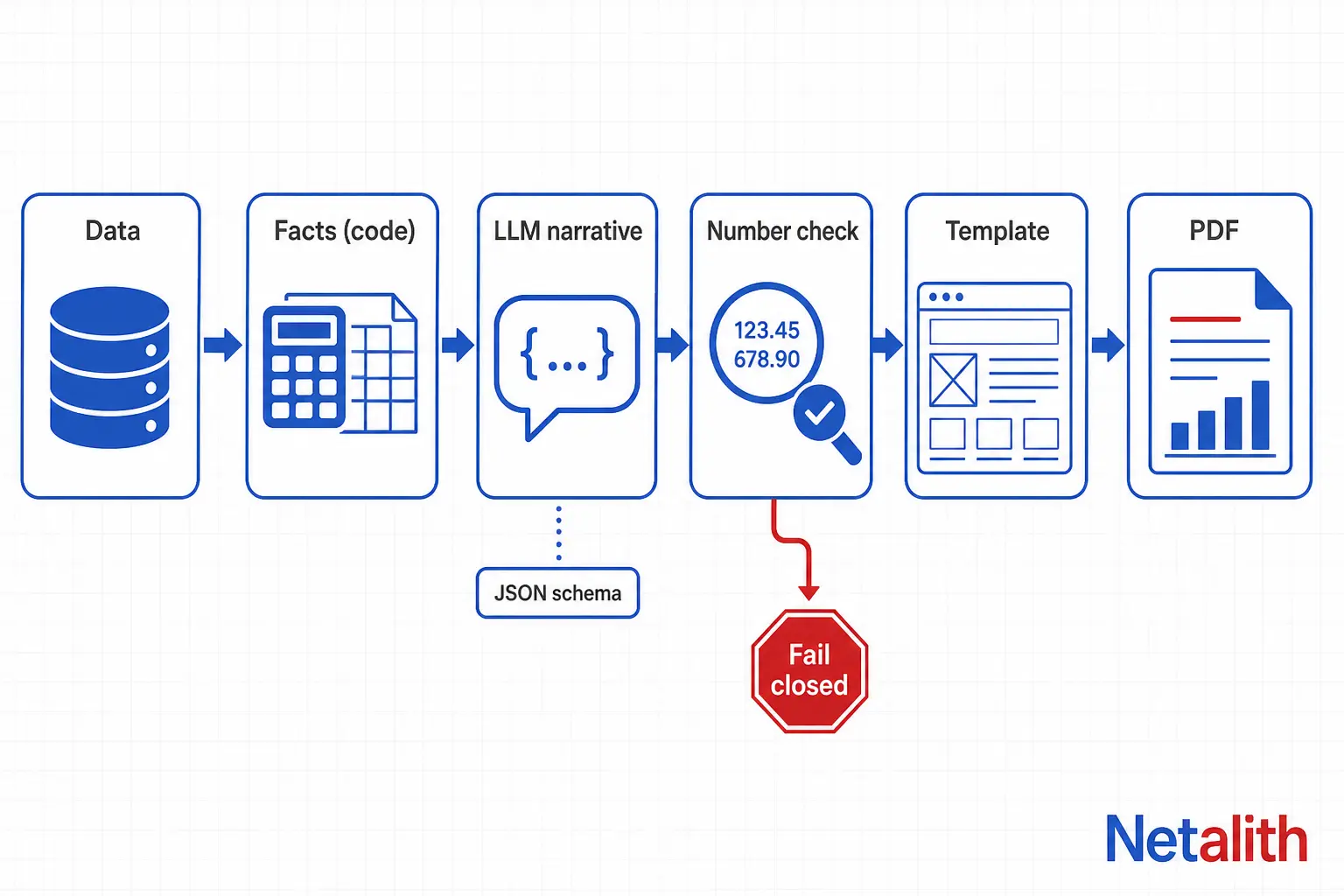
The design that holds up has six stages. Only one of them calls a model.
- Extract. Pull the raw data from a database, CSV or API.
- Compute facts. Aggregate in code into one
factsdictionary. It is the only source of numbers in the report. - Write the narrative. Send the facts to the LLM and get back JSON that matches a schema.
- Verify. Confirm every number in the narrative exists in the facts. Fail closed if one does not.
- Render. Fill an HTML template and convert it to PDF. Charts are drawn by code, never by the model.
- Deliver. Store the PDF with its facts and narrative, then send it or hold it for approval.
Step 1: compute the facts in code
The facts dictionary is the contract between your data and everything downstream. Build it with ordinary tested code and keep it small: only the figures the report is allowed to mention.
import pandas as pd

def build_facts(csv_path: str, month: str) -> dict:
    df = pd.read_csv(csv_path, parse_dates=["order_date"])
    period = df["order_date"].dt.to_period("M")
    cur = df[period == pd.Period(month)]
    prev = df[period == pd.Period(month) - 1]

    revenue = round(float(cur["amount"].sum()), 2)
    prev_revenue = round(float(prev["amount"].sum()), 2)
    change_pct = (
        round((revenue - prev_revenue) / prev_revenue * 100, 1)
        if prev_revenue else None      # None, never 0, when there is no baseline
    )
    top = cur.groupby("channel")["amount"].sum().nlargest(3)

    return {
        "month": month,
        "orders": int(len(cur)),
        "revenue": revenue,
        "prev_revenue": prev_revenue,
        "revenue_change_pct": change_pct,
        "top_channels": [
            {"name": name, "revenue": round(float(v), 2)} for name, v in top.items()
        ],
    }
Two habits matter here. Return None when a value cannot be computed, because a zero looks like a real result and the model will happily comment on it. And round once, in this function, so the narrative and the table in the PDF can never disagree.
Step 2: constrain the narrative with a JSON schema
Ask the model for fields, not for a document. Each field is a slot the template places, so the model cannot move, add or restyle anything on the page. Schema-constrained output is the right tool: according to OpenAI's Structured Outputs documentation, it makes the reply adhere to your JSON Schema rather than merely being valid JSON, and refusals become detectable in code. If you use another provider, look for its schema-constrained output mode; the principle is identical.
import json
from openai import OpenAI
from pydantic import BaseModel

client = OpenAI()
MODEL = "your-validated-model"   # pin the model you tested; re-test before changing it

class ReportNarrative(BaseModel):
    headline: str
    summary: str
    channel_notes: list[str]
    risks: list[str]

SYSTEM = (
    "You write the commentary for a monthly sales report. "
    "Use ONLY numbers that appear in the facts JSON, copied exactly. "
    "Never calculate, round or estimate. If a value is null, say it is unavailable. "
    "Do not claim trends, causes or records that the facts do not show."
)

def write_narrative(facts: dict) -> ReportNarrative:
    response = client.responses.parse(
        model=MODEL,
        input=[
            {"role": "system", "content": SYSTEM},
            {"role": "user", "content": json.dumps(facts)},
        ],
        text_format=ReportNarrative,
    )
    if response.output_parsed is None:   # refusal or incomplete output
        raise RuntimeError("No valid narrative returned")
    return response.output_parsed
Remember what the schema does not do. It guarantees shape, not truth: a perfectly valid string can still contain a figure the model invented. That is why the next step exists. Also send aggregated facts, not raw customer rows. The model only needs the numbers it is going to describe, and sending less data is the cheapest privacy control you have.
Step 3: verify every number before the PDF ships
This is the stage most tutorials skip, and it is what makes the pipeline safe to run unattended. Extract every number from the generated text and require that each one appears in the facts. If any does not, raise an error and ship nothing.
import re

NUM = re.compile(r"\d[\d,]*\.?\d*")

def to_float(token: str) -> float:
    return float(token.replace(",", "").rstrip("."))

def fact_numbers(obj) -> set[float]:
    nums: set[float] = set()
    if isinstance(obj, dict):
        for v in obj.values():
            nums |= fact_numbers(v)
    elif isinstance(obj, list):
        for v in obj:
            nums |= fact_numbers(v)
    elif isinstance(obj, str):
        nums |= {to_float(m) for m in NUM.findall(obj)}   # catches "2026-09" style periods
    elif isinstance(obj, (int, float)) and not isinstance(obj, bool):
        nums.add(float(obj))
    return nums

def check_narrative(facts: dict, n) -> None:
    allowed = fact_numbers(facts)
    text = " ".join([n.headline, n.summary, *n.channel_notes, *n.risks])
    unknown = [m for m in NUM.findall(text)
               if not any(abs(to_float(m) - a) < 0.01 for a in allowed)]
    if unknown:
        raise ValueError(f"Numbers not found in facts: {unknown}")
With the check in place, the whole run reads as four lines:
facts = build_facts("orders.csv", "2026-09")
narrative = write_narrative(facts)
check_narrative(facts, narrative)          # raises, so nothing ships
render_pdf(facts, narrative, "reports/sales-2026-09.pdf")
The check is deliberately strict. A model that writes 12 percent when the fact is 12.4 gets rejected, and so does a stray number such as the 3 in top 3 channels unless you whitelist small ordinals. Tighten the prompt before you loosen the check. Numbers are only half of it: add a line to the prompt that forbids causes, trends and records the facts do not contain, and read the first few narratives yourself.
For the first weeks of any new report, hold the PDF for human approval and only switch to automatic sending once the check has run clean for a while. Keep the rejected narratives; they show you which instruction in the prompt is being ignored.
Step 4: render the PDF from a template
Write the report as an ordinary HTML template and let a renderer turn it into a PDF. WeasyPrint is a good default for business documents because it implements print CSS. Its official documentation for version 70.0 lists Python 3.10 or later and Pango 1.44 or later as requirements, and recommends installing with pip and then running weasyprint --info to confirm the system libraries are found.
The template holds the layout, and the narrative fields drop into it:
<h1>{{ n.headline }}</h1>
<p class="lead">{{ n.summary }}</p>
<table>
  {% for c in facts.top_channels %}
  <tr><td>{{ c.name }}</td><td>{{ "{:,.2f}".format(c.revenue) }}</td></tr>
  {% endfor %}
</table>
Page size, margins and page numbers are plain CSS:
@page {
  size: A4;
  margin: 18mm;
  @bottom-center { content: "Page " counter(page) " of " counter(pages); }
}
Then render. Jinja autoescaping is switched on, so model text is inserted as data and never interpreted as markup:
from pathlib import Path
from urllib.parse import unquote, urlparse

from jinja2 import Environment, FileSystemLoader, select_autoescape
from weasyprint import HTML
from weasyprint.urls import URLFetcher

TEMPLATES = Path("templates").resolve()
env = Environment(loader=FileSystemLoader(TEMPLATES), autoescape=select_autoescape(["html"]))

class AssetsOnlyFetcher(URLFetcher):
    # Local files are allowed only inside the templates folder
    def fetch(self, url, headers=None):
        if url.startswith("file:"):
            path = Path(unquote(urlparse(url).path)).resolve()
            if not path.is_relative_to(TEMPLATES):
                raise ValueError(f"Blocked local file: {url}")
        return super().fetch(url, headers)

def render_pdf(facts: dict, narrative, out_path: str) -> None:
    page = env.get_template("monthly_report.html").render(facts=facts, n=narrative)
    HTML(string=page, base_url=str(TEMPLATES), url_fetcher=AssetsOnlyFetcher()).write_pdf(out_path)
Three details from the documentation are worth designing around:
- Fonts. If a font is missing, the PDF can show squares or nothing at all instead of letters. This bites first on accented or non-Latin text. Install the fonts on the server or reference them with
@font-face, and if you load that CSS through a CSS object, pass aFontConfigurationas the docs describe. - Security. The documentation warns that untrusted HTML or CSS can read local files and embed them in the output. Treat model output as untrusted: never let it emit raw HTML, keep autoescape on, and restrict file access as in the fetcher above. WeasyPrint catches fetcher errors and turns them into warnings, so a blocked file is skipped rather than crashing the run. The class-based fetcher shown here is what the 70.0 docs describe; older releases used a plain function.
- Speed. The docs note that rendering can be slow for long documents, and suggest long-lived processes for many documents so start-up cost is paid once. A worker that stays up beats launching a new process per PDF.
Draw charts in code with matplotlib or SVG and embed them as images. The model describes the chart; it never draws it.
Which Python library should render the PDF
Pick the renderer on three criteria: how you want to describe the layout, whether you need JavaScript charts, and what you are willing to install and license for client work. Confirm the current licence of your exact version before shipping to a client.
| Option | Layout model | Charts | Install weight | Licence | Pick it when |
|---|---|---|---|---|---|
| WeasyPrint | HTML and print CSS | Static images or SVG; no JavaScript | Python plus Pango system libraries | BSD-3-Clause | Templated business reports your designer can edit |
| ReportLab | Python code | Built-in drawing and charts | Light, mostly pip | Open-source edition, BSD-style; commercial add-ons exist | Dense, programmatic layouts at high volume |
| Headless Chromium via Playwright | A full browser | JavaScript charts such as Chart.js | Heavy: a browser download | Apache-2.0 for Playwright | The PDF must match an existing web dashboard exactly |
For most recurring business reports, WeasyPrint with a Jinja template is the shortest path from idea to a maintainable pipeline. Move to Chromium only when you genuinely need JavaScript to draw the page.
How to schedule and deliver automated PDF reports
Once a single run works, the remaining work is operational. These are the decisions that keep a scheduled report trustworthy:
- Trigger. Use whatever scheduler you already operate: cron on a server, a cloud scheduler, a scheduled CI workflow or a task queue. The pipeline is a plain Python function, so it does not care.
- Idempotency. Key each output by report type and period, so a re-run replaces the file instead of creating a duplicate.
- Audit trail. Save the facts, the narrative, the template version and the final PDF together. When someone questions a figure, you can show exactly where it came from.
- Failure behaviour. If the verification step fails, alert a person and keep the last good PDF available. Never send a report you could not verify.
- Delivery. Email a link for large files and an attachment for small ones, and log who received which version.
The model call is a single request per report, so the larger running cost is usually human review time, not API usage. Tune the review gate rather than the prompt length. If you would rather have this built around your own data sources and templates, Netalith builds AI report agents that produce PDF, DOCX, Excel and PowerPoint files.
When automating a PDF report is not worth it
Automation has a fixed cost: the template, the facts code, the checks and the monitoring. It is not worth paying in these cases:
- The report is produced a few times a year. Building the template takes longer than the hours saved.
- Every recipient needs a different structure and there is no common skeleton to template.
- The value of the report is professional judgment, such as a legal opinion or an audit conclusion. AI can draft around it, but the part you actually sell is not the part being automated.
- The source data is unreliable. Automation publishes bad data faster and with better formatting, so fix the data first.
If your reports are recurring, structured and built from data you can query, the pipeline above pays back quickly. If you want a second pair of eyes on the design, send Netalith a description of your current report for a free quote.
FAQ
Frequently asked questions
Can AI generate a PDF report directly?
Yes. Some models can write and run code in a sandbox that produces a PDF, which is fine for a one-off document. For recurring or client-facing reports it is safer to let code compute the numbers, let the model write only the commentary as structured JSON, and render the PDF from a fixed template, so layout and figures cannot drift between runs.
How do I stop AI from making up numbers in a report?
Never let the model calculate. Compute every figure in code, give the model only those figures, and instruct it to copy them exactly. Then run an automated check that every number in the generated text appears in your facts, and block the report if one does not. A JSON schema guarantees structure, not accuracy, so the check is essential.
What is the best Python library for automated PDF reports?
For templated business reports, WeasyPrint with a Jinja HTML template is a strong default because the layout is plain HTML and print CSS. ReportLab suits dense, code-driven layouts, and headless Chromium suits pages that need JavaScript charts. Choose by layout model, chart needs, install weight and licence.
Is it safe to send business data to an LLM for report writing?
Reduce the exposure first: send aggregated facts rather than raw customer rows, since the model only needs the numbers it will describe. Then review your provider's data-handling terms for your plan. If the data cannot leave your environment at all, a self-hosted model is an option, with the same pipeline around it.
Can I automate reports when my source data arrives as PDFs?
Yes, but treat extraction as its own unreliable step. Pull the fields into a structured format, validate totals and required values in code, and route low-confidence documents to a person. Only validated data should enter the facts that feed the report.
How do I schedule automated PDF reports?
Wrap the pipeline in a single function and trigger it from any scheduler you already run, such as cron, a cloud scheduler or a scheduled CI job. Make outputs idempotent by keying them on report type and period, store the facts and narrative beside each PDF, and alert a person when verification fails instead of sending an unchecked report.