OSI model explained: The 7 OSI Layers (Layer-by-Layer) With Real-World Examples
A clear OSI model explained guide covering all 7 layers with responsibilities, PDU names, encapsulation, device mapping (switches/routers), a cheat sheet table, and practical troubleshooting examples.
Drake Nguyen
Founder · System Architect
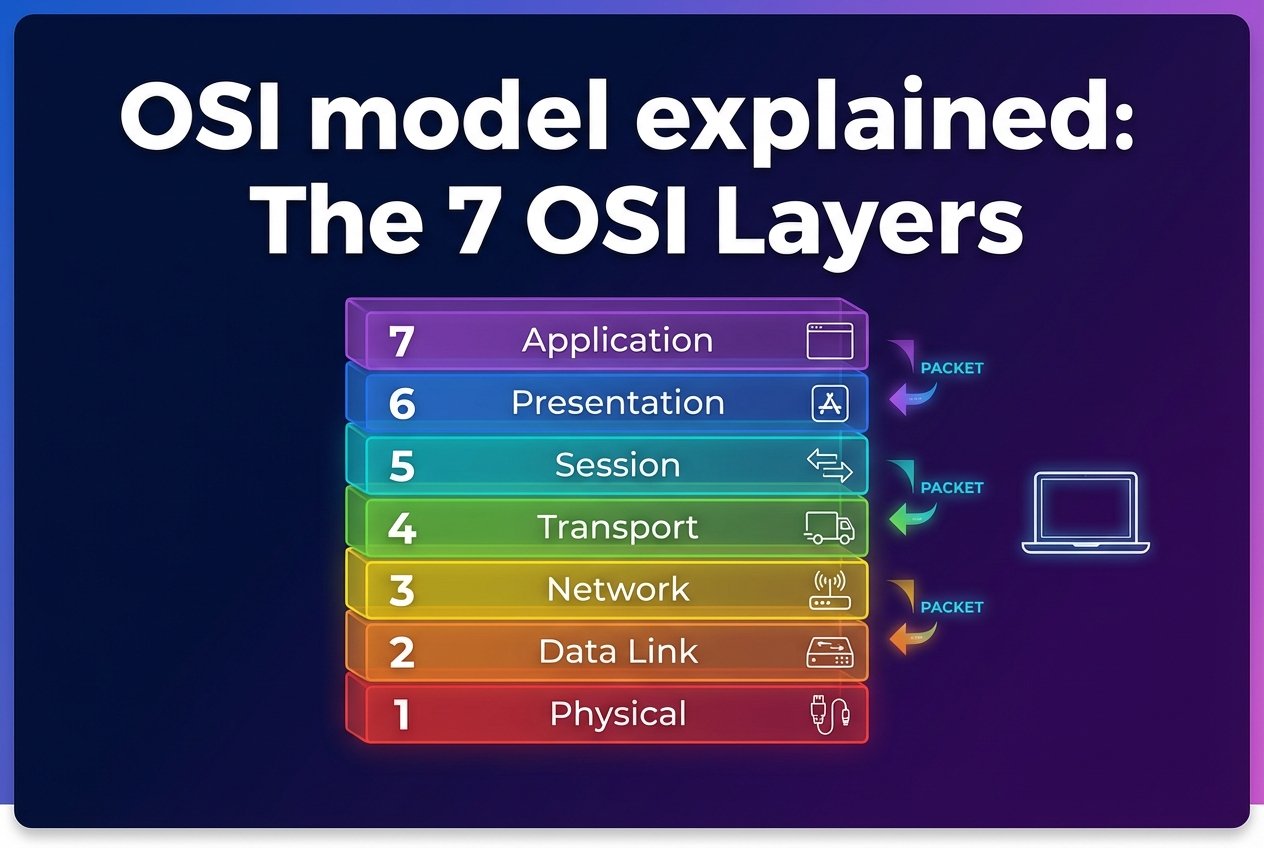
Introduction — what you’ll learn
This guide is an OSI model explained with examples for students, network engineers, and troubleshooters. Read layer-by-layer to learn each layer’s responsibilities, PDU names, encapsulation/decapsulation, how common devices map to layers, a printable cheat sheet, and step-by-step troubleshooting examples. Keep the cheat sheet handy as you work through the labs and real incidents.
What is the OSI model? (brief purpose)
The OSI (Open Systems Interconnection) reference model is a conceptual 7-layer framework that separates networking responsibilities into distinct functions. It’s primarily a teaching and troubleshooting tool—real-world stacks (like TCP/IP) map onto it, but the model helps isolate problems by layer. As data moves, each layer may add headers/trailers (encapsulation); when receiving, those are removed (decapsulation).
OSI model explained (Layer-by-Layer) — overview of the 7 layers
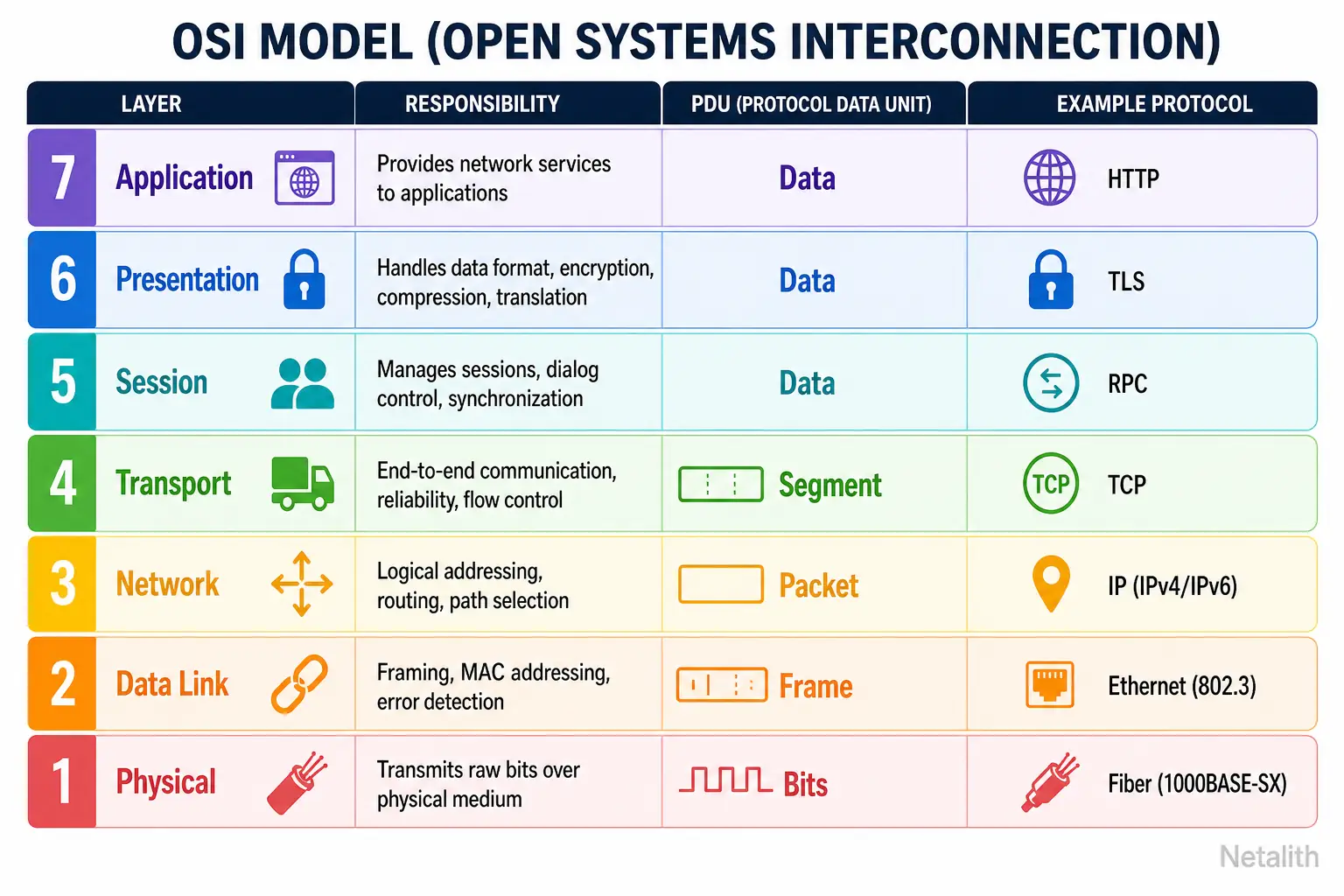
- Layer 1 — Physical (PDU: bits): signaling, cabling, connectors, electrical/optical/RF characteristics.
- Layer 2 — Data Link (PDU: frames): framing, MAC addressing, local delivery, error detection (FCS), switching, VLAN tags (802.1Q).
- Layer 3 — Network (PDU: packets): logical addressing and routing between subnets (IPv4/IPv6, ICMP, routing protocols conceptually).
- Layer 4 — Transport (PDU: segments/datagrams): segmentation, reliability/ordering/flow control (TCP) or best-effort delivery (UDP).
- Layer 5 — Session: session establishment, checkpoints, stateful connections and recovery concepts.
- Layer 6 — Presentation: translation, encryption, compression, and character encoding (TLS, gzip, UTF‑8).
- Layer 7 — Application: user-facing services and protocols (HTTP, DNS, SMTP, SSH, FTP).
Each layer wraps the higher-layer data in headers (and sometimes trailers) during encapsulation. Common protocol examples by layer give context when you inspect captures or logs.
Layer 1 — Physical layer
Responsibilities: electrical/optical/RF signaling, media type (copper, fiber, wireless), connectors, transceivers, and physical bit encoding. PDU: bits.
Examples: Ethernet cabling and connectors (Cat5e/Cat6), SFP transceivers, NIC ports, and Wi‑Fi radio frequencies.
Troubleshooting checklist:
- Check link lights and SFP detection.
- Verify cable continuity and correct type (straight vs crossover not usually required with modern NICs).
- Confirm negotiated speed/duplex and check for CRC errors.
- For wireless, check SNR, channel overlap, and RF interference.
Layer 2 — Data link layer
Responsibilities: framing, MAC addressing for local delivery, error detection (FCS), switch forwarding, and VLAN tagging (802.1Q). PDU: frames.
Examples: Ethernet frames with MAC addresses, 802.1Q VLAN tags, Spanning Tree Protocol (STP), and ARP (address resolution sits at the L2/L3 boundary).
Troubleshooting steps:
- Verify VLAN membership and whether the port is access or trunk.
- Inspect switch MAC address tables to ensure MAC learning/forwarding is correct.
- Check STP state for blocked/forwarding ports.
- Review port security and error counters (FCS, collisions).
Layer 3 — Network layer
Responsibilities: logical addressing and routing between subnets. PDU: packets.
Examples: IPv4 and IPv6 addressing, ICMP for diagnostics, and routing protocols conceptually (OSPF, BGP).
Troubleshooting basics:
- Verify IP address, subnet mask, and default gateway on hosts.
- Inspect route tables on routers and hosts.
- Use ping and traceroute to confirm reachability and where packets are dropped.
- Check ACLs, firewall rules, and NAT behavior that may affect routing.
Layer 4 — Transport layer
Responsibilities: segmentation and reassembly, end-to-end reliability and ordering (TCP), or connectionless best-effort (UDP). PDU: TCP segments and UDP datagrams.
Examples: TCP for HTTP, SSH, and other reliable streams; UDP for DNS queries, VoIP, and DHCP.
Troubleshooting tips:
- Test port connectivity with netcat, telnet, or equivalent tools.
- Analyze TCP behavior: retransmits, resets (RST), and handshake failures.
- Consider stateful firewalls and how NAT alters connection tracking.
Layer 5 — Session layer
Responsibilities: establishing, managing, and terminating sessions; checkpointing and recovery concepts for long-lived interactions.
Examples: application login sessions, SMB/RPC session handshakes, keepalives and timeout semantics.
Troubleshooting: investigate idle timeouts, expired tokens/cookies, session table exhaustion on servers or middleboxes, and failed session re-establishment.
Layer 6 — Presentation layer
Responsibilities: data translation, encryption/decryption, compression, and character encoding. This layer ensures data is in a usable format for applications.
Examples: TLS encryption/decryption, JSON/XML serialization, gzip compression, and UTF‑8/ASCII encoding.
Troubleshooting pointers: certificate validation failures, cipher suite mismatches, compression errors, and character-encoding problems that garble payloads.
Layer 7 — Application layer
Responsibilities: network services exposed to applications and end users. PDU: application data (messages/objects).
Examples: HTTP/HTTPS for web traffic, DNS for name resolution, DHCP for IP assignment, SMTP for email, SSH for remote shells, and FTP/SFTP for file transfer.
Troubleshooting: use curl, dig, or nslookup to probe services; check application logs for auth or request errors; inspect request/response headers and payloads for problems.
Encapsulation & PDU names — how data moves through layers
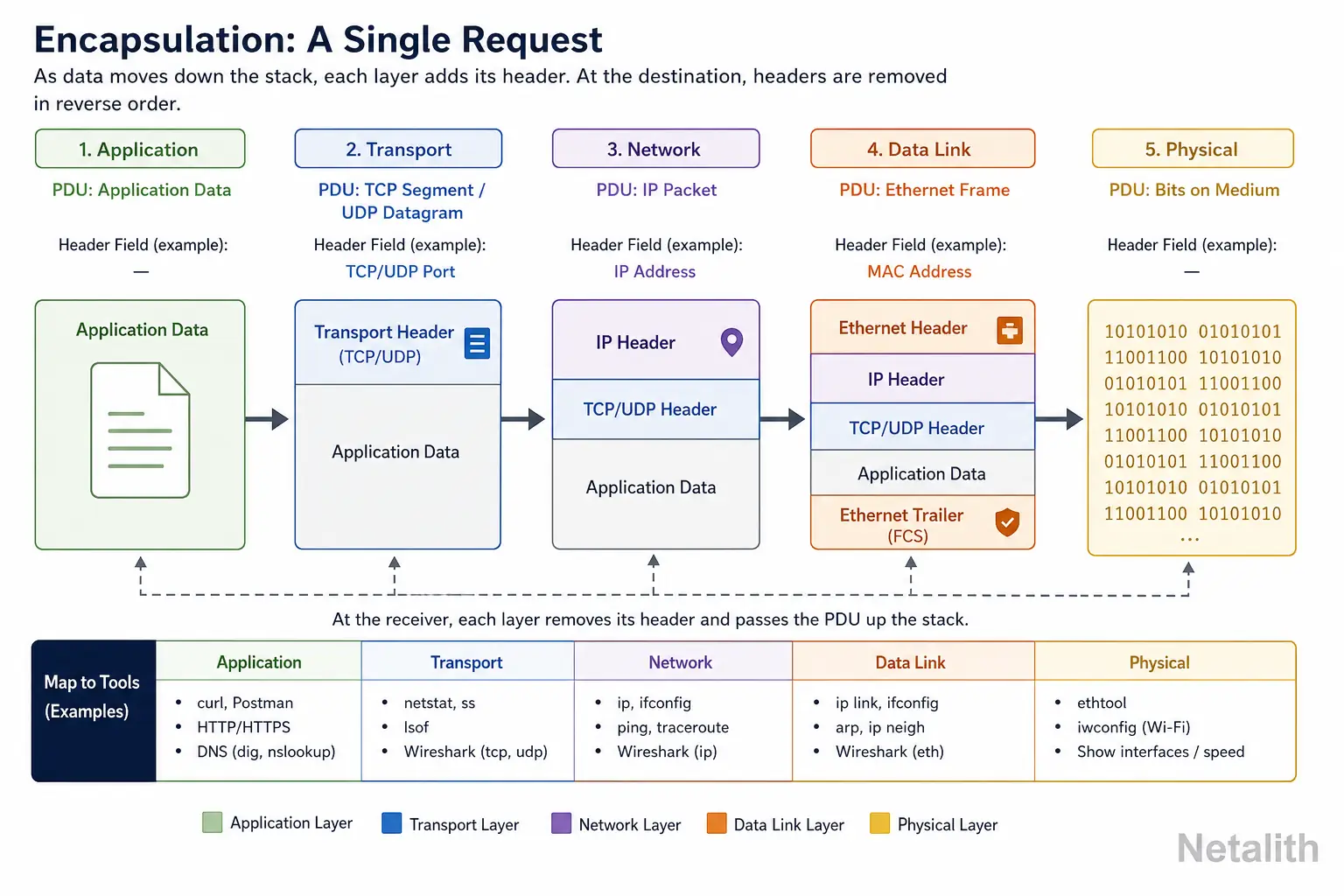
Encapsulation: as data moves from the application down the stack, each lower layer wraps the payload in its header/trailer. For a single HTTP GET this maps roughly to:
- Layer 7: HTTP message (application data)
- Layer 4: TCP segment (adds source/destination ports, sequence numbers)
- Layer 3: IP packet (adds source/destination IPs)
- Layer 2: Ethernet frame (adds source/destination MACs, 802.1Q tag if present)
- Layer 1: Bits on the wire
Knowing PDUs helps isolate faults: e.g., if ARP fails (L2/L3 boundary), you have L2 issues; if TCP handshake fails but ICMP pings succeed, suspect L4 or stateful firewall rules.
Where network devices operate — switches vs routers vs firewalls
- Switches: primarily Layer 2 devices performing MAC-based forwarding; many modern switches are multilayer and support L3 routing.
- Routers: operate at Layer 3 to route IP packets between subnets and networks.
- Firewalls: commonly operate at Layers 3 and 4 (stateful packet inspection); some perform Layer 7 inspection for application-aware policies.
- Other devices: access points bridge L1/L2; load balancers may operate at L4 (transport) or L7 (application) depending on functionality.
OSI model vs TCP/IP model — practical comparison and mapping
| OSI Layer | TCP/IP Layer | Typical responsibilities / protocols |
|---|---|---|
| Layer 1–2 (Physical & Data Link) | Link | Ethernet, 802.11, switching, VLANs, MAC addressing |
| Layer 3 (Network) | Internet | IPv4/IPv6, ICMP, routing (OSPF/BGP conceptually) |
| Layer 4 (Transport) | Transport | TCP, UDP — ports, segmentation, flow control |
| Layer 5–7 (Session, Presentation, Application) | Application | HTTP(S), DNS, SMTP, TLS, serialization, session management |
Practical note: some protocols span layers (e.g., ARP is link-layer but resolves IP; TLS is often described at presentation or application levels). Mapping helps choose the right tools: Wireshark for packet details, netstat/ss for L4 sockets, and app logs for L7 issues.
Cheat sheet & quick reference
| Layer | Main responsibility | Example protocols / devices | PDU | Quick troubleshooting tip |
|---|---|---|---|---|
| 7 Application | App services & user interfaces | HTTP, DNS, SMTP, SSH | Data | Use curl/dig; check app logs |
| 6 Presentation | Encryption, compression, encoding | TLS, gzip, UTF‑8 | Data | Check certs and ciphers |
| 5 Session | Session establishment & state | SMB sessions, RPC | Data | Verify session timeouts and tokens |
| 4 Transport | Ports, reliability, segmentation | TCP, UDP | Segments / Datagrams | Test ports; analyze retransmits |
| 3 Network | Routing & logical addressing | IPv4/IPv6, ICMP | Packets | Check IP/gateway and routing table |
| 2 Data Link | Framing, MACs, VLANs, switching | Ethernet, 802.1Q, STP | Frames | Verify VLANs, MAC table, trunk config |
| 1 Physical | Media, signaling, connectors | Copper, fiber, Wi‑Fi radios | Bits | Check link lights, cables, SNR |
Real-world scenarios & troubleshooting examples
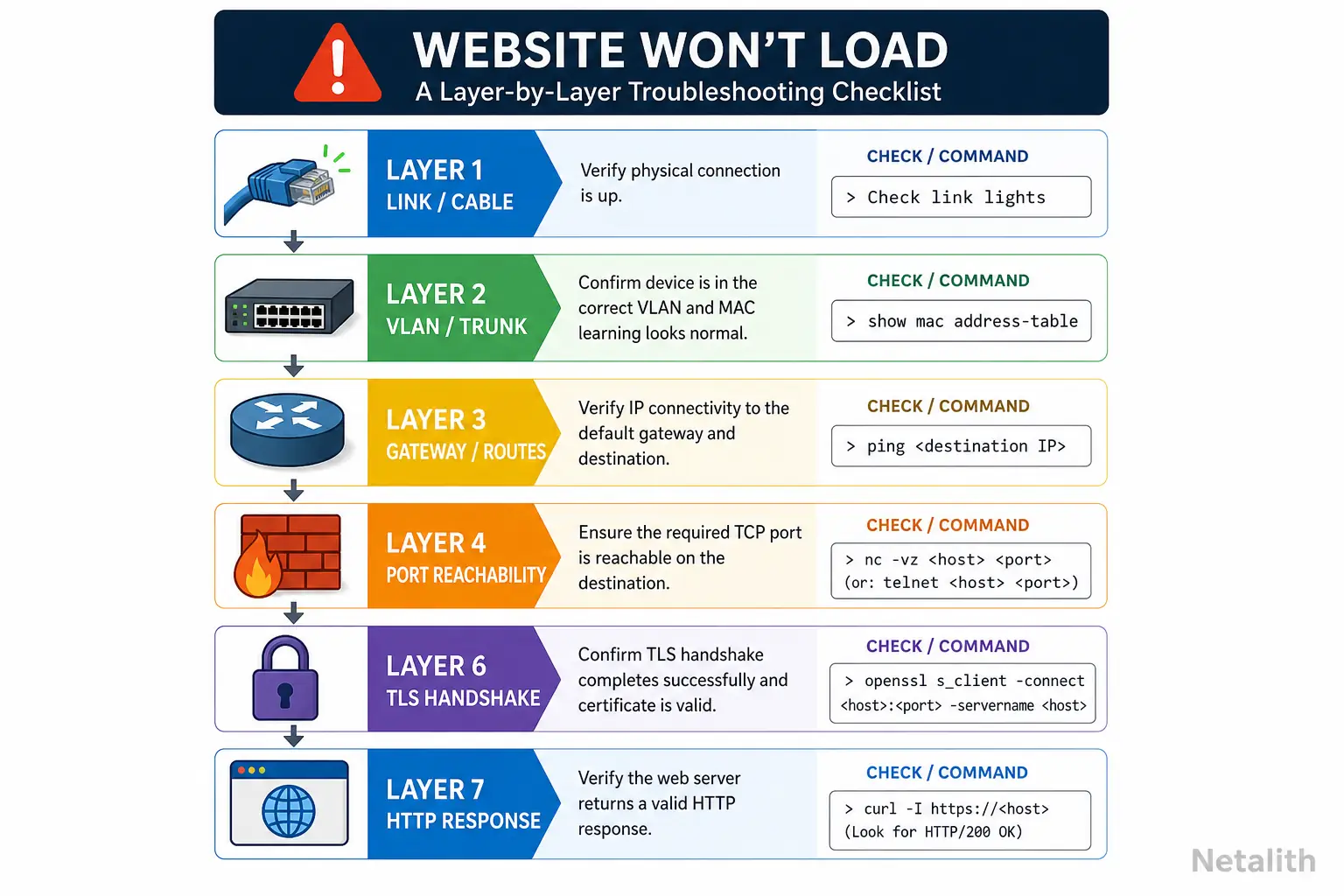
- Website won’t load — layered workflow:
- Layer 1: confirm physical link and switch/router port status.
- Layer 2: verify VLAN and trunk settings; ensure MAC learning on switches.
- Layer 3: confirm server IP, default gateway, and routing to the server subnet.
- Layer 4: test HTTP(S) ports (80/443) from a client and from intermediate hops.
- Layer 6–7: check TLS certificate validity and application logs for errors.
- VLAN issue (device has IP but can’t reach servers): verify switchport VLAN membership, trunk tagging on uplinks, STP status, and MAC table entries for the server and client ports.
- DNS resolves fail (IP connectivity OK): confirm resolver configuration, test queries with dig/nslookup, check whether UDP 53 or TCP 53 is blocked by firewall, and inspect DNS server logs for refusal or recursion issues.
How to remember the 7 layers (mnemonics and study tips)
Popular mnemonics to remember layers 1→7: “Please Do Not Throw Sausage Pizza Away” or 7→1: “All People Seem To Need Data Processing.” Pair mnemonics with the cheat sheet for faster recall.
Practice suggestions:
- Map common commands to layers: ping (L3/ICMP), traceroute (L3 path discovery), dig (L7 DNS), curl (L7 HTTP), netstat/ss (L4 sockets).
- Capture packets with Wireshark and step through encapsulation for a sample HTTP transaction.
- Build simple labs with virtual routers/switches or use packet-emulation sandboxes to practice configs and failure injection.
- Create a one-page laminated reference with the cheat sheet and common troubleshooting commands.
Conclusion — recap and next steps
Recap: this OSI model explained with examples covered each layer’s role, PDU names, encapsulation flow, device mappings, and practical troubleshooting workflows. Next steps: print the cheat sheet, run the suggested lab exercises (capture, route, switch, and application tests), and compare the OSI concepts to real TCP/IP tools. Repeated practice with real captures and configs is the fastest way to internalize the model.